Loading
Form preview
  • US Legal Forms
  • Other Templates
  • More Forms
  • More Multi-State Forms
  • Home Renovation Agreement Template

Get Home Renovation Agreement Template

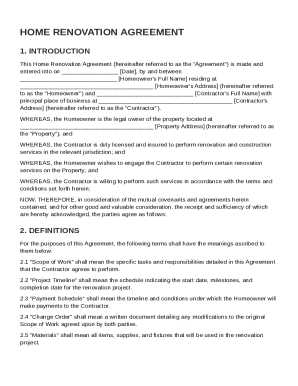
Homeowner's Full Name residing at Homeowner's Address (hereinafter referred to as the "Homeowner") and Contractor's Full Name with principal place of business at Contractor's Address (hereinafter referred to as the "Contractor"). WHEREAS, the Homeowner is the legal owner of the property located at Property Address (.

How it works

  1. Open form

    Open form follow the instructions

  2. Easily sign form

    Easily sign the form with your finger

  3. Share form

    Send filled & signed form or save

How to fill out and sign Home Renovation Agreement Template online?

Get your online template and fill it in using progressive features. Enjoy smart fillable fields and interactivity.Follow the simple instructions below:

Finding a legal expert, making an appointment and going to the office for a private meeting makes finishing a Home Renovation Agreement Template from start to finish tiring. US Legal Forms allows you to rapidly produce legally binding documents according to pre-created browser-based blanks.

Prepare your docs in minutes using our simple step-by-step guide:

  1. Find the Home Renovation Agreement Template you require.
  2. Open it using the online editor and begin editing.
  3. Fill in the empty areas; involved parties names, places of residence and phone numbers etc.
  4. Change the blanks with smart fillable areas.
  5. Include the particular date and place your electronic signature.
  6. Simply click Done following double-checking everything.
  7. Save the ready-created record to your system or print it out like a hard copy.

Easily generate a Home Renovation Agreement Template without having to involve professionals. We already have more than 3 million users benefiting from our rich catalogue of legal forms. Join us today and gain access to the #1 collection of online templates. Try it yourself!

Tips on how to fill out, edit and sign Home Renovation Agreement Template online

How to fill out and sign Home Renovation Agreement Template online?

Get your online template and fill it in using progressive features. Enjoy smart fillable fields and interactivity.Follow the simple instructions below:

Finding a legal expert, making an appointment and going to the office for a private meeting makes finishing a Home Renovation Agreement Template from start to finish tiring. US Legal Forms allows you to rapidly produce legally binding documents according to pre-created browser-based blanks.

Prepare your docs in minutes using our simple step-by-step guide:

  1. Find the Home Renovation Agreement Template you require.
  2. Open it using the online editor and begin editing.
  3. Fill in the empty areas; involved parties names, places of residence and phone numbers etc.
  4. Change the blanks with smart fillable areas.
  5. Include the particular date and place your electronic signature.
  6. Simply click Done following double-checking everything.
  7. Save the ready-created record to your system or print it out like a hard copy.

Easily generate a Home Renovation Agreement Template without having to involve professionals. We already have more than 3 million users benefiting from our rich catalogue of legal forms. Join us today and gain access to the #1 collection of online templates. Try it yourself!

How to edit Home Renovation Agreement Template: customize forms online

Use our comprehensive editor to turn a simple online template into a completed document. Keep reading to learn how to edit Home Renovation Agreement Template online easily.

Once you find an ideal Home Renovation Agreement Template, all you need to do is adjust the template to your preferences or legal requirements. In addition to completing the fillable form with accurate details, you might need to remove some provisions in the document that are irrelevant to your circumstance. Alternatively, you might want to add some missing conditions in the original template. Our advanced document editing tools are the simplest way to fix and adjust the document.

The editor allows you to modify the content of any form, even if the document is in PDF format. It is possible to add and erase text, insert fillable fields, and make extra changes while keeping the initial formatting of the document. You can also rearrange the structure of the form by changing page order.

You don’t have to print the Home Renovation Agreement Template to sign it. The editor comes along with electronic signature functionality. Most of the forms already have signature fields. So, you just need to add your signature and request one from the other signing party with a few clicks.

Follow this step-by-step guide to build your Home Renovation Agreement Template:

  1. Open the preferred template.
  2. Use the toolbar to adjust the template to your preferences.
  3. Fill out the form providing accurate details.
  4. Click on the signature field and add your electronic signature.
  5. Send the document for signature to other signers if needed.

After all parties complete the document, you will receive a signed copy which you can download, print, and share with other people.

Our services allow you to save tons of your time and minimize the risk of an error in your documents. Improve your document workflows with effective editing capabilities and a powerful eSignature solution.

Get form

Experience a faster way to fill out and sign forms on the web. Access the most extensive library of templates available.
Get form

Related content

HOME IMPROVEMENT CONTRACT AGREEMENT NOTE
NOTE: This is a sample contract. It is not intended to be, and is not, legal advice. This...
Learn more
Construction Agreement Template - LearnTech Hub
By using a residential construction agreement template, you can establish a solid...
Learn more
Implementing Instructions for Executive Order...
Jun 10, 2015 — guidance and a template issued by CEQ. Each annual SSPP shall include:...
Learn more

Related links form

Allianz Global Investors Premier Funds - Citibank Singapore - Citibank Com PROPOSAL FOR LIFE ASSURANCE (CPFIS) - NTUC Income Your Guide To Anterior Cruciate Ligament Reconstruction Microsoft PowerPoint - TC3-NB ISO 9001-LAC-Jul & Oct 2007

Questions & Answers

Get answers to your most pressing questions about US Legal Forms API.

Contact support

The five essential elements of a construction contract include an offer, acceptance, consideration, a legal purpose, and contractual capacity. Each component must be clearly defined to ensure an enforceable agreement. Utilizing a Home Renovation Agreement Template can help you include these elements systematically, ensuring nothing is overlooked.

Writing an agreement in short form requires distilling the essential details into clear, concise statements. Focus on the agreement's purpose, key terms, and actionable items. You can reference a Home Renovation Agreement Template to capture critical information succinctly and effectively.

An example of an agreement could be a Home Renovation Agreement that outlines the obligations of homeowners and contractors. This document typically includes project details, timelines, and payment terms. Viewing various examples can provide insights that help you draft your own effective agreement.

To write a construction agreement, start by defining the roles of each party and the project details. Include information such as payment schedules and deadlines. A Home Renovation Agreement Template provides a solid framework, making it easier to include all necessary clauses and protections.

Writing a renovation plan involves outlining the scope of the project, budget, and timeline. Begin with detailed descriptions of the work to be performed and identify any permits needed. You can enhance your planning with a Home Renovation Agreement Template, ensuring that all aspects are covered and agreed upon.

To fill out an agreement form effectively, make sure to include all relevant information pertaining to the agreement’s terms. Take your time to understand each section, filling in details such as dates and expectations. Using a Home Renovation Agreement Template can simplify this process and help you avoid common mistakes.

Filling out an agreement form requires careful attention to detail. Begin by entering the names and contact information of all parties involved. Then, specify the terms of the agreement, including the scope of work and deadlines, ensuring you refer to a Home Renovation Agreement Template for guidance.

To create a simple agreement, start by clearly stating the purpose of the agreement. Use clear and straightforward language to outline the responsibilities and expectations of each party involved. For a comprehensive approach, consider utilizing a Home Renovation Agreement Template to ensure you capture all essential details.

Get This Form Now!

Use professional pre-built templates to fill in and sign documents online faster. Get access to thousands of forms.
Get form
If you believe that this page should be taken down, please follow our DMCA take down processhere.
Get Home Renovation Agreement Template
Get form
  • Adoption
  • Bankruptcy
  • Contractors
  • Divorce
  • Home Sales
  • Employment
  • Identity Theft
  • Incorporation
  • Landlord Tenant
  • Living Trust
  • Name Change
  • Personal Planning
  • Small Business
  • Wills & Estates
  • Packages A-Z
  • Affidavits
  • Bankruptcy
  • Bill of Sale
  • Corporate - LLC
  • Divorce
  • Employment
  • Identity Theft
  • Internet Technology
  • Landlord Tenant
  • Living Wills
  • Name Change
  • Power of Attorney
  • Real Estate
  • Small Estates
  • Wills
  • All Forms
  • Forms A-Z
  • Other Templates
  • Legal Hub
  • About Us
  • Help Portal
  • Legal Resources
  • Blog
  • Affiliates
  • Contact Us
  • Delete My Account
  • Site Map
  • Industries
  • Forms in Spanish
  • Localized Forms
  • State-specific Forms
  • Forms Kit
  • Real Estate Handbook
  • All Guides
  • Notarize
  • Incorporation services
  • For Consumers
  • For Small Business
  • For Attorneys
  • USLegal
  • FormsPass
  • pdfFiller
  • signNow
  • altaFlow
  • DocHub
  • Instapage
Form Packages
  • Adoption
  • Bankruptcy
  • Contractors
  • Divorce
  • Home Sales
  • Employment
  • Identity Theft
  • Incorporation
  • Landlord Tenant
  • Living Trust
  • Name Change
  • Personal Planning
  • Small Business
  • Wills & Estates
  • Packages A-Z
Form Categories
  • Affidavits
  • Bankruptcy
  • Bill of Sale
  • Corporate - LLC
  • Divorce
  • Employment
  • Identity Theft
  • Internet Technology
  • Landlord Tenant
  • Living Wills
  • Name Change
  • Power of Attorney
  • Real Estate
  • Small Estates
  • Wills
  • All Forms
  • Forms A-Z
  • Other Templates
Customer Service
  • Legal Hub
  • About Us
  • Help Portal
  • Legal Resources
  • Blog
  • Affiliates
  • Contact Us
  • Delete My Account
  • Site Map
  • Industries
  • Forms in Spanish
  • Localized Forms
  • State-specific Forms
  • Forms Kit
Legal Guides
  • Real Estate Handbook
  • All Guides
Prepared for you
  • Notarize
  • Incorporation services
Our Customers
  • For Consumers
  • For Small Business
  • For Attorneys
Our Sites
  • USLegal
  • FormsPass
  • pdfFiller
  • signNow
  • altaFlow
  • DocHub
  • Instapage
Social Media
Call us now toll free:
+1 833 426 79 33
As seen in:
© Copyright 1999-2026 airSlate Legal Forms, Inc. 17 Station Street, Ste. 203, Brookline, MA 02445
  • Your Privacy Choices
  • Terms of Service
  • Privacy Notice
  • Content Takedown Policy
  • Bug Bounty Program