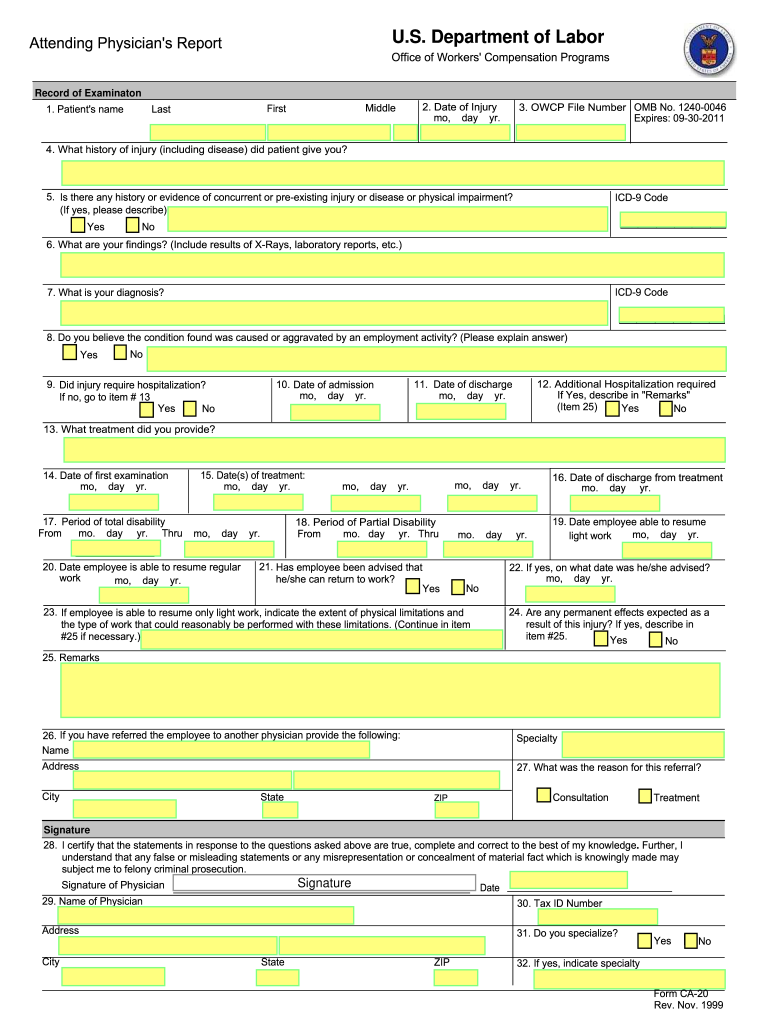
OSPITAL BILLS, BE SUBMITTED ON THE AMERICAN MEDICAL ASSOCIATION HEALTH INSURANCE CLAIM FORM, HCFA 1500/OWCP-1500a. INSTRUCTIONS TO PHYSICIAN FOR COMPLETING ATTENDING PHYSICIAN'S REPORT 1. COMPLETE THE ENTRIES 1-32 ON THE FORM; AND 2. IF DISABILITY HAS NOT TERMINATED, INDICATE IN ITEM 17; AND 3. SEND THE FORM AND YOUR BILL TO: OFFICE OF WORKERS' COMPENSATION PROGRAMS DOL DFEC Central Mailroom PO Box 8300 London, KY 40742-8300 Public Burden Statement We estimate that it will take an average of 5.
Loading

Open form follow the instructions

Easily sign the form with your finger

Send filled & signed form or save
How to fill out the DoL CA-20 online
Completing the DoL CA-20 form is an essential step in the process of submitting a physician's report for workers' compensation claims. This guide will provide clear and detailed instructions on how to fill out the form online, ensuring that users of all backgrounds can navigate it successfully.
Follow the steps to complete the DoL CA-20 form online.
- Press the 'Get Form' button to access and open the document in the editing interface.
- Begin by entering the patient's name in the designated fields, ensuring to include their first, middle, and last names.
- Next, input the date of injury in the specified format (month, day, year).
- Provide the OWCP file number in the appropriate section.
- In the history of injury section, detail the information the patient has given regarding their injury or disease.
- Indicate whether there is any history or evidence of concurrent or pre-existing injuries or diseases. If yes, provide descriptions and include the related ICD-9 code if applicable.
- Outline your medical findings, incorporating results from X-rays and laboratory reports as applicable, along with the relevant ICD-9 code.
- State your diagnosis clearly.
- Indicate whether you believe the condition was caused or aggravated by employment activities and provide an explanation if applicable.
- Specify if additional hospitalization is required. If yes, provide details in the remarks section.
- Fill in the dates for the patient's admission and discharge from the hospital, if hospitalization occurred.
- Detail the treatment provided to the patient.
- Record the date of the first examination.
- Document the period of total disability, specifying start and end dates.
- Indicate the date the employee is able to resume regular work and any limits on light work, including types of work that can be performed.
- Answer whether permanent effects are expected from the injury, providing descriptions in the remarks if necessary.
- If a referral to another physician is necessary, provide the name, specialty, and address of the referred physician.
- Certify the accuracy of your statements by signing the form and providing your name, tax ID number, and specialty.
- Once all fields are completed, save your changes, and proceed to download, print, or share the form as needed.
Complete your documents online today for a smoother submission process.
Experience a faster way to fill out and sign forms on the web. Access the most extensive library of templates available.
Related content
The CA-20 form is an Attending Physician's Report for the US Department of Labor, used to...
Medical reports can use forms CA-16, CA-20, or CA-20a, or narrative form, and should be...
Get answers to your most pressing questions about US Legal Forms API.
Who fills out CA 20 form?
The CA 20 form is typically filled out by the injured worker or their representative. This form requires comprehensive details about the injury and its impact on the worker's ability to perform their job. Accurate completion of the CA 20 form is critical for effective claims processing. Utilizing platforms like uslegalforms can provide guidance to ensure all necessary information aligns with the DoL CA-20 requirements.
How do you write a causation?
To write causation, begin with a clear statement linking the incident to the injury. Identify key details such as dates, locations, and any relevant outcomes. Use straightforward language to ensure that your point is understood, and back it up with evidence where possible. Aligning your message with the guidelines of the DoL CA-20 can further strengthen your argument.
What is the meaning of causation letter?
A causation letter is a document that outlines the connection between an incident and the resulting injury or damages. It serves to establish accountability and can be crucial in legal or insurance claims. By clearly stating how the event caused the injury, this letter plays an important role in the compensation process. Understanding the nuances of the DoL CA-20 can enhance your ability to articulate this causation effectively.
How to write a letter to claim compensation?
Begin your letter to claim compensation by clearly identifying the incident and its date. Include details about the injury and how it affects your life. Support your claim with documentation such as medical records and proof of lost wages. For optimal results, refer to the expectations outlined by the DoL CA-20 when drafting your letter.
How to fill out workers' compensation forms?
Filling out workers' compensation forms can be straightforward. Begin by writing your personal information and your employer’s details. Carefully describe the injury and attach any relevant medical documentation. Implementing guidelines from the DoL CA-20 can ensure that your submission meets all necessary requirements, helping to facilitate the claims process.
How to write a letter for pain and suffering?
When writing a letter for pain and suffering, focus on expressing your emotional and physical struggles due to the injury. Use specific examples to illustrate how your life has changed since the incident. Highlight the medical treatments you've sought, as well as any ongoing challenges. Incorporating elements related to the DoL CA-20 can strengthen your claims when seeking compensation.
How to write a workers' comp report?
Start your workers' compensation report by stating your personal information and details about your employer. Clearly describe the events leading to the injury, including dates and locations. Include any medical treatments received and how the injury affects your daily life. Utilizing the DoL CA-20 form can help streamline this process and ensure accuracy and completeness.
How to write a causation letter?
To write a causation letter, begin by clearly stating the purpose of the letter. Provide accurate details about the incident, including dates, locations, and involved parties. Support your claims with evidence such as medical documents and witness statements. Finally, connect the incident to the impact on your life, ensuring that the letter aligns with the requirements of the DoL CA-20.
How does Washington workers' compensation work?
In Washington, workers' compensation operates as a no-fault system, providing benefits to employees injured on the job. When filing a claim, you may need to complete the DoL CA-20 form to document your injury. This system ensures that injured workers receive necessary medical care and compensation while protecting employers from lawsuits.
What is the most you can get from a workers' comp settlement?
The amount obtainable from a workers' comp settlement varies based on several factors, including the severity of the injury and the state's regulations. With forms like the DoL CA-20 playing a role in documenting your claims, having complete information can maximize your potential settlement. It's essential to consult with a legal expert to navigate this process effectively.
Use professional pre-built templates to fill in and sign documents online faster. Get access to thousands of forms.
If you believe that this page should be taken down, please follow our DMCA take down process here.