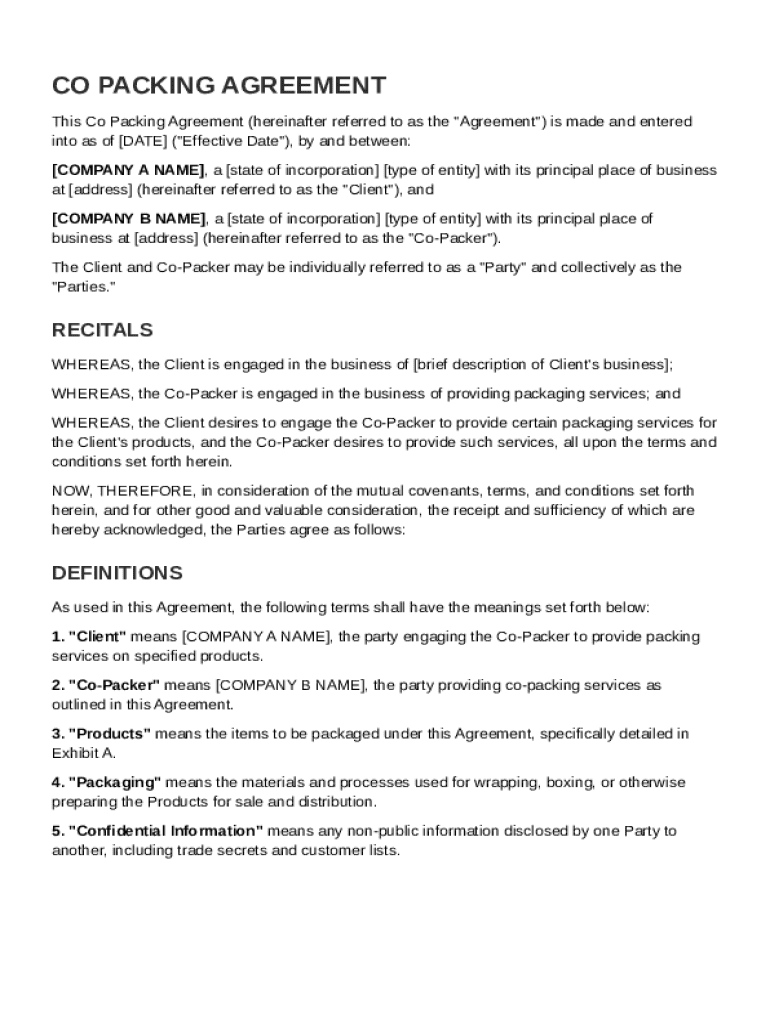
State of incorporation type of entity with its principal place of business at address (hereinafter referred to as the "Client"), and COMPANY B NAME , a state of incorporation type of entity with its principal place of business at address (hereinafter referred to as the "Co-Packer"). The Client and Co-Packer may be individually referred to as a "Party" and collectively as the "Parties." RECITALS WHEREAS, the Client is engaged in the business of brief description of Client's busine.
Loading

Open form follow the instructions

Easily sign the form with your finger

Send filled & signed form or save
How to fill out and sign Co Packing Agreement Template online?
Get your online template and fill it in using progressive features. Enjoy smart fillable fields and interactivity.Follow the simple instructions below:
The days of terrifying complex tax and legal documents are over. With US Legal Forms the process of submitting legal documents is anxiety-free. The leading editor is directly at your fingertips giving you a wide variety of advantageous instruments for filling out a Co Packing Agreement Template. The following tips, along with the editor will assist you with the whole process.
- Click the orange Get Form option to start modifying.
- Switch on the Wizard mode in the top toolbar to have more suggestions.
- Complete each fillable field.
- Ensure that the data you fill in Co Packing Agreement Template is updated and correct.
- Include the date to the document using the Date feature.
- Select the Sign tool and make an electronic signature. You can use 3 available choices; typing, drawing, or capturing one.
- Check each area has been filled in correctly.
- Select Done in the top right corne to save the form. There are various alternatives for getting the doc. An attachment in an email or through the mail as a hard copy, as an instant download.
We make completing any Co Packing Agreement Template faster. Use it now!
Tips on how to fill out, edit and sign Co Packing Agreement Template online
How to fill and sign Co Packing Agreement Template
Get your online template and fill it in using progressive features. Enjoy smart fillable fields and interactivity.Follow the simple instructions below:
The days of terrifying complex tax and legal documents are over. With US Legal Forms the process of submitting legal documents is anxiety-free. The leading editor is directly at your fingertips giving you a wide variety of advantageous instruments for filling out a Co Packing Agreement Template. The following tips, along with the editor will assist you with the whole process.
- Click the orange Get Form option to start modifying.
- Switch on the Wizard mode in the top toolbar to have more suggestions.
- Complete each fillable field.
- Ensure that the data you fill in Co Packing Agreement Template is updated and correct.
- Include the date to the document using the Date feature.
- Select the Sign tool and make an electronic signature. You can use 3 available choices; typing, drawing, or capturing one.
- Check each area has been filled in correctly.
- Select Done in the top right corne to save the form. There are various alternatives for getting the doc. An attachment in an email or through the mail as a hard copy, as an instant download.
We make completing any Co Packing Agreement Template faster. Use it now!
How to edit Co Packing Agreement Template
Use our advanced editor to transform a simple online template into a completed document. Read on to learn how to edit Co Packing Agreement Template online easily.
Once you find a perfect Co Packing Agreement Template, all you have to do is adjust the template to your needs or legal requirements. In addition to completing the fillable form with accurate information, you may want to remove some provisions in the document that are irrelevant to your circumstance. On the other hand, you might like to add some missing conditions in the original template. Our advanced document editing features are the best way to fix and adjust the form.
The editor lets you change the content of any form, even if the file is in PDF format. You can add and erase text, insert fillable fields, and make further changes while keeping the original formatting of the document. You can also rearrange the structure of the document by changing page order.
You don’t need to print the Co Packing Agreement Template to sign it. The editor comes along with electronic signature capabilities. The majority of the forms already have signature fields. So, you simply need to add your signature and request one from the other signing party via email.
Follow this step-by-step guide to create your Co Packing Agreement Template:
- Open the preferred template.
- Use the toolbar to adjust the template to your preferences.
- Complete the form providing accurate information.
- Click on the signature field and add your eSignature.
- Send the document for signature to other signers if necessary.
After all parties sign the document, you will receive a signed copy which you can download, print, and share with other people.
Our solutions enable you to save tons of your time and minimize the chance of an error in your documents. Streamline your document workflows with efficient editing tools and a powerful eSignature solution.
How to fill and sign Co Packing Agreement Template
Get your online template and fill it in using progressive features. Enjoy smart fillable fields and interactivity.Follow the simple instructions below:
The days of terrifying complex tax and legal documents are over. With US Legal Forms the process of submitting legal documents is anxiety-free. The leading editor is directly at your fingertips giving you a wide variety of advantageous instruments for filling out a Co Packing Agreement Template. The following tips, along with the editor will assist you with the whole process.
- Click the orange Get Form option to start modifying.
- Switch on the Wizard mode in the top toolbar to have more suggestions.
- Complete each fillable field.
- Ensure that the data you fill in Co Packing Agreement Template is updated and correct.
- Include the date to the document using the Date feature.
- Select the Sign tool and make an electronic signature. You can use 3 available choices; typing, drawing, or capturing one.
- Check each area has been filled in correctly.
- Select Done in the top right corne to save the form. There are various alternatives for getting the doc. An attachment in an email or through the mail as a hard copy, as an instant download.
We make completing any Co Packing Agreement Template faster. Use it now!
Experience a faster way to fill out and sign forms on the web. Access the most extensive library of templates available.
Related content
THIS CO-PACKING AGREEMENT ("Agreement"), effective April 20, 2018, (the "Effective Date")...
May 17, 2023 — We will provide sample lab diagrams, packing and labeling instructions...
Jan 29, 2014 — Commanding Officer Inventory Certification Letter Format. Below is an...
Get answers to your most pressing questions about US Legal Forms API.
What should a founders agreement include?
A founders agreement should include details on roles, ownership percentages, intellectual property rights, and exit strategies. It fosters clear communication and reduces misunderstandings among founders. For a structured approach, a Co Packing Agreement Template can be an invaluable resource in drafting this agreement.
What is the basic co-founder agreement?
The basic co-founder agreement outlines essential terms of the partnership, including equity distribution and decision-making processes. This document serves as a foundational guide for collaboration. A comprehensive Co Packing Agreement Template can help you include necessary clauses to protect all founders.
How to write a co-founder agreement?
Writing a co-founder agreement involves outlining the roles, responsibilities, and contributions of each founder. It should also address profit distribution and conflict resolution. For clarity and legal standing, consider utilizing a Co Packing Agreement Template that incorporates these elements.
What is a co-packing agreement?
packing agreement is a formal document that defines the relationship between a manufacturer and a copacker. It details specifications for production, packaging, and delivery. Using a wellstructured Co Packing Agreement Template simplifies this process and ensures both parties understand their obligations.
What is co packaging?
Co packaging involves two or more companies collaborating to package their products together. This strategy can enhance marketing efforts and reduce costs. Utilizing a Co Packing Agreement Template helps streamline this collaboration by outlining roles and responsibilities.
What are the four types of agreements?
There are four fundamental types of agreements: verbal, written, implied, and executed. Each type serves a unique purpose in business relationships. Understanding the distinctions can help you choose the right Co Packing Agreement Template for your needs.
How to write co-founder correctly?
To write 'co-founder' correctly, ensure you use a hyphen between 'co' and 'founder.' This denotes shared responsibility in starting a business. For any legal documentation, like a Co Packing Agreement Template, clarity and accuracy in terminology are essential.
How to write a contract agreement between two parties for payment?
To write a contract agreement for payment between two parties, begin by specifying both parties and the payment terms, such as amount, due date, and payment method. Clearly outline any penalties for late payment or additional conditions that may apply. Using a Co Packing Agreement Template can help establish clear expectations and safeguard both parties in this financial agreement.
What is the meaning of co-packing?
Co-packing refers to the practice of hiring a third-party manufacturer to produce and package products on behalf of a brand. This allows businesses to focus on their brand's development while entrusting the production and packaging to specialists. A clear Co Packing Agreement Template can streamline this relationship, clarifying expectations and roles for both parties.
How to write an agreement between two people?
Writing an agreement between two people starts with clearly identifying both parties and stating the purpose of the agreement. Incorporate specific terms, such as obligations, timelines, and any compensation involved. Finally, ensure both parties review and sign the document, turning it into a binding Co Packing Agreement Template if it relates to packaging aspects of your business.
Use professional pre-built templates to fill in and sign documents online faster. Get access to thousands of forms.
If you believe that this page should be taken down, please follow our DMCA take down process here.