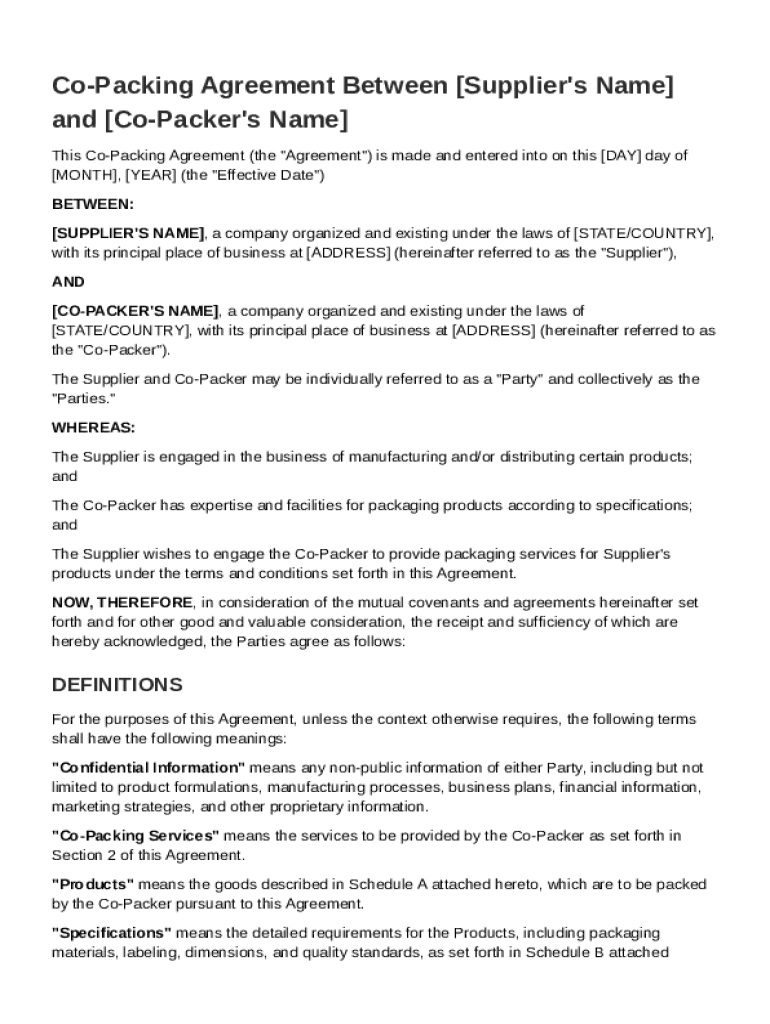
AY day of MONTH , YEAR (the "Effective Date") BETWEEN: SUPPLIER'S NAME , a company organized and existing under the laws of STATE/COUNTRY , with its principal place of business at ADDRESS (hereinafter referred to as the "Supplier"), AND CO-PACKER'S NAME , a company organized and existing under the laws of STATE/COUNTRY , with its principal place of business at ADDRESS (hereinafter referred to as the "Co-Packer"). The Supplier and Co-Packer may be individually referred to as a "Party".

Open form follow the instructions

Easily sign the form with your finger

Send filled & signed form or save
How to fill out and sign Co Packer Agreement Template online?
Get your online template and fill it in using progressive features. Enjoy smart fillable fields and interactivity.Follow the simple instructions below:
The days of distressing complex tax and legal forms have ended. With US Legal Forms the whole process of creating legal documents is anxiety-free. A powerhouse editor is right at your fingertips giving you a wide variety of beneficial tools for filling out a Co Packer Agreement Template. These guidelines, in addition to the editor will help you with the whole process.
- Click on the orange Get Form option to start editing.
- Turn on the Wizard mode in the top toolbar to get extra recommendations.
- Fill each fillable area.
- Make sure the data you fill in Co Packer Agreement Template is updated and accurate.
- Indicate the date to the record using the Date function.
- Select the Sign icon and create an e-signature. You can find three available alternatives; typing, drawing, or capturing one.
- Re-check each and every area has been filled in properly.
- Select Done in the top right corne to save the template. There are various choices for getting the doc. As an instant download, an attachment in an email or through the mail as a hard copy.
We make completing any Co Packer Agreement Template simpler. Use it now!
Tips on how to fill out, edit and sign Co Packer Agreement Template online
How to fill and sign Co Packer Agreement Template
Get your online template and fill it in using progressive features. Enjoy smart fillable fields and interactivity.Follow the simple instructions below:
The days of distressing complex tax and legal forms have ended. With US Legal Forms the whole process of creating legal documents is anxiety-free. A powerhouse editor is right at your fingertips giving you a wide variety of beneficial tools for filling out a Co Packer Agreement Template. These guidelines, in addition to the editor will help you with the whole process.
- Click on the orange Get Form option to start editing.
- Turn on the Wizard mode in the top toolbar to get extra recommendations.
- Fill each fillable area.
- Make sure the data you fill in Co Packer Agreement Template is updated and accurate.
- Indicate the date to the record using the Date function.
- Select the Sign icon and create an e-signature. You can find three available alternatives; typing, drawing, or capturing one.
- Re-check each and every area has been filled in properly.
- Select Done in the top right corne to save the template. There are various choices for getting the doc. As an instant download, an attachment in an email or through the mail as a hard copy.
We make completing any Co Packer Agreement Template simpler. Use it now!
How to edit Co Packer Agreement Template
Check out a single service to take care of all of your paperwork easily. Find, modify, and complete your Co Packer Agreement Template in a single interface with the help of smart tools.
The days when people needed to print out forms or even write them manually are long gone. Nowadays, all it takes to find and complete any form, such as Co Packer Agreement Template, is opening just one browser tab. Here, you will find the Co Packer Agreement Template form and customize it any way you need, from inserting the text straight in the document to drawing it on a digital sticky note and attaching it to the document. Discover tools that will streamline your paperwork without extra effort.
Just click the Get form button to prepare your Co Packer Agreement Template paperwork rapidly and start modifying it instantly. In the editing mode, you can easily complete the template with your details for submission. Simply click on the field you need to modify and enter the data right away. The editor's interface does not need any specific skills to use it. When done with the edits, check the information's accuracy once again and sign the document. Click on the signature field and follow the instructions to eSign the form in a moment.
Use Additional tools to customize your form:
- Use Cross, Check, or Circle tools to pinpoint the document's data.
- Add textual content or fillable text fields with text customization tools.
- Erase, Highlight, or Blackout text blocks in the document using corresponding tools.
- Add a date, initials, or even an image to the document if necessary.
- Utilize the Sticky note tool to annotate the form.
- Use the Arrow and Line, or Draw tool to add visual components to your file.
Preparing Co Packer Agreement Template paperwork will never be perplexing again if you know where to search for the suitable template and prepare it quickly. Do not hesitate to try it yourself.
How to fill and sign Co Packer Agreement Template
Get your online template and fill it in using progressive features. Enjoy smart fillable fields and interactivity.Follow the simple instructions below:
The days of distressing complex tax and legal forms have ended. With US Legal Forms the whole process of creating legal documents is anxiety-free. A powerhouse editor is right at your fingertips giving you a wide variety of beneficial tools for filling out a Co Packer Agreement Template. These guidelines, in addition to the editor will help you with the whole process.
- Click on the orange Get Form option to start editing.
- Turn on the Wizard mode in the top toolbar to get extra recommendations.
- Fill each fillable area.
- Make sure the data you fill in Co Packer Agreement Template is updated and accurate.
- Indicate the date to the record using the Date function.
- Select the Sign icon and create an e-signature. You can find three available alternatives; typing, drawing, or capturing one.
- Re-check each and every area has been filled in properly.
- Select Done in the top right corne to save the template. There are various choices for getting the doc. As an instant download, an attachment in an email or through the mail as a hard copy.
We make completing any Co Packer Agreement Template simpler. Use it now!
Experience a faster way to fill out and sign forms on the web. Access the most extensive library of templates available.
Related content
THIS CO-PACKING AGREEMENT ("Agreement"), effective April 20, 2018, (the "Effective Date")...
May 17, 2023 — This MASTER SERVICES AGREEMENT (“MSA”), effective as of the last date...
7-1 PURPOSE. This chapter provides definitions, responsibilities, and procedures for...
Get answers to your most pressing questions about US Legal Forms API.
What is the difference between co-packing and packaging?
Co-packing involves both the production and packaging of products by an external company, while packaging typically refers to the process of enclosing or protecting products for shipping or sale. Co-packing provides a comprehensive solution that includes manufacturing and finishing touches. A Co Packer Agreement Template helps define these roles clearly, ensuring smooth collaboration.
How do you write a vendor agreement?
To write a vendor agreement, begin by defining the scope of the products or services, terms of payment, and delivery schedules. Clearly outline roles, expectations, and dispute resolution processes. A well-structured Co Packer Agreement Template can serve as a great starting point for drafting an effective vendor agreement.
What is the meaning of co-packing?
Co-packing refers to the process where one company produces and packages products for another company. This arrangement allows businesses to leverage external expertise while minimizing overhead. Using a Co Packer Agreement Template can help secure the expectations and responsibilities involved in co-packing.
What are the four types of agreements?
The four common types of agreements include partnership agreements, employment agreements, lease agreements, and co-packing agreements. Each serves a specific purpose and sets the terms for collaboration or the use of resources. A Co Packer Agreement Template falls under the category of contracts designed to regulate business interactions.
What is a co-packer?
packer is a company that manufactures and packages products on behalf of another business. Typically, companies hire copackers to streamline production and reduce costs. This allows you to focus on marketing and sales while utilizing a Co Packer Agreement Template to manage the relationship effectively.
What is a co-packing agreement?
packing agreement is a contract that outlines the relationship between a product owner and a copacker. This document details the responsibilities, expectations, and terms for producing and packaging products. By using a Co Packer Agreement Template, you can ensure clarity and legal protection for both parties.
How do you write a collaboration agreement?
Writing a collaboration agreement involves outlining the objectives of the partnership and detailing each party's contributions and expectations. Be specific about deadlines, deliverables, and any financial arrangements. A well-crafted Co Packer Agreement Template can help you ensure that no critical points are omitted, leading to a successful collaboration.
How to fill out an agreement form?
To fill out an agreement form, start by reading it thoroughly to grasp all conditions and requirements. Provide clear and accurate information in each section, double-checking for any errors. If you're creating a co-packing relationship, a Co Packer Agreement Template can guide you in including essential details and clauses, making it easier to complete the form.
How to write an agreement between two people?
To write an agreement between two individuals, begin by clearly defining the purpose and terms of the agreement. Be straightforward about the roles and responsibilities of each party. Using a Co Packer Agreement Template can streamline this process, ensuring all important details are covered and understood.
What are the pros and cons of co-packing?
Co-packing offers several advantages, such as lower overhead costs and access to specialized equipment. By partnering with a co-packer, businesses can scale production quickly without the need for large investments. However, co-packing also has drawbacks, like potential loss of control over the manufacturing process and the need for a solid Co Packer Agreement Template to ensure clear communication and expectations.
Use professional pre-built templates to fill in and sign documents online faster. Get access to thousands of forms.
If you believe that this page should be taken down, please follow our DMCA take down process here.