Loading
Form preview
  • US Legal Forms
  • Other Templates
  • More Forms
  • More Multi-State Forms
  • Business Referral Agreement Template

Get Business Referral Agreement Template

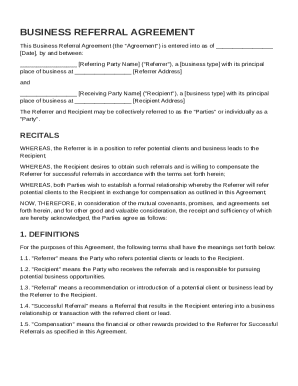
Rrer"), a business type with its principal place of business at Referrer Address and Receiving Party Name ("Recipient"), a business type with its principal place of business at Recipient Address The Referrer and Recipient may be collectively referred to as the "Parties" or individually as a "Party". RECITALS WHEREAS, the Referrer is in a position to refer potential clients and business leads to the Recipient; WHEREAS, the Recipient.

How it works

  1. Open form

    Open form follow the instructions

  2. Easily sign form

    Easily sign the form with your finger

  3. Share form

    Send filled & signed form or save

How to fill out and sign Business Referral Agreement Template online?

Get your online template and fill it in using progressive features. Enjoy smart fillable fields and interactivity.Follow the simple instructions below:

Legal, business, tax as well as other documents require an advanced level of protection and compliance with the legislation. Our templates are regularly updated in accordance with the latest amendments in legislation. In addition, with us, all the data you provide in the Business Referral Agreement Template is well-protected from loss or damage by means of cutting-edge encryption.

The tips below will help you fill in Business Referral Agreement Template easily and quickly:

  1. Open the template in our feature-rich online editor by clicking Get form.
  2. Fill out the required boxes that are yellow-colored.
  3. Click the green arrow with the inscription Next to move from box to box.
  4. Go to the e-autograph tool to e-sign the template.
  5. Insert the relevant date.
  6. Read through the entire e-document to be sure that you haven?t skipped anything important.
  7. Press Done and save the new document.

Our solution allows you to take the entire process of completing legal documents online. Due to this, you save hours (if not days or weeks) and get rid of unnecessary costs. From now on, fill in Business Referral Agreement Template from the comfort of your home, place of work, or even while on the go.

Tips on how to fill out, edit and sign Business Referral Agreement Template online

How to fill out and sign Business Referral Agreement Template online?

Get your online template and fill it in using progressive features. Enjoy smart fillable fields and interactivity.Follow the simple instructions below:

Legal, business, tax as well as other documents require an advanced level of protection and compliance with the legislation. Our templates are regularly updated in accordance with the latest amendments in legislation. In addition, with us, all the data you provide in the Business Referral Agreement Template is well-protected from loss or damage by means of cutting-edge encryption.

The tips below will help you fill in Business Referral Agreement Template easily and quickly:

  1. Open the template in our feature-rich online editor by clicking Get form.
  2. Fill out the required boxes that are yellow-colored.
  3. Click the green arrow with the inscription Next to move from box to box.
  4. Go to the e-autograph tool to e-sign the template.
  5. Insert the relevant date.
  6. Read through the entire e-document to be sure that you haven?t skipped anything important.
  7. Press Done and save the new document.

Our solution allows you to take the entire process of completing legal documents online. Due to this, you save hours (if not days or weeks) and get rid of unnecessary costs. From now on, fill in Business Referral Agreement Template from the comfort of your home, place of work, or even while on the go.

How to edit Business Referral Agreement Template: customize forms online

Put the right document management tools at your fingertips. Complete Business Referral Agreement Template with our trusted tool that comes with editing and eSignature functionality}.

If you want to complete and certify Business Referral Agreement Template online without hassle, then our online cloud-based solution is the way to go. We offer a rich template-based library of ready-to-use paperwork you can modify and complete online. In addition, you don't need to print out the form or use third-party solutions to make it fillable. All the necessary features will be available at your disposal as soon as you open the document in the editor.

Let’s examine our online editing tools and their key features. The editor has a self-explanatory interface, so it won't require much time to learn how to use it. We’ll take a look at three major parts that let you:

  • Edit and annotate the template
  • The top toolbar has the features that help you highlight and blackout text, without images and image factors (lines, arrows and checkmarks etc.), sign, initialize, date the form, and more.

  • Organize your documents
  • Use the toolbar on the left if you would like to re-order the form or/and remove pages.

  • Make them shareable
  • If you want to make the document fillable for other people and share it, you can use the tools on the right and insert various fillable fields, signature and date, text box, etc.).

Apart from the functionality mentioned above, you can shield your document with a password, add a watermark, convert the file to the required format, and much more.

Our editor makes modifying and certifying the Business Referral Agreement Template very simple. It allows you to make pretty much everything concerning working with documents. In addition, we always make sure that your experience editing files is secure and compliant with the main regulatory criteria. All these aspects make using our tool even more pleasant.

Get Business Referral Agreement Template, make the necessary edits and changes, and download it in the preferred file format. Try it out today!

Get form

Experience a faster way to fill out and sign forms on the web. Access the most extensive library of templates available.
Get form

Related content

referral agreement
Under this Agreement, Referral Partner is not required to and will not promote and market...
Learn more
Referral-Agreement-and-Referral-Template.
This is a mutual agreement between Behavioral Health Agency and Primary Care Clinic. The...
Learn more
referral partner agreement
This Partner Agreement, consisting of this Cover Page and the attached Business Terms...
Learn more

Related links form

Application For NUI E J Phelan Fellowship In International Law 2012 Application For Approval To Use The Simplified Procedure For The Issue ... Railway Restaurant Car Licence Renewal Application (RailAp2) Application For NUI Travelling Studentships In The Sciences 2012

Questions & Answers

Get answers to your most pressing questions about US Legal Forms API.

Contact support

To create a successful referral program for your business, start by defining your goals and the incentives you wish to offer to referrers. Promote your program through various channels, like social media or email, to maximize visibility. Incorporating a Business Referral Agreement Template can help set clear expectations and guidelines for participants, ensuring smooth operations and effective referrals.

Creating a referral agreement involves drafting a document that outlines the terms of the referral relationship. Be sure to specify the compensation or incentives for referrals, the duration of the agreement, and any confidentiality clauses. Utilizing a Business Referral Agreement Template can simplify this process, ensuring all relevant details are included and professionally presented.

To write a business referral, start by clearly stating who you are referring and the context of the referral. Include details about the services or products the referred business offers and how it aligns with the needs of the recipient. Ensure you use a Business Referral Agreement Template to facilitate a formal understanding between parties, enhancing trust and communication.

Referral commissions can vary widely based on industry, product, and the value of the sale. Typically, they range from 5% to 30% of the sale amount. To determine the right percentage for your specific situation, consider both your profit margins and how much you value acquiring new customers. A Business Referral Agreement Template can help you clearly define these commission terms to avoid any confusion.

Writing a simple business agreement involves identifying the parties, specifying the purpose of the agreement, and outlining the obligations of each party. It's essential to use clear language and structure your document logically. Utilizing a Business Referral Agreement Template can streamline this process, providing a solid framework while ensuring you cover all necessary points. Always review the agreement for clarity before signing.

Creating a referral program starts with defining your goals and target audience. Next, outline the rewards for referrals, making them attractive yet sustainable for your business. You can simplify the process by using a Business Referral Agreement Template, which can help outline the terms and conditions clearly. Consider promoting your program through email and social media to reach potential referrers.

Get This Form Now!

Use professional pre-built templates to fill in and sign documents online faster. Get access to thousands of forms.
Get form
If you believe that this page should be taken down, please follow our DMCA take down processhere.
Get Business Referral Agreement Template
Get form
  • Adoption
  • Bankruptcy
  • Contractors
  • Divorce
  • Home Sales
  • Employment
  • Identity Theft
  • Incorporation
  • Landlord Tenant
  • Living Trust
  • Name Change
  • Personal Planning
  • Small Business
  • Wills & Estates
  • Packages A-Z
  • Affidavits
  • Bankruptcy
  • Bill of Sale
  • Corporate - LLC
  • Divorce
  • Employment
  • Identity Theft
  • Internet Technology
  • Landlord Tenant
  • Living Wills
  • Name Change
  • Power of Attorney
  • Real Estate
  • Small Estates
  • Wills
  • All Forms
  • Forms A-Z
  • Other Templates
  • Legal Hub
  • About Us
  • Help Portal
  • Legal Resources
  • Blog
  • Affiliates
  • Contact Us
  • Delete My Account
  • Site Map
  • Industries
  • Forms in Spanish
  • Localized Forms
  • State-specific Forms
  • Forms Kit
  • Real Estate Handbook
  • All Guides
  • Notarize
  • Incorporation services
  • For Consumers
  • For Small Business
  • For Attorneys
  • USLegal
  • FormsPass
  • pdfFiller
  • signNow
  • altaFlow
  • DocHub
  • Instapage
Form Packages
  • Adoption
  • Bankruptcy
  • Contractors
  • Divorce
  • Home Sales
  • Employment
  • Identity Theft
  • Incorporation
  • Landlord Tenant
  • Living Trust
  • Name Change
  • Personal Planning
  • Small Business
  • Wills & Estates
  • Packages A-Z
Form Categories
  • Affidavits
  • Bankruptcy
  • Bill of Sale
  • Corporate - LLC
  • Divorce
  • Employment
  • Identity Theft
  • Internet Technology
  • Landlord Tenant
  • Living Wills
  • Name Change
  • Power of Attorney
  • Real Estate
  • Small Estates
  • Wills
  • All Forms
  • Forms A-Z
  • Other Templates
Customer Service
  • Legal Hub
  • About Us
  • Help Portal
  • Legal Resources
  • Blog
  • Affiliates
  • Contact Us
  • Delete My Account
  • Site Map
  • Industries
  • Forms in Spanish
  • Localized Forms
  • State-specific Forms
  • Forms Kit
Legal Guides
  • Real Estate Handbook
  • All Guides
Prepared for you
  • Notarize
  • Incorporation services
Our Customers
  • For Consumers
  • For Small Business
  • For Attorneys
Our Sites
  • USLegal
  • FormsPass
  • pdfFiller
  • signNow
  • altaFlow
  • DocHub
  • Instapage
Social Media
Call us now toll free:
+1 833 426 79 33
As seen in:
© Copyright 1999-2026 airSlate Legal Forms, Inc. 17 Station Street, Ste. 203, Brookline, MA 02445
  • Your Privacy Choices
  • Terms of Service
  • Privacy Notice
  • Content Takedown Policy
  • Bug Bounty Program