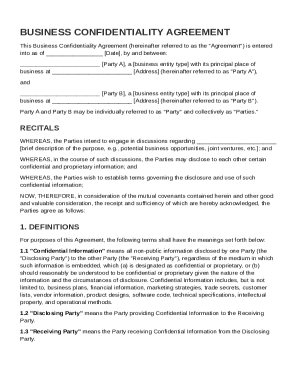
And between: Party A , a business entity type with its principal place of business at Address (hereinafter referred to as "Party A"), and Party B , a business entity type with its principal place of business at Address (hereinafter referred to as "Party B"). Party A and Party B may be individually referred to as "Party" and collectively as "Parties." RECITALS WHEREAS, the Parties intend.
Open form follow the instructions
Easily sign the form with your finger
Send filled & signed form or save
How to fill out and sign Business Confidentiality Agreement Template online?
Get your online template and fill it in using progressive features. Enjoy smart fillable fields and interactivity.Follow the simple instructions below:
The preparing of legal paperwork can be expensive and time-ingesting. However, with our pre-built web templates, things get simpler. Now, using a Business Confidentiality Agreement Template takes no more than 5 minutes. Our state-specific web-based blanks and simple guidelines remove human-prone errors.
Follow our simple actions to get your Business Confidentiality Agreement Template prepared rapidly:
- Choose the web sample from the catalogue.
- Complete all required information in the required fillable areas. The intuitive drag&drop graphical user interface makes it simple to add or relocate fields.
- Check if everything is completed properly, without typos or missing blocks.
- Place your electronic signature to the page.
- Click on Done to save the adjustments.
- Download the data file or print out your copy.
- Send instantly towards the recipient.
Take advantage of the quick search and powerful cloud editor to generate an accurate Business Confidentiality Agreement Template. Remove the routine and create papers on the web!
Tips on how to fill out, edit and sign Business Confidentiality Agreement Template online
How to fill and sign Business Confidentiality Agreement Template
Get your online template and fill it in using progressive features. Enjoy smart fillable fields and interactivity.Follow the simple instructions below:
The preparing of legal paperwork can be expensive and time-ingesting. However, with our pre-built web templates, things get simpler. Now, using a Business Confidentiality Agreement Template takes no more than 5 minutes. Our state-specific web-based blanks and simple guidelines remove human-prone errors.
Follow our simple actions to get your Business Confidentiality Agreement Template prepared rapidly:
- Choose the web sample from the catalogue.
- Complete all required information in the required fillable areas. The intuitive drag&drop graphical user interface makes it simple to add or relocate fields.
- Check if everything is completed properly, without typos or missing blocks.
- Place your electronic signature to the page.
- Click on Done to save the adjustments.
- Download the data file or print out your copy.
- Send instantly towards the recipient.
Take advantage of the quick search and powerful cloud editor to generate an accurate Business Confidentiality Agreement Template. Remove the routine and create papers on the web!
How to edit Business Confidentiality Agreement Template
Use our comprehensive editor to turn a simple online template into a completed document. Keep reading to learn how to modify Business Confidentiality Agreement Template online easily.
Once you discover a perfect Business Confidentiality Agreement Template, all you have to do is adjust the template to your preferences or legal requirements. In addition to completing the fillable form with accurate data, you might need to erase some provisions in the document that are irrelevant to your case. On the other hand, you might like to add some missing conditions in the original template. Our advanced document editing tools are the best way to fix and adjust the document.
The editor lets you change the content of any form, even if the document is in PDF format. You can add and remove text, insert fillable fields, and make additional changes while keeping the original formatting of the document. You can also rearrange the structure of the document by changing page order.
You don’t need to print the Business Confidentiality Agreement Template to sign it. The editor comes along with electronic signature capabilities. The majority of the forms already have signature fields. So, you just need to add your signature and request one from the other signing party via email.
Follow this step-by-step guide to make your Business Confidentiality Agreement Template:
- Open the preferred template.
- Use the toolbar to adjust the form to your preferences.
- Fill out the form providing accurate information.
- Click on the signature field and add your electronic signature.
- Send the document for signature to other signers if needed.
Once all parties sign the document, you will get a signed copy which you can download, print, and share with other people.
Our solutions enable you to save tons of your time and reduce the chance of an error in your documents. Enhance your document workflows with efficient editing capabilities and a powerful eSignature solution.
How to fill and sign Business Confidentiality Agreement Template
Get your online template and fill it in using progressive features. Enjoy smart fillable fields and interactivity.Follow the simple instructions below:
The preparing of legal paperwork can be expensive and time-ingesting. However, with our pre-built web templates, things get simpler. Now, using a Business Confidentiality Agreement Template takes no more than 5 minutes. Our state-specific web-based blanks and simple guidelines remove human-prone errors.
Follow our simple actions to get your Business Confidentiality Agreement Template prepared rapidly:
- Choose the web sample from the catalogue.
- Complete all required information in the required fillable areas. The intuitive drag&drop graphical user interface makes it simple to add or relocate fields.
- Check if everything is completed properly, without typos or missing blocks.
- Place your electronic signature to the page.
- Click on Done to save the adjustments.
- Download the data file or print out your copy.
- Send instantly towards the recipient.
Take advantage of the quick search and powerful cloud editor to generate an accurate Business Confidentiality Agreement Template. Remove the routine and create papers on the web!
Experience a faster way to fill out and sign forms on the web. Access the most extensive library of templates available.
Related content
This Agreement shall be governed by the laws of the [Name of Country, other political...
THIS CONFIDENTIAL DISCLOSURE AGREEMENT (this “Agreement”) is entered into as of....
Mar 24, 2022 — Secure Confidentiality. Any consulting agreement must include a language...
Get answers to your most pressing questions about US Legal Forms API.
How do you write a simple confidentiality agreement?
To write a simple confidentiality agreement, begin by stating the parties involved and the purpose of the agreement. Clearly define what information is confidential and what the obligations of each party will be. Using a Business Confidentiality Agreement Template can help you create a straightforward and legally sound document.
Can I write an NDA myself?
Yes, you can write an NDA yourself by outlining the required information and terms clearly. However, it's important to ensure that all legal aspects are addressed to avoid issues later. A Business Confidentiality Agreement Template can be a helpful resource to guide you, making it easier to create a comprehensive and effective NDA.
How to fill out a confidentiality agreement?
Filling out a confidentiality agreement involves specifying the parties involved and defining what information is confidential. You should also include the obligations of each party regarding the use and protection of this information. Utilizing a Business Confidentiality Agreement Template can streamline the process, providing a clear structure to follow.
What is an example of a confidentiality agreement?
An example of a confidentiality agreement is a document that outlines the terms under which one party agrees to keep information secret. For example, a tech startup might require investors to sign an agreement that prevents them from sharing proprietary technology details. A Business Confidentiality Agreement Template helps in crafting such agreements easily and efficiently.
What is an example of a confidentiality statement for a business plan?
A confidentiality statement in a business plan typically outlines that the information contained within the document is proprietary and should not be disclosed to unauthorized parties. For instance, you might state, 'This business plan contains confidential information intended only for the recipient. All rights to confidentiality are reserved and any unauthorized disclosure is strictly prohibited.' Using a Business Confidentiality Agreement Template can help you formalize this statement.
How to write a confidential agreement?
To write a confidential agreement, start by clearly defining the parties involved in the agreement. Include the purpose of the agreement, the information considered confidential, and the obligations of each party regarding the confidential information. Utilize a Business Confidentiality Agreement Template to ensure you cover all necessary legal terms and conditions effectively.
How to fill out the NDA?
To fill out a Non-Disclosure Agreement (NDA), start by stating the full names of the parties involved and outlining what constitutes confidential information, ideally using a Business Confidentiality Agreement Template. Follow the sections provided, ensuring you address all obligations and terms clearly. Once filled, make sure to sign and keep copies for all parties involved.
What is an example of a confidential agreement?
An example of a confidential agreement could be a Non-Disclosure Agreement (NDA) using a Business Confidentiality Agreement Template. This agreement lays out the conditions under which sensitive information can be shared and emphasizes that the receiving party must keep such information confidential. These agreements are essential in maintaining trust during business transactions.
Can you make your own confidentiality agreement?
Yes, you can create your own confidentiality agreement using a Business Confidentiality Agreement Template. By following a clear structure, you ensure all necessary elements are included, such as the parties involved, the definition of confidential information, and the duration of the agreement. A well-constructed template helps you cover all essential points, making it easier to safeguard your sensitive data.
What's the difference between CDA and NDA?
The difference between a CDA and an NDA lies primarily in their intent and functionality. A CDA is typically for mutual sharing of information, while an NDA often protects one party's data from being disclosed. Understanding these differences is important, and using a Business Confidentiality Agreement Template can help you choose the right agreement for your situation.
Use professional pre-built templates to fill in and sign documents online faster. Get access to thousands of forms.
If you believe that this page should be taken down, please follow our DMCA take down process here.