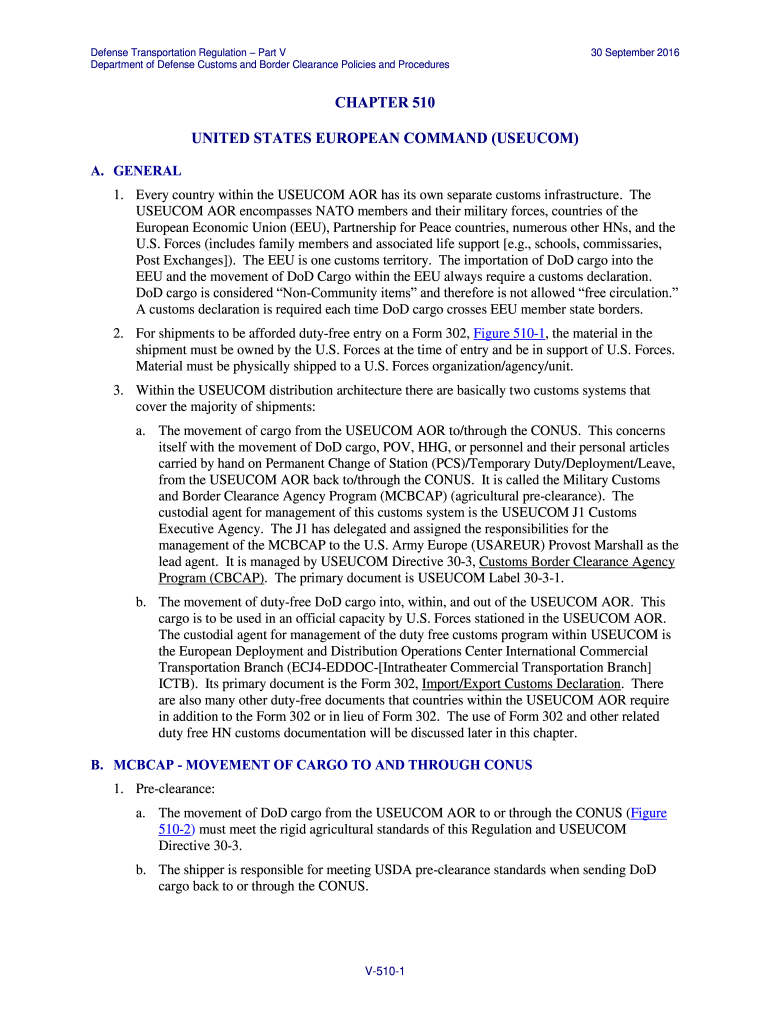
T meet the standards of this Regulation and USEUCOM Directive 30-3. If required, the servicing MCT/TO will provide the shipper POC information of the MCBCAP field office for their AOR. NOTE: The MCT/TO will maintain a list of authorized MCBCAP agents in their area of operation on file to help the shipper. e. The shipper will contact the MCBCAP field office to arrange for the cargo to be inspected by an MCBCAP agent before it is packed in boxes, built on 463L pallets, or loaded in containers. Th.
Loading

Open form follow the instructions

Easily sign the form with your finger

Send filled & signed form or save
How to fill out the V-510 online
The V-510 form is an essential document used for customs declarations, specifically for Department of Defense cargo within the USEUCOM area of responsibility. This guide provides detailed instructions to assist users in filling out the form accurately, ensuring compliance with customs regulations.
Follow the steps to accurately complete the V-510 form online.
- Click the ‘Get Form’ button to access the V-510 form and open it in an online editor.
- Provide your contact information in the designated fields, ensuring all details are accurate to facilitate communication.
- Complete the cargo description section by specifying the type and quantity of the items being declared.
- Fill in the details regarding the shipping and receiving addresses, making sure to include all relevant information to avoid delays.
- Indicate the purpose of the shipment, selecting the appropriate option that matches your circumstances.
- Review all entries for accuracy, then proceed to electronically sign the document in the designated area.
- After completing the form, you can choose to save the changes, download, print, or share the completed V-510 form.
Complete your V-510 form online today to ensure a smooth customs clearance process.
Experience a faster way to fill out and sign forms on the web. Access the most extensive library of templates available.
Related content
Aug 29, 2007 — Title V, Section 510 programs were among the first abstinence education...
V510 Pup (IRAS 08005-2356) is a binary post-AGB system with a fast molecular outflow that...
About the recording format for recording motion pictures. You can record motion pictures...
Get answers to your most pressing questions about US Legal Forms API.
How to prime a 510 cartridge?
Priming a V-510 cartridge is crucial for optimal performance. Start by adding a few drops of vape juice directly onto the exposed wick or inside the cartridge. Allow it to sit for a few minutes so the wick can absorb the liquid, ensuring a smoother initial hit when you start vaping.
How does a 510 vape work?
510 vape works by heating up the liquid in the cartridge to create vapor. When you activate the device, the battery powers a coil that heats the liquid, which then produces a flavorful vapor for inhalation. Understanding this process helps you optimize your vaping routine.
How do I get my 510 vape to work?
To get your V-510 vape to work, make sure your battery is charged and the cartridge is securely attached. Check for any pairing issues and ensure that the device is turned on. If issues persist, you may need to troubleshoot by inspecting the cartridge or attempting a different one.
How to use a 510 vape?
Using a V-510 vape is simple and intuitive. Begin by ensuring your device is fully charged and the cartridge is filled or replaced. Turn the device on, typically by clicking a button multiple times, and take a slow inhale through the mouthpiece while activating the heating element. This process ensures a smooth vaping experience.
How to refill a disposable vape?
Refilling a disposable vape can be tricky, especially with V-510 models. If you choose to refill, locate the fill port, typically under a rubber seal, and use a syringe or dropper to add the vape juice. Keep in mind that not all disposables are designed for refilling, so ensure yours allows this.
How to fill a 510 vape?
Filling a V-510 vape is easy, especially with refillable cartridges. Start by removing the cartridge from the battery. Locate the fill port, usually on the side or top, and carefully add your favorite vape oil using a dropper. Be sure not to overfill, and reattach the cartridge when done.
How to hit a 510 vape?
To hit a V-510 vape, take a slow and steady inhale. First, make sure the device is powered on, then place your lips around the mouthpiece. Press and hold the button while inhaling to produce vapor, and exhale smoothly. This method will help you get the best flavor and experience.
Why is my vape pen not hitting?
If your V-510 vape pen is not hitting, check a few things first. Make sure the battery is charged and the cartridge is properly connected. Additionally, inspect the airflow and ensure that there's no blockage. If everything looks good, consider replacing the cartridge.
How do you use a 510 thread vape pen?
Using a V-510 thread vape pen is straightforward. First, ensure your pen is charged and has a compatible cartridge attached. Next, turn on the device, usually by pressing the button five times, then inhale gently through the mouthpiece while pressing the button. Enjoy your vapor.
How do I know if I have a 510 cartridge?
To determine if you have a V-510 cartridge, inspect the threading at the base of the cartridge. It should match the standard V-510 thread pattern, which can be easily connected to compatible batteries. Additionally, check the packaging or product description if available, as it often specifies compatibility. Knowing this can help you confidently use your device.
Use professional pre-built templates to fill in and sign documents online faster. Get access to thousands of forms.
If you believe that this page should be taken down, please follow our DMCA take down process here.