Loading
Get Nppsc 1300/4 (formerly 1320/2) 2013
How it works
-

Open form follow the instructions
-

Easily sign the form with your finger
-

Send filled & signed form or save
How to use or fill out the NPPSC 1300/4 (formerly 1320/2) online
Filling out the NPPSC 1300/4 form online can streamline your document management process. This guide walks you through the essential steps to complete this form effectively, ensuring all necessary information is captured accurately.
Follow the steps to complete the NPPSC 1300/4 form online.
- Click ‘Get Form’ button to obtain the form and open it in the editor.
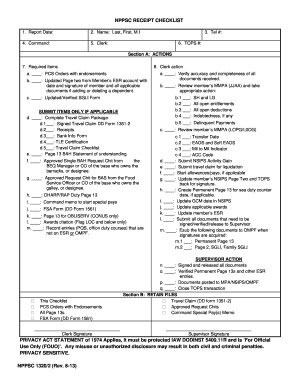
- Enter the report date at the top of the form. This date should reflect when the report is being submitted.
- In section A, review the required items. Check each item that you are submitting with the form.
- Complete additional checklist items if applicable, such as ensuring that travel claim packages or other specified documents are included.
- After filling out all required sections, review your entries for accuracy and completeness.
Complete your NPPSC 1300/4 form online efficiently by following these steps.
Get form
Experience a faster way to fill out and sign forms on the web. Access the most extensive library of templates available.
NPPSC 1300/4 (formerly 1320/2) serves as a vital tool for managing Navy personnel data and evaluations. This form facilitates various administrative tasks, ensuring efficiency in personnel management. When effectively utilized, it supports service members in tracking their records and career progress. By accessing resources like uslegalforms, you can simplify your experience with this important documentation.
Get This Form Now!
Use professional pre-built templates to fill in and sign documents online faster. Get access to thousands of forms.