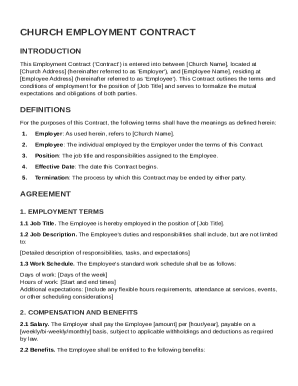
Get Church Employment Contract Template
How it works
-

Open form follow the instructions
-

Easily sign the form with your finger
-

Send filled & signed form or save
How to fill out and sign Church Employment Contract Template online?
Get your online template and fill it in using progressive features. Enjoy smart fillable fields and interactivity.Follow the simple instructions below:Experience all the benefits of completing and submitting legal forms online. Using our service filling in Church Employment Contract Template usually takes a few minutes. We make that possible through giving you access to our full-fledged editor capable of changing/fixing a document?s initial textual content, adding special boxes, and putting your signature on.
Complete Church Employment Contract Template within several moments following the instructions below:
- Pick the template you need from the library of legal form samples.
- Click the Get form button to open the document and begin editing.
- Complete all of the required fields (these are yellow-colored).
- The Signature Wizard will enable you to put your electronic autograph after you?ve finished imputing info.
- Insert the relevant date.
- Look through the entire form to ensure you?ve completed everything and no changes are required.
- Click Done and save the filled out form to the device.
Send the new Church Employment Contract Template in an electronic form when you are done with filling it out. Your information is securely protected, since we keep to the newest security standards. Become one of numerous satisfied users who are already filling out legal templates straight from their houses.
Tips on how to fill out, edit and sign Church Employment Contract Template online
How to fill out and sign Church Employment Contract Template online?
Get your online template and fill it in using progressive features. Enjoy smart fillable fields and interactivity.Follow the simple instructions below:
Experience all the benefits of completing and submitting legal forms online. Using our service filling in Church Employment Contract Template usually takes a few minutes. We make that possible through giving you access to our full-fledged editor capable of changing/fixing a document?s initial textual content, adding special boxes, and putting your signature on.
Complete Church Employment Contract Template within several moments following the instructions below:
- Pick the template you need from the library of legal form samples.
- Click the Get form button to open the document and begin editing.
- Complete all of the required fields (these are yellow-colored).
- The Signature Wizard will enable you to put your electronic autograph after you?ve finished imputing info.
- Insert the relevant date.
- Look through the entire form to ensure you?ve completed everything and no changes are required.
- Click Done and save the filled out form to the device.
Send the new Church Employment Contract Template in an electronic form when you are done with filling it out. Your information is securely protected, since we keep to the newest security standards. Become one of numerous satisfied users who are already filling out legal templates straight from their houses.
How to edit Church Employment Contract Template: customize forms online
Make the best use of our comprehensive online document editor while completing your paperwork. Complete the Church Employment Contract Template, emphasize on the most important details, and easily make any other essential modifications to its content.
Completing documents electronically is not only time-saving but also gives an opportunity to alter the template in accordance with your requirements. If you’re about to manage the Church Employment Contract Template, consider completing it with our extensive online editing solutions. Whether you make an error or enter the requested information into the wrong field, you can quickly make changes to the document without the need to restart it from the beginning as during manual fill-out. Aside from that, you can point out the vital data in your document by highlighting particular pieces of content with colors, underlining them, or circling them.
Adhere to these quick and simple actions to fill out and adjust your Church Employment Contract Template online:
- Open the form in the editor.
- Type in the necessary information in the empty fields using Text, Check, and Cross tools.
- Adhere to the document navigation to avoid missing any mandatory fields in the template.
- Circle some of the important details and add a URL to it if needed.
- Use the Highlight or Line tools to point out the most important facts.
- Decide on colors and thickness for these lines to make your sample look professional.
- Erase or blackout the facts you don’t want to be visible to other people.
- Substitute pieces of content containing errors and type in text that you need.
- End up modifcations with the Done button as soon as you ensure everything is correct in the document.
Our powerful online solutions are the simplest way to complete and customize Church Employment Contract Template according to your needs. Use it to prepare personal or professional documents from anywhere. Open it in a browser, make any alterations in your forms, and return to them at any time in the future - they all will be safely kept in the cloud.
Related links form
When creating an employment contract, particularly using a Church Employment Contract Template, include vital elements such as job title, description, and duties. It's also essential to specify compensation, work schedule, and any benefits provided. Consider adding clauses for termination and dispute resolution as well. Including these key details ensures clarity and protects both parties involved.