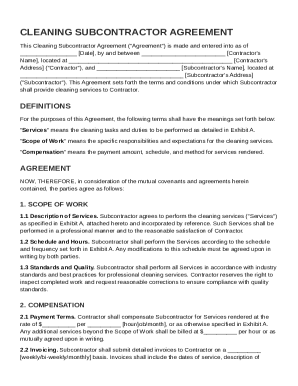
Get Cleaning Subcontractor Agreement Template
How it works
-

Open form follow the instructions
-

Easily sign the form with your finger
-

Send filled & signed form or save
How to fill out and sign Cleaning Subcontractor Agreement Template online?
Get your online template and fill it in using progressive features. Enjoy smart fillable fields and interactivity.Follow the simple instructions below:The times of frightening complicated tax and legal documents have ended. With US Legal Forms creating legal documents is anxiety-free. A powerhouse editor is already at your fingertips providing you with various advantageous instruments for filling out a Cleaning Subcontractor Agreement Template. The following tips, combined with the editor will help you with the entire process.
- Select the Get Form option to start editing.
- Activate the Wizard mode in the top toolbar to obtain additional tips.
- Complete each fillable area.
- Ensure that the data you add to the Cleaning Subcontractor Agreement Template is updated and correct.
- Add the date to the record using the Date function.
- Click on the Sign button and make a digital signature. Feel free to use 3 available alternatives; typing, drawing, or capturing one.
- Make certain every field has been filled in correctly.
- Click Done in the top right corne to export the form. There are many ways for receiving the doc. As an instant download, an attachment in an email or through the mail as a hard copy.
We make completing any Cleaning Subcontractor Agreement Template less difficult. Start now!
Tips on how to fill out, edit and sign Cleaning Subcontractor Agreement Template online
How to fill out and sign Cleaning Subcontractor Agreement Template online?
Get your online template and fill it in using progressive features. Enjoy smart fillable fields and interactivity.Follow the simple instructions below:
The times of frightening complicated tax and legal documents have ended. With US Legal Forms creating legal documents is anxiety-free. A powerhouse editor is already at your fingertips providing you with various advantageous instruments for filling out a Cleaning Subcontractor Agreement Template. The following tips, combined with the editor will help you with the entire process.
- Select the Get Form option to start editing.
- Activate the Wizard mode in the top toolbar to obtain additional tips.
- Complete each fillable area.
- Ensure that the data you add to the Cleaning Subcontractor Agreement Template is updated and correct.
- Add the date to the record using the Date function.
- Click on the Sign button and make a digital signature. Feel free to use 3 available alternatives; typing, drawing, or capturing one.
- Make certain every field has been filled in correctly.
- Click Done in the top right corne to export the form. There are many ways for receiving the doc. As an instant download, an attachment in an email or through the mail as a hard copy.
We make completing any Cleaning Subcontractor Agreement Template less difficult. Start now!
How to modify Cleaning Subcontractor Agreement Template: customize forms online
Eliminate the mess from your paperwork routine. Discover the simplest way to find and edit, and file a Cleaning Subcontractor Agreement Template
The process of preparing Cleaning Subcontractor Agreement Template requires precision and attention, especially from people who are not well familiar with this sort of job. It is essential to get a suitable template and fill it in with the correct information. With the right solution for processing paperwork, you can get all the instruments at hand. It is simple to simplify your editing process without learning new skills. Find the right sample of Cleaning Subcontractor Agreement Template and fill it out immediately without switching between your browser tabs. Discover more tools to customize your Cleaning Subcontractor Agreement Template form in the editing mode.
While on the Cleaning Subcontractor Agreement Template page, click on the Get form button to start editing it. Add your details to the form on the spot, as all the necessary instruments are at hand right here. The sample is pre-designed, so the work required from the user is minimal. Simply use the interactive fillable fields in the editor to easily complete your paperwork. Simply click on the form and proceed to the editor mode immediately. Fill in the interactive field, and your file is good to go.
Try out more tools to customize your form:
- Place more textual content around the document if needed. Use the Text and Text Box tools to insert text in a separate box.
- Add pre-designed graphic elements like Circle, Cross, and Check with respective tools.
- If needed, capture or upload images to the document with the Image tool.
- If you need to draw something in the document, use Line, Arrow, and Draw tools.
- Try the Highlight, Erase, and Blackout tools to change the text in the document.
- If you need to add comments to specific document parts, click on the Sticky tool and place a note where you want.
Often, a small error can wreck the whole form when someone completes it manually. Forget about inaccuracies in your paperwork. Find the samples you need in moments and finish them electronically using a smart editing solution.
Filling out a subcontractor agreement requires careful attention to detail. Focus on accurately inputting the information regarding the scope of work, payment terms, and relevant deadlines. By using a Cleaning Subcontractor Agreement Template, you can easily navigate the necessary fields, making sure you do not miss any important details.