Loading
Form preview
  • US Legal Forms
  • Other Templates
  • More Forms
  • More Multi-State Forms
  • Business Rental Contract Template

Get Business Rental Contract Template

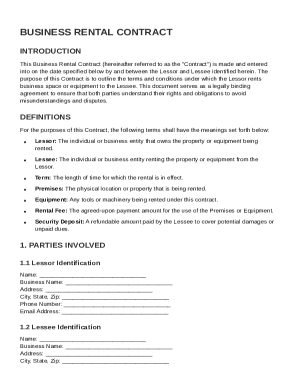
Lessee identified herein. The purpose of this Contract is to outline the terms and conditions under which the Lessor rents business space or equipment to the Lessee. This document serves as a legally binding agreement to ensure that both parties understand their rights and obligations to avoid misunderstandings and disputes. DEFINITIONS For the purposes of this Contract, the following terms shall have the meanings set forth below: Lessor: The individual or business entity that owns the property.

How it works

  1. Open form

    Open form follow the instructions

  2. Easily sign form

    Easily sign the form with your finger

  3. Share form

    Send filled & signed form or save

How to fill out and sign Business Rental Contract Template online?

Get your online template and fill it in using progressive features. Enjoy smart fillable fields and interactivity.Follow the simple instructions below:

The prep of lawful documents can be expensive and time-consuming. However, with our predesigned web templates, things get simpler. Now, creating a Business Rental Contract Template requires no more than 5 minutes. Our state-specific online blanks and simple instructions eliminate human-prone faults.

Comply with our simple steps to have your Business Rental Contract Template well prepared rapidly:

  1. Pick the web sample in the library.
  2. Enter all required information in the required fillable fields. The intuitive drag&drop graphical user interface makes it easy to include or relocate fields.
  3. Make sure everything is filled out correctly, without any typos or absent blocks.
  4. Place your electronic signature to the PDF page.
  5. Click Done to save the alterations.
  6. Save the papers or print out your PDF version.
  7. Submit immediately towards the recipient.

Use the fast search and innovative cloud editor to generate a correct Business Rental Contract Template. Remove the routine and make documents on the internet!

Tips on how to fill out, edit and sign Business Rental Contract Template online

How to fill out and sign Business Rental Contract Template online?

Get your online template and fill it in using progressive features. Enjoy smart fillable fields and interactivity.Follow the simple instructions below:

The prep of lawful documents can be expensive and time-consuming. However, with our predesigned web templates, things get simpler. Now, creating a Business Rental Contract Template requires no more than 5 minutes. Our state-specific online blanks and simple instructions eliminate human-prone faults.

Comply with our simple steps to have your Business Rental Contract Template well prepared rapidly:

  1. Pick the web sample in the library.
  2. Enter all required information in the required fillable fields. The intuitive drag&drop graphical user interface makes it easy to include or relocate fields.
  3. Make sure everything is filled out correctly, without any typos or absent blocks.
  4. Place your electronic signature to the PDF page.
  5. Click Done to save the alterations.
  6. Save the papers or print out your PDF version.
  7. Submit immediately towards the recipient.

Use the fast search and innovative cloud editor to generate a correct Business Rental Contract Template. Remove the routine and make documents on the internet!

How to edit Business Rental Contract Template: customize forms online

Put the right document editing tools at your fingertips. Complete Business Rental Contract Template with our reliable tool that comes with editing and eSignature functionality}.

If you want to complete and certify Business Rental Contract Template online without hassle, then our online cloud-based option is the way to go. We offer a wealthy template-based catalog of ready-to-use forms you can modify and complete online. In addition, you don't need to print out the form or use third-party options to make it fillable. All the necessary features will be readily available at your disposal as soon as you open the document in the editor.

Let’s examine our online editing tools and their key features. The editor has a self-explanatory interface, so it won't take a lot of time to learn how to utilize it. We’ll check out three major parts that allow you to:

  • Edit and annotate the template
  • The top toolbar has the features that help you highlight and blackout text, without graphics and graphic factors (lines, arrows and checkmarks etc.), add your signature to, initialize, date the document, and more.

  • Arrange your documents
  • Use the toolbar on the left if you wish to re-order the document or/and remove pages.

  • Make them shareable
  • If you want to make the document fillable for others and share it, you can use the tools on the right and insert different fillable fields, signature and date, text box, etc.).

Aside from the capabilities mentioned above, you can shield your document with a password, add a watermark, convert the document to the required format, and much more.

Our editor makes completing and certifying the Business Rental Contract Template a piece of cake. It allows you to make just about everything concerning dealing with documents. Moreover, we always ensure that your experience modifying files is safe and compliant with the major regulatory criteria. All these aspects make using our tool even more enjoyable.

Get Business Rental Contract Template, make the necessary edits and changes, and get it in the preferred file format. Try it out today!

Get form

Experience a faster way to fill out and sign forms on the web. Access the most extensive library of templates available.
Get form

Related content

SAMPLE COMMERCIAL LEASE AGREEMENT
COMMERCIAL LEASE AGREEMENT. THIS LEASE AGREEMENT is made and entered into on December 1...
Learn more
SAMPLE COMMERCIAL LEASE AGREEMENT
Landlord, in consideration of the rents to be paid and the covenants and agreements to be...
Learn more
Contracts, organisation and operations
Nov 17, 2020 — Long-term contracts with limited landlord concentration underpinning...
Learn more

Related links form

Title IX Report 2014.pdf - Tennessee Board Of Regents PIANO JURY FORM - Tntech Critical Illness - Tennessee Technological University - Tntech Proposal Due

Questions & Answers

Get answers to your most pressing questions about US Legal Forms API.

Contact support

A commercial tenancy agreement template is a document designed for leasing commercial properties, outlining the rights and responsibilities of both landlords and tenants. It includes details like rental terms, maintenance obligations, and termination clauses. By utilizing a Business Rental Contract Template from uslegalforms, you ensure a comprehensive approach to creating an effective agreement tailored to your commercial leasing needs.

You can write your own tenancy agreement or seek help from a legal professional who specializes in real estate law. Additionally, a Business Rental Contract Template available on uslegalforms serves as a user-friendly option that guides you through the agreement-writing process. This saves time and ensures you include all necessary legal protections.

Creating a business contract template involves outlining essential elements, such as the scope of work, payment terms, and confidentiality clauses. You can simplify the process by utilizing a Business Rental Contract Template from uslegalforms. This resource helps you by providing a legally sound framework, which you can adjust according to your specific business needs.

Yes, you can create your own tenancy agreement, but it's essential to include specific legal terms to protect both parties. You might consider using a Business Rental Contract Template, which provides a well-structured format while allowing customization based on your unique situation. This approach not only saves time, but it also ensures compliance with local laws.

To draft a tenancy agreement, start by defining the terms of rental, including duration, rental amount, and payment frequency. Next, specify the responsibilities of both the landlord and the tenant regarding property maintenance and repairs. For a simple process, you can use a Business Rental Contract Template available on uslegalforms to ensure you meet all legal requirements.

When reviewing a rental lease, watch for red flags like unclear terms, ambiguous clauses, or exorbitant fees not mentioned upfront. Also, be cautious of landlords who require payment before signing and do not allow you to take the contract home to review. A solid Business Rental Contract Template can help you identify potential issues and protect your interests. Always read through the lease thoroughly before agreeing.

Yes, you can write your own rental contract using a Business Rental Contract Template as a guide. Customizing the template allows you to include specific terms that match your needs and circumstances. However, ensure that your contract covers all necessary legalities and obligations to avoid disputes in the future. If you're unsure, consulting a legal expert can provide added clarity.

To fill out a Business Rental Contract Template, start by entering the names and contact details of both parties involved. Next, specify the rental period, payment terms, and any security deposit requirements. Make sure to include the address of the property and detailed terms for maintenance and repairs. Lastly, review the document for accuracy and ensure that both parties sign the contract.

Get This Form Now!

Use professional pre-built templates to fill in and sign documents online faster. Get access to thousands of forms.
Get form
If you believe that this page should be taken down, please follow our DMCA take down processhere.
Get Business Rental Contract Template
Get form
  • Adoption
  • Bankruptcy
  • Contractors
  • Divorce
  • Home Sales
  • Employment
  • Identity Theft
  • Incorporation
  • Landlord Tenant
  • Living Trust
  • Name Change
  • Personal Planning
  • Small Business
  • Wills & Estates
  • Packages A-Z
  • Affidavits
  • Bankruptcy
  • Bill of Sale
  • Corporate - LLC
  • Divorce
  • Employment
  • Identity Theft
  • Internet Technology
  • Landlord Tenant
  • Living Wills
  • Name Change
  • Power of Attorney
  • Real Estate
  • Small Estates
  • Wills
  • All Forms
  • Forms A-Z
  • Other Templates
  • Legal Hub
  • About Us
  • Help Portal
  • Legal Resources
  • Blog
  • Affiliates
  • Contact Us
  • Delete My Account
  • Site Map
  • Industries
  • Forms in Spanish
  • Localized Forms
  • State-specific Forms
  • Forms Kit
  • Real Estate Handbook
  • All Guides
  • Notarize
  • Incorporation services
  • For Consumers
  • For Small Business
  • For Attorneys
  • USLegal
  • FormsPass
  • pdfFiller
  • signNow
  • altaFlow
  • DocHub
  • Instapage
Form Packages
  • Adoption
  • Bankruptcy
  • Contractors
  • Divorce
  • Home Sales
  • Employment
  • Identity Theft
  • Incorporation
  • Landlord Tenant
  • Living Trust
  • Name Change
  • Personal Planning
  • Small Business
  • Wills & Estates
  • Packages A-Z
Form Categories
  • Affidavits
  • Bankruptcy
  • Bill of Sale
  • Corporate - LLC
  • Divorce
  • Employment
  • Identity Theft
  • Internet Technology
  • Landlord Tenant
  • Living Wills
  • Name Change
  • Power of Attorney
  • Real Estate
  • Small Estates
  • Wills
  • All Forms
  • Forms A-Z
  • Other Templates
Customer Service
  • Legal Hub
  • About Us
  • Help Portal
  • Legal Resources
  • Blog
  • Affiliates
  • Contact Us
  • Delete My Account
  • Site Map
  • Industries
  • Forms in Spanish
  • Localized Forms
  • State-specific Forms
  • Forms Kit
Legal Guides
  • Real Estate Handbook
  • All Guides
Prepared for you
  • Notarize
  • Incorporation services
Our Customers
  • For Consumers
  • For Small Business
  • For Attorneys
Our Sites
  • USLegal
  • FormsPass
  • pdfFiller
  • signNow
  • altaFlow
  • DocHub
  • Instapage
Social Media
Call us now toll free:
+1 833 426 79 33
As seen in:
© Copyright 1999-2026 airSlate Legal Forms, Inc. 17 Station Street, Ste. 203, Brookline, MA 02445
  • Your Privacy Choices
  • Terms of Service
  • Privacy Notice
  • Content Takedown Policy
  • Bug Bounty Program