Loading
Form preview
  • US Legal Forms
  • Other Templates
  • More Forms
  • More Multi-State Forms
  • Bounce House Rental Contract Template

Get Bounce House Rental Contract Template

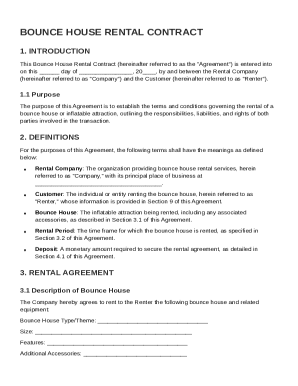
, 20 , by and between the Rental Company (hereinafter referred to as "Company") and the Customer (hereinafter referred to as "Renter"). 1.1 Purpose The purpose of this Agreement is to establish the terms and conditions governing the rental of a bounce house or inflatable attraction, outlining the responsibilities, liabilities, and rights of both parties involved in the transaction. 2. DEFINITIONS For the purposes of this Agreement, the following terms shall have the meanings as defined be.

How it works

  1. Open form

    Open form follow the instructions

  2. Easily sign form

    Easily sign the form with your finger

  3. Share form

    Send filled & signed form or save

How to fill out and sign Bounce House Rental Contract Template online?

Get your online template and fill it in using progressive features. Enjoy smart fillable fields and interactivity.Follow the simple instructions below:

The times of frightening complex legal and tax documents are over. With US Legal Forms the entire process of filling out legal documents is anxiety-free. The best editor is directly at your fingertips providing you with multiple useful instruments for filling out a Bounce House Rental Contract Template. These tips, combined with the editor will assist you through the entire procedure.

  1. Click the Get Form option to begin filling out.
  2. Activate the Wizard mode on the top toolbar to obtain more suggestions.
  3. Fill in each fillable field.
  4. Make sure the details you add to the Bounce House Rental Contract Template is up-to-date and correct.
  5. Include the date to the template using the Date feature.
  6. Click on the Sign button and create a signature. There are three options; typing, drawing, or capturing one.
  7. Make certain every area has been filled in properly.
  8. Click Done in the top right corne to save the form. There are several options for getting the doc. As an instant download, an attachment in an email or through the mail as a hard copy.

We make completing any Bounce House Rental Contract Template easier. Get started now!

Tips on how to fill out, edit and sign Bounce House Rental Contract Template online

How to fill out and sign Bounce House Rental Contract Template online?

Get your online template and fill it in using progressive features. Enjoy smart fillable fields and interactivity.Follow the simple instructions below:

The times of frightening complex legal and tax documents are over. With US Legal Forms the entire process of filling out legal documents is anxiety-free. The best editor is directly at your fingertips providing you with multiple useful instruments for filling out a Bounce House Rental Contract Template. These tips, combined with the editor will assist you through the entire procedure.

  1. Click the Get Form option to begin filling out.
  2. Activate the Wizard mode on the top toolbar to obtain more suggestions.
  3. Fill in each fillable field.
  4. Make sure the details you add to the Bounce House Rental Contract Template is up-to-date and correct.
  5. Include the date to the template using the Date feature.
  6. Click on the Sign button and create a signature. There are three options; typing, drawing, or capturing one.
  7. Make certain every area has been filled in properly.
  8. Click Done in the top right corne to save the form. There are several options for getting the doc. As an instant download, an attachment in an email or through the mail as a hard copy.

We make completing any Bounce House Rental Contract Template easier. Get started now!

How to edit Bounce House Rental Contract Template: customize forms online

Check out a standalone service to manage all your paperwork effortlessly. Find, edit, and complete your Bounce House Rental Contract Template in a single interface with the help of smart tools.

The times when people needed to print forms or even write them manually are long gone. Right now, all it takes to get and complete any form, such as Bounce House Rental Contract Template, is opening a single browser tab. Here, you will find the Bounce House Rental Contract Template form and customize it any way you need, from inserting the text straight in the document to drawing it on a digital sticky note and attaching it to the document. Discover tools that will simplify your paperwork without extra effort.

Just click the Get form button to prepare your Bounce House Rental Contract Template paperwork quickly and start editing it instantly. In the editing mode, you can easily complete the template with your information for submission. Just click on the field you need to change and enter the information right away. The editor's interface does not require any specific skills to use it. When finished with the edits, check the information's accuracy once more and sign the document. Click on the signature field and follow the instructions to eSign the form in a moment.

Use Additional tools to customize your form:

  • Use Cross, Check, or Circle tools to pinpoint the document's data.
  • Add text or fillable text fields with text customization tools.
  • Erase, Highlight, or Blackout text blocks in the document using corresponding tools.
  • Add a date, initials, or even an image to the document if necessary.
  • Utilize the Sticky note tool to annotate the form.
  • Use the Arrow and Line, or Draw tool to add graphic components to your document.

Preparing Bounce House Rental Contract Template paperwork will never be confusing again if you know where to search for the suitable template and prepare it effortlessly. Do not hesitate to try it yourself.

Get form

Experience a faster way to fill out and sign forms on the web. Access the most extensive library of templates available.
Get form

Related content

“Bounce House” User's Agreement
The Parks & Recreation Department has adopted a policy governing the use of inflatable...
Learn more
Therapy pool, lap pool, and a party room Rental...
To book a party, you must complete a rental agreement form. Payment is required at the...
Learn more
Table of Contents - IIS Windows Server
This is known as “bounce-back”. If the ignition is turned off (without accessory delay...
Learn more

Related links form

UT XAPP 2023 PA Danville Area School District Pythagorean Theorem Worksheet 2018 TX Scottish Rite For Children Financial Assistance/Charity Care Application 2022 TX Scottish Rite For Children Financial Assistance/Charity Care Application 2024

Questions & Answers

Get answers to your most pressing questions about US Legal Forms API.

Contact support

The format of a lease agreement typically includes sections for tenant and landlord information, property details, rental terms, and signatures. By employing the Bounce House Rental Contract Template, you can ensure that your lease agreement follows a standard structure that protects all parties involved. This clarity helps prevent misunderstandings later on.

Filling in a tenancy agreement means entering crucial details such as tenant names, rental property specifics, and terms of tenancy. The Bounce House Rental Contract Template offers clear sections for you to input this information efficiently. After completing the tenancy agreement, both parties should review the document to ensure agreement on all terms.

Completing a lease requires careful attention to detail, including filling in the dates, rental amounts, and tenant responsibilities. Using a Bounce House Rental Contract Template can guide you through the process smoothly, ensuring you include all vital information. Always sign and date the agreement once you check that all sections are filled correctly.

To obtain a rental agreement in Mumbai, you can use local legal service providers or online platforms. Consider utilizing the Bounce House Rental Contract Template for a comprehensive and easy-to-use format. Ensure you include all essential terms to protect both parties' interests thoroughly.

Filling in a lease agreement involves providing specific details about the rental arrangement, including parties' names and property specifics. Utilize the Bounce House Rental Contract Template for a structured approach that outlines payment terms, duration, and obligations. Always double-check your entries to ensure clarity and completeness.

To fill in a lease agreement, start by gathering all necessary information such as the names of the parties involved, property details, and rental terms. Clearly state the rental amount, due date, and other terms, ensuring everything aligns with the Bounce House Rental Contract Template. Review the agreement for correctness before signing to ensure mutual understanding and prevent future disputes.

Get This Form Now!

Use professional pre-built templates to fill in and sign documents online faster. Get access to thousands of forms.
Get form
If you believe that this page should be taken down, please follow our DMCA take down processhere.
Get Bounce House Rental Contract Template
Get form
  • Adoption
  • Bankruptcy
  • Contractors
  • Divorce
  • Home Sales
  • Employment
  • Identity Theft
  • Incorporation
  • Landlord Tenant
  • Living Trust
  • Name Change
  • Personal Planning
  • Small Business
  • Wills & Estates
  • Packages A-Z
  • Affidavits
  • Bankruptcy
  • Bill of Sale
  • Corporate - LLC
  • Divorce
  • Employment
  • Identity Theft
  • Internet Technology
  • Landlord Tenant
  • Living Wills
  • Name Change
  • Power of Attorney
  • Real Estate
  • Small Estates
  • Wills
  • All Forms
  • Forms A-Z
  • Other Templates
  • Legal Hub
  • About Us
  • Help Portal
  • Legal Resources
  • Blog
  • Affiliates
  • Contact Us
  • Delete My Account
  • Site Map
  • Industries
  • Forms in Spanish
  • Localized Forms
  • State-specific Forms
  • Forms Kit
  • Real Estate Handbook
  • All Guides
  • Notarize
  • Incorporation services
  • For Consumers
  • For Small Business
  • For Attorneys
  • USLegal
  • FormsPass
  • pdfFiller
  • signNow
  • altaFlow
  • DocHub
  • Instapage
Form Packages
  • Adoption
  • Bankruptcy
  • Contractors
  • Divorce
  • Home Sales
  • Employment
  • Identity Theft
  • Incorporation
  • Landlord Tenant
  • Living Trust
  • Name Change
  • Personal Planning
  • Small Business
  • Wills & Estates
  • Packages A-Z
Form Categories
  • Affidavits
  • Bankruptcy
  • Bill of Sale
  • Corporate - LLC
  • Divorce
  • Employment
  • Identity Theft
  • Internet Technology
  • Landlord Tenant
  • Living Wills
  • Name Change
  • Power of Attorney
  • Real Estate
  • Small Estates
  • Wills
  • All Forms
  • Forms A-Z
  • Other Templates
Customer Service
  • Legal Hub
  • About Us
  • Help Portal
  • Legal Resources
  • Blog
  • Affiliates
  • Contact Us
  • Delete My Account
  • Site Map
  • Industries
  • Forms in Spanish
  • Localized Forms
  • State-specific Forms
  • Forms Kit
Legal Guides
  • Real Estate Handbook
  • All Guides
Prepared for you
  • Notarize
  • Incorporation services
Our Customers
  • For Consumers
  • For Small Business
  • For Attorneys
Our Sites
  • USLegal
  • FormsPass
  • pdfFiller
  • signNow
  • altaFlow
  • DocHub
  • Instapage
Social Media
Call us now toll free:
+1 833 426 79 33
As seen in:
© Copyright 1999-2026 airSlate Legal Forms, Inc. 17 Station Street, Ste. 203, Brookline, MA 02445
  • Your Privacy Choices
  • Terms of Service
  • Privacy Notice
  • Content Takedown Policy
  • Bug Bounty Program