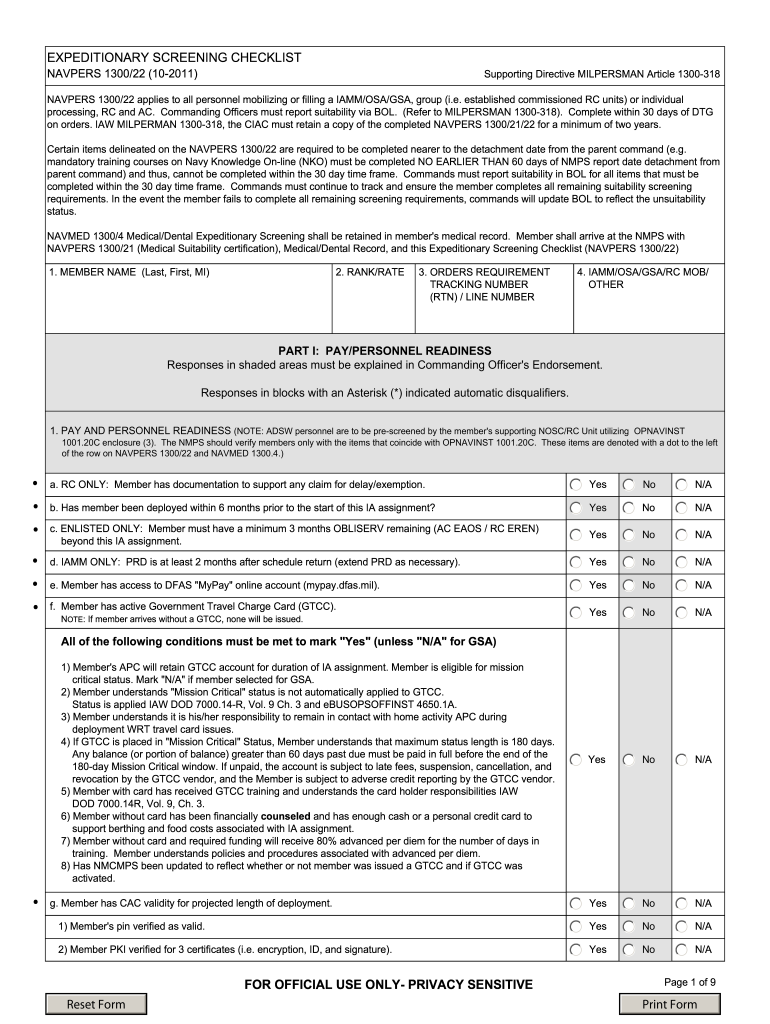
E. established commissioned RC units) or individual processing, RC and AC. Commanding Officers must report suitability via BOL. (Refer to MILPERSMAN 1300-318). Complete within 30 days of DTG on orders. IAW MILPERMAN 1300-318, the CIAC must retain a copy of the completed NAVPERS 1300/21/22 for a minimum of two years. Certain items delineated on the NAVPERS 1300/22 are required to be completed nearer to the detachment date from the parent command (e.g. mandatory training courses on Navy Knowledge .

Open form follow the instructions

Easily sign the form with your finger

Send filled & signed form or save
How to fill out the NAVPERS 1300/22 online
The NAVPERS 1300/22, also known as the Expeditionary Screening Checklist, is a vital document for personnel mobilizing for certain assignments. This guide will provide clear, step-by-step instructions on how to accurately complete this form online, ensuring that you meet all necessary requirements.
Follow the steps to complete the NAVPERS 1300/22 online.
- Use the ‘Get Form’ button to access and open the NAVPERS 1300/22 in your online editor.
- Begin by entering your member name in the designated field, including your last name, first name, and middle initial.
- Next, fill in your rank or rate in the appropriate field.
- In the orders requirement section, input your tracking number and line number as provided in your orders.
- Indicate your assignment category from IAMM, OSA, GSA, RC mob, or other, selecting the one that applies to you.
- Proceed to Part I: Pay/Personnel Readiness. Answer all questions truthfully, particularly those in shaded areas which require explanations in your Commanding Officer's endorsement.
- Complete the responses to questions regarding pay and personnel readiness, ensuring to check the boxes for 'Yes', 'No', or 'N/A' as applicable.
- Continue through the form, addressing legal readiness and command review sections with the same diligence, ensuring all necessary documentation and requirements are accounted for.
- Review the entire completed form for accuracy and completeness before submission.
- Once satisfied with the form, save your changes, and choose to download, print, or share the document as necessary.
Start filling out your NAVPERS 1300/22 online today to ensure a smooth mobilization process.
Experience a faster way to fill out and sign forms on the web. Access the most extensive library of templates available.
Related content
Oct 1, 2021 — *Updated* NAVPERS 1300/22 (Expeditionary Screening Checklist). This is the...
NAVMED 1300/22, Expeditionary Screening Checklist. F. Personal. Driver's ... Copy of...
Get answers to your most pressing questions about US Legal Forms API.
What is navy form 1306?
The Navy form 1306, often referred to as NAVPERS 1306, is a critical document used for various submissions, including requests for assignments or transfers. This form enables personnel to articulate their needs or desires regarding their service within the Navy. If you need assistance in understanding how to use the NAVPERS 1306, consider platforms like US Legal Forms, which offer valuable insights and downloadable resources.
How to fill out a navpers 1070 613?
Filling out the NAVPERS 1070/613 involves providing personal military details, including your achievements and qualifications. To ensure accuracy and completeness, follow the instructions provided with the form, and review examples online. You can also find user-friendly resources on platforms like US Legal Forms that assist in completing the NAVPERS 1070/613 effectively.
What is the Navpers 1306 92 special program?
The NAVPERS 1306/92 special program refers to a specific application that allows Navy personnel to apply for various special programs within the service. It often involves special duty assignments or training opportunities, enhancing your career growth. It's advisable to check the instructions carefully or visit platforms like US Legal Forms for templates and detailed guidance.
What navpers form is used to process immediate reenlistment?
The NAVPERS 1300/22 is the primary form used to process immediate reenlistment in the Navy. This form captures essential details about your reenlistment and must be completed accurately to ensure compliance with Navy regulations. For help in filling out your NAVPERS 1300/22, consider using the resources available on US Legal Forms, which guide you through each step.
Where can I find Navpers forms?
You can find NAVPERS forms, including the NAVPERS 1300/22, on official Navy websites or through authorized Navy personnel offices. Additionally, US Legal Forms offers a comprehensive database where you can access a variety of NAVPERS forms easily. This platform streamlines the process, ensuring you have the correct forms at your fingertips.
How to submit a 1306 7?
To submit a NAVPERS 1306 7, you must complete the form with accurate information and then route it to your chain of command for approval. Once signed, you can deliver the form to the appropriate personnel office. Utilizing services like USLegalForms can simplify the preparation and submission process, allowing you to focus on your Navy obligations.
Where can I get navy forms?
You can obtain Navy forms, including the NAVPERS 1300/22, from several official sources, such as Navy personnel offices or online databases. Visiting the US Legal Forms platform can significantly simplify your search, offering easy access to various Navy forms and comprehensive guides on how to fill them out properly. This platform serves as a one-stop-shop for all your Navy documentation needs.
Where can I find navres forms?
NAVRES forms can be accessed through the official Navy Reserve website, military administrative offices, and sites that specialize in military documentation, such as USLegalForms. Having reliable access to these forms is crucial for active service members and reservists alike in managing their military obligations. Make sure to check these resources regularly for updates and necessary paperwork.
Where can I find Navy bibliographies?
Navy bibliographies can be located through official Navy libraries, online databases, and educational resource centers. These bibliographies serve as valuable tools for research and educational purposes. Additionally, some platforms compile these resources for easier access, helping you find what you need quickly. Make use of tools like USLegalForms when looking for specific documentation.
What is Navpers 1070 613 used for?
The NAVPERS 1070 613 is used to document performance evaluations and service records of Navy personnel. This form plays a critical role in tracking an individual’s achievements and career progression. It can impact promotions and assignments, underscoring its importance in a service member's career. Always refer to Navy guidelines for the correct usage of this form.
Use professional pre-built templates to fill in and sign documents online faster. Get access to thousands of forms.
If you believe that this page should be taken down, please follow our DMCA take down process here.