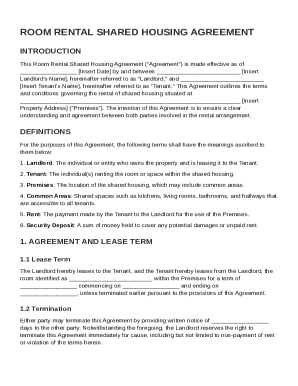
Get Room Rental Shared Housing Agreement Template
How it works
-

Open form follow the instructions
-

Easily sign the form with your finger
-

Send filled & signed form or save
How to fill out and sign Room Rental Shared Housing Agreement Template online?
Get your online template and fill it in using progressive features. Enjoy smart fillable fields and interactivity.Follow the simple instructions below:Feel all the advantages of completing and submitting forms online. With our service filling in Room Rental Shared Housing Agreement Template will take a few minutes. We make that possible through giving you access to our full-fledged editor effective at changing/fixing a document?s original textual content, inserting special boxes, and e-signing.
Complete Room Rental Shared Housing Agreement Template in a couple of clicks by following the guidelines listed below:
- Select the document template you will need from our collection of legal form samples.
- Click the Get form key to open it and move to editing.
- Fill in all the required boxes (they will be yellow-colored).
- The Signature Wizard will allow you to put your e-signature after you have finished imputing details.
- Put the date.
- Double-check the entire template to make sure you?ve filled in all the information and no changes are required.
- Hit Done and download the filled out document to the gadget.
Send the new Room Rental Shared Housing Agreement Template in an electronic form right after you finish filling it out. Your data is securely protected, since we adhere to the latest security standards. Join millions of satisfied clients that are already filling in legal documents straight from their houses.
Tips on how to fill out, edit and sign Room Rental Shared Housing Agreement Template online
How to fill out and sign Room Rental Shared Housing Agreement Template online?
Get your online template and fill it in using progressive features. Enjoy smart fillable fields and interactivity.Follow the simple instructions below:
Feel all the advantages of completing and submitting forms online. With our service filling in Room Rental Shared Housing Agreement Template will take a few minutes. We make that possible through giving you access to our full-fledged editor effective at changing/fixing a document?s original textual content, inserting special boxes, and e-signing.
Complete Room Rental Shared Housing Agreement Template in a couple of clicks by following the guidelines listed below:
- Select the document template you will need from our collection of legal form samples.
- Click the Get form key to open it and move to editing.
- Fill in all the required boxes (they will be yellow-colored).
- The Signature Wizard will allow you to put your e-signature after you have finished imputing details.
- Put the date.
- Double-check the entire template to make sure you?ve filled in all the information and no changes are required.
- Hit Done and download the filled out document to the gadget.
Send the new Room Rental Shared Housing Agreement Template in an electronic form right after you finish filling it out. Your data is securely protected, since we adhere to the latest security standards. Join millions of satisfied clients that are already filling in legal documents straight from their houses.
How to edit Room Rental Shared Housing Agreement Template: customize forms online
Have your stressless and paper-free way of editing Room Rental Shared Housing Agreement Template. Use our trusted online solution and save a great deal of time.
Drafting every document, including Room Rental Shared Housing Agreement Template, from scratch requires too much time, so having a tried-and-tested platform of pre-drafted form templates can do magic for your efficiency.
But editing them can be struggle, especially when it comes to the documents in PDF format. Luckily, our extensive library includes a built-in editor that allows you to easily fill out and customize Room Rental Shared Housing Agreement Template without leaving our website so that you don't need to waste time modifying your forms. Here's what to do with your document using our tools:
- Step 1. Locate the needed form on our website.
- Step 2. Click Get Form to open it in the editor.
- Step 3. Use our specialized modifying features that allow you to add, remove, annotate and highlight or blackout text.
- Step 4. Generate and add a legally-binding signature to your document by using the sign option from the top toolbar.
- Step 5. If the form layout doesn’t look the way you want it, utilize the features on the right to remove, add, and arrange pages.
- step 6. Add fillable fields so other parties can be invited to fill out the form (if applicable).
- Step 7. Share or send the document, print it out, or choose the format in which you’d like to get the document.
Whether you need to execute editable Room Rental Shared Housing Agreement Template or any other form available in our catalog, you’re on the right track with our online document editor. It's easy and safe and doesn’t require you to have special skills. Our web-based solution is set up to handle practical everything you can imagine when it comes to file editing and completion.
No longer use conventional way of working with your documents. Choose a more efficient option to help you streamline your activities and make them less dependent on paper.
Related links form
A flatmate refers to a person who shares accommodation with others, typically within a rental property. In contrast, a tenancy agreement is the legal contract that outlines the relationship between a landlord and tenants. While flatmates may share rooms and expenses, a tenancy agreement establishes the rules of tenancy and responsibilities. For clarity and legal protection, consider using a Room Rental Shared Housing Agreement Template.