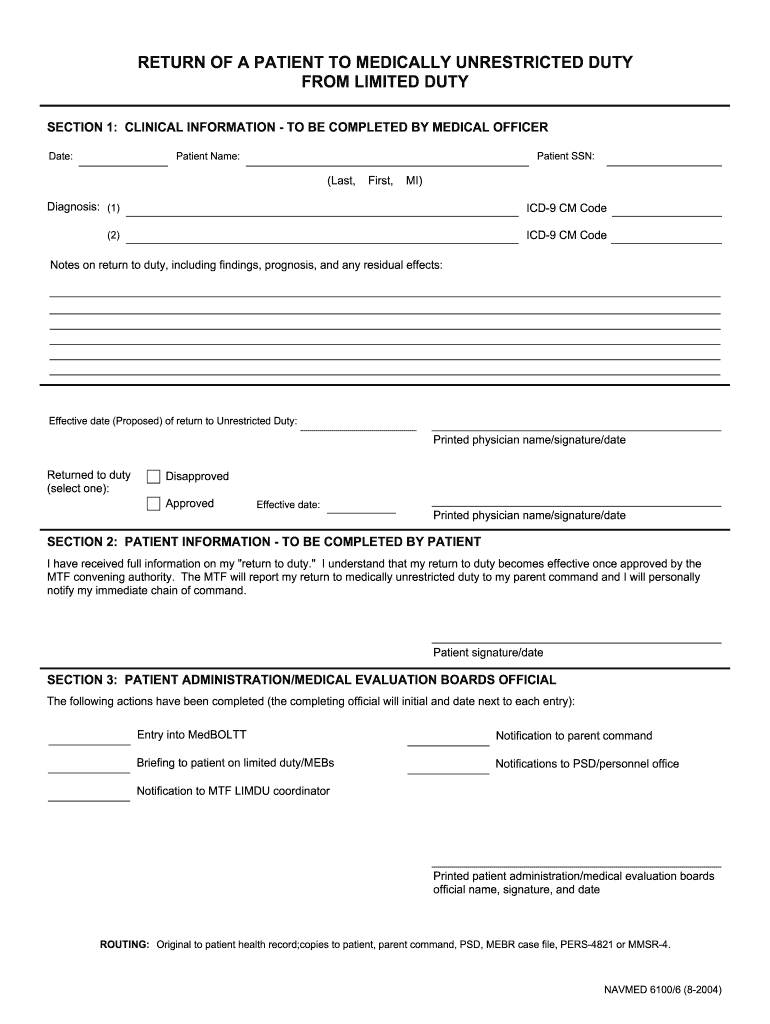
RETURN OF A PATIENT TO MEDICALLY UNRESTRICTED DUTY FROM LIMITED DUTY SECTION 1: CLINICAL INFORMATION - TO BE COMPLETED BY MEDICAL OFFICER Date: Patient SSN: Patient Name: (Last, First, MI) Diagnosis:.
Loading

Open form follow the instructions

Easily sign the form with your finger

Send filled & signed form or save
How to fill out the NAVMED 6100/6 online
The NAVMED 6100/6 form is essential for documenting a patient's return to medically unrestricted duty from limited duty. This guide will walk you through the process of filling out the form online, ensuring that you complete each section accurately and efficiently.
Follow the steps to complete the NAVMED 6100/6 form online.
- Press the ‘Get Form’ button to access the digital version of the NAVMED 6100/6 and open it in the designated editor.
- In 'Section 1: Clinical Information', the medical officer should enter the date, patient SSN, name (last, first, middle initial), and diagnosis, including two ICD-9 CM codes. Provide notes on the return to duty, including findings and prognosis, along with the proposed effective date of return to unrestricted duty. The medical officer must print their name, sign, and date the section, and select whether the return to duty is approved or disapproved.
- In 'Section 2: Patient Information', the patient must confirm they have received full information regarding their return to duty. They should understand that this return becomes effective only upon approval by the MTF convening authority. The patient must provide their signature and the date to acknowledge this information.
- In 'Section 3: Patient Administration/Medical Evaluation Boards Official', the completing official must indicate that actions have been completed by initializing and dating next to each entry, which includes entries related to MedBOLTT, notifications, briefings, and other relevant updates. The official should also print their name, sign, and date the section.
- Once all sections are completed, save the changes made to the form. Users can then choose to download, print, or share the completed NAVMED 6100/6 as necessary.
Complete your NAVMED 6100/6 form online today for efficient processing.
Experience a faster way to fill out and sign forms on the web. Access the most extensive library of templates available.
Related content
NAVMED 6100/5. Abbreviated Medical Evaluation Board Report. NAVMED 6100/6. Return of a...
This report includes clinical info, patient info, and actions completed. It covers limited...
Get answers to your most pressing questions about US Legal Forms API.
How to access eLearning Navy?
You can access eLearning Navy through the Navy Knowledge Online (NKO) platform. Simply log in using your credentials, and navigate to the training section. You'll find various resources and courses designed to support your development. For specific guidance relating to your NAVMED 6100/6 needs, consider integrating tools available on uslegalforms to enhance your learning experience.
How to be placed on Limdu?
To be placed on Limdu, you must undergo a medical evaluation by an authorized healthcare provider. They will assess your condition and determine whether a NAVMED 6100/6 is appropriate for you. If approved, your provider will submit the necessary paperwork, allowing you to receive the support you require. It is important to communicate any medical concerns with your command promptly.
How long can you be on Limdu?
The duration you can remain on Limdu varies depending on your medical condition and recovery progress. Generally, Limdu orders can be issued for up to 12 months, depending on your situation and assessment by the medical board. Regular communication with your medical provider regarding your NAVMED 6100/6 status is essential. They will monitor your recovery and determine if any adjustments are necessary.
Where can I access Limdu Smart?
Limdu Smart is accessible through the official military health web portal available to service members. You can log in using your CAC and navigate to the designated Limdu section. If you encounter challenges, consider reaching out to your command for guidance or exploring the resources available on the uslegalforms platform for additional support with your NAVMED 6100/6 needs.
How to access Limdu Smart?
Accessing Limdu Smart is straightforward and involves logging into the official military health system portal. You will need your Common Access Card (CAC) for authentication. Once logged in, you can find the NAVMED 6100/6 forms along with tools and resources that aid in your Limdu management. If you're unsure where to start, consult your unit's administrator for assistance.
Can you separate on Limdu?
Yes, separating while on Limdu can be possible under specific conditions. Typically, if your Limdu status is temporary and your situation changes, you may still be able to process your separation. It's important to discuss your options with your command and review the implications of your NAVMED 6100/6. Legal counsel can also provide guidance regarding your personal circumstances.
How long does it take to get Limdu orders?
The timeline for receiving Limdu orders can vary based on several factors. Generally, you should expect 1 to 4 weeks for processing once you've submitted your NAVMED 6100/6 form. Prompt submission of all required documents can help expedite the process. Staying in touch with your chain of command can also ensure you receive timely updates.
What is the 4 2 2 rule in the Navy?
The 4-2-2 rule refers to the Navy's policy on limited duty personnel, stating that if you are on Limdu for 12 months, you should either transition to the next appropriate level of care or return to full duty. This rule is designed to ensure that service members receive timely evaluations and assistance for their medical conditions. Understanding this rule can empower you to manage your situation effectively.
Can you PCs while on Limdu?
The ability to PCS while on Limdu is typically restricted, as your medical needs must be met at your current location. Transitioning to a new duty station could complicate your medical evaluations and treatments. Consulting your medical officer and chain of command can provide clarity on any potential exceptions in your case.
Is there a way to get out of the Navy early?
While it is challenging to exit the Navy early, certain circumstances can lead to an early release. These may include medical reasons documented through forms like NAVMED 6100/6, as well as specific administrative options based on your situation. It’s advisable to consult your chain of command to discuss your case and explore possible paths for early discharge.
Use professional pre-built templates to fill in and sign documents online faster. Get access to thousands of forms.
If you believe that this page should be taken down, please follow our DMCA take down process here.