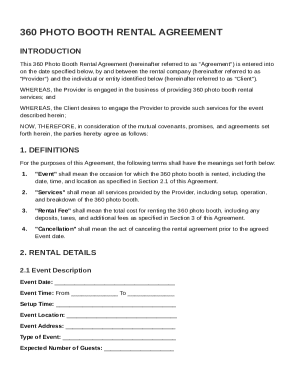
Get 360 Photo Booth Rental Agreement Template
How it works
-

Open form follow the instructions
-

Easily sign the form with your finger
-

Send filled & signed form or save
How to fill out and sign 360 Photo Booth Rental Agreement Template online?
Get your online template and fill it in using progressive features. Enjoy smart fillable fields and interactivity.Follow the simple instructions below:Experience all the key benefits of submitting and completing legal documents online. Using our service filling in 360 Photo Booth Rental Agreement Template will take a couple of minutes. We make that possible through giving you access to our full-fledged editor capable of changing/correcting a document?s original textual content, inserting unique fields, and e-signing.
Complete 360 Photo Booth Rental Agreement Template in several moments by following the instructions listed below:
- Pick the document template you want in the library of legal form samples.
- Click on the Get form key to open it and start editing.
- Submit all the necessary boxes (they will be yellowish).
- The Signature Wizard will allow you to add your electronic autograph after you?ve finished imputing info.
- Insert the relevant date.
- Look through the whole form to make certain you?ve completed all the information and no changes are needed.
- Press Done and download the resulting template to your computer.
Send your 360 Photo Booth Rental Agreement Template in an electronic form when you are done with completing it. Your data is well-protected, as we adhere to the newest security standards. Join numerous satisfied clients that are already filling in legal documents straight from their homes.
Tips on how to fill out, edit and sign 360 Photo Booth Rental Agreement Template online
How to fill out and sign 360 Photo Booth Rental Agreement Template online?
Get your online template and fill it in using progressive features. Enjoy smart fillable fields and interactivity.Follow the simple instructions below:
Experience all the key benefits of submitting and completing legal documents online. Using our service filling in 360 Photo Booth Rental Agreement Template will take a couple of minutes. We make that possible through giving you access to our full-fledged editor capable of changing/correcting a document?s original textual content, inserting unique fields, and e-signing.
Complete 360 Photo Booth Rental Agreement Template in several moments by following the instructions listed below:
- Pick the document template you want in the library of legal form samples.
- Click on the Get form key to open it and start editing.
- Submit all the necessary boxes (they will be yellowish).
- The Signature Wizard will allow you to add your electronic autograph after you?ve finished imputing info.
- Insert the relevant date.
- Look through the whole form to make certain you?ve completed all the information and no changes are needed.
- Press Done and download the resulting template to your computer.
Send your 360 Photo Booth Rental Agreement Template in an electronic form when you are done with completing it. Your data is well-protected, as we adhere to the newest security standards. Join numerous satisfied clients that are already filling in legal documents straight from their homes.
How to edit 360 Photo Booth Rental Agreement Template: customize forms online
Simplify your paperwork preparation process and adapt it to your requirements within clicks. Fill out and sign 360 Photo Booth Rental Agreement Template using a robust yet easy-to-use online editor.
Preparing documentation is always troublesome, especially when you cope with it from time to time. It demands you strictly follow all the formalities and accurately complete all areas with full and precise information. Nevertheless, it often occurs that you need to change the form or add more areas to fill out. If you need to optimize 360 Photo Booth Rental Agreement Template before submitting it, the best way to do it is by using our powerful yet easy-to-use online editing tools.
This extensive PDF editing tool enables you to easily and quickly fill out legal paperwork from any internet-connected device, make basic edits to the form, and insert more fillable areas. The service enables you to choose a particular area for each data type, like Name, Signature, Currency and SSN and so on. You can make them required or conditional and decide who should fill out each field by assigning them to a specific recipient.
Make the steps listed below to optimize your 360 Photo Booth Rental Agreement Template online:
- Open needed file from the catalog.
- Fill out the blanks with Text and place Check and Cross tools to the tickboxes.
- Utilize the right-hand panel to modify the template with new fillable areas.
- Choose the areas based on the type of data you want to be collected.
- Make these fields required, optional, and conditional and customize their order.
- Assign each area to a particular party with the Add Signer option.
- Check if you’ve made all the required modifications and click Done.
Our editor is a universal multi-featured online solution that can help you quickly and easily adapt 360 Photo Booth Rental Agreement Template and other templates based on your requirements. Optimize document preparation and submission time and make your paperwork look perfect without hassle.
Yes, a 360 photo booth business can be quite profitable, especially during events like weddings and corporate gatherings. By offering attractive packages and utilizing social media for marketing, you can attract more clients. A well-crafted 360 Photo Booth Rental Agreement Template can also help you secure favorable terms with clients, boosting your profitability.