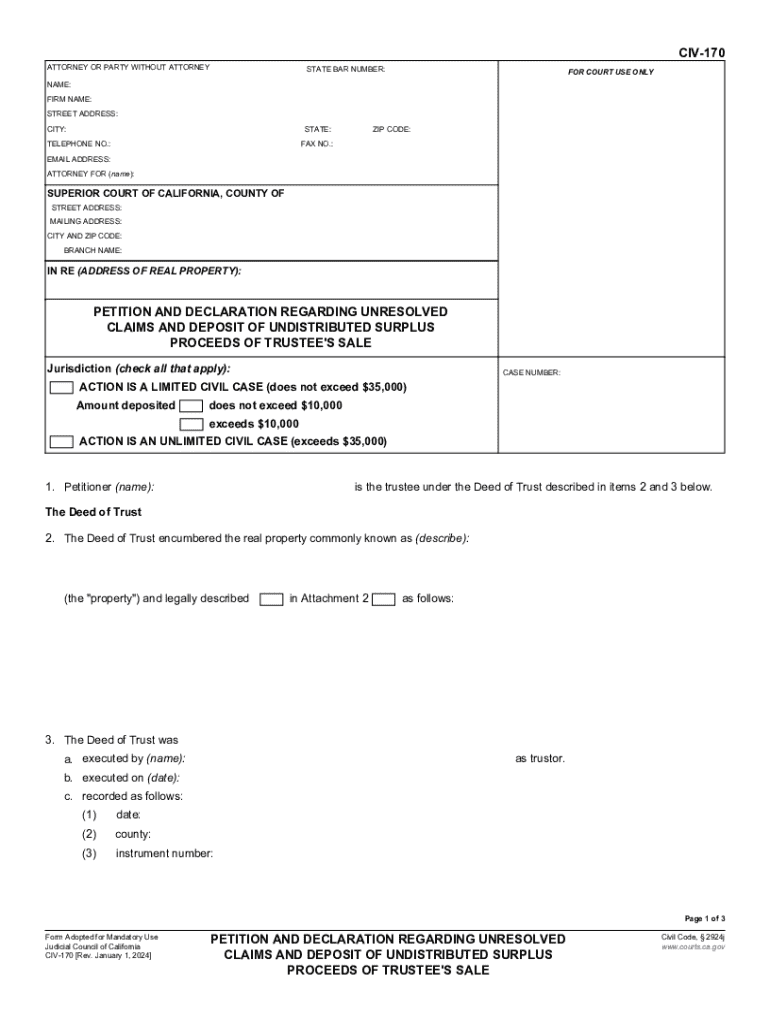
E): SUPERIOR COURT OF CALIFORNIA, COUNTY OF STREET ADDRESS: MAILING ADDRESS: CITY AND ZIP CODE: BRANCH NAME: IN RE (ADDRESS OF REAL PROPERTY): PETITION AND DECLARATION REGARDING UNRESOLVED CLAIMS AND DEPOSIT OF UNDISTRIBUTED SURPLUS PROCEEDS OF TRUSTEE'S SALE Jurisdiction (check all that apply): CASE NUMBER: ACTION IS A LIMITED CIVIL CASE (does not exceed $35,000) Amount deposited does not exceed $10,000 exceeds $10,000 ACTION IS AN UNLIMITED CIVIL CASE (exceeds $35,000) 1. Petitioner (na.
Loading

Open form follow the instructions

Easily sign the form with your finger

Send filled & signed form or save
How to fill out and sign CA CIV-170 online?
Get your online template and fill it in using progressive features. Enjoy smart fillable fields and interactivity.Follow the simple instructions below:
Feel all the advantages of completing and submitting legal documents online. Using our platform submitting CA CIV-170 usually takes a few minutes. We make that achievable through giving you access to our full-fledged editor effective at transforming/correcting a document?s initial text, inserting special fields, and e-signing.
Complete CA CIV-170 in just several moments by following the recommendations listed below:
- Select the template you require in the collection of legal form samples.
- Select the Get form key to open the document and move to editing.
- Complete the required boxes (they will be marked in yellow).
- The Signature Wizard will help you insert your e-autograph after you have finished imputing data.
- Add the date.
- Look through the whole document to ensure you have filled in all the data and no corrections are required.
- Click Done and download the ecompleted form to the device.
Send the new CA CIV-170 in an electronic form as soon as you finish completing it. Your information is well-protected, because we adhere to the newest security requirements. Become one of numerous happy clients that are already filling in legal forms from their homes.
Tips on how to fill out, edit and sign CA CIV-170 online
How to fill and sign CA CIV-170
Get your online template and fill it in using progressive features. Enjoy smart fillable fields and interactivity.Follow the simple instructions below:
Feel all the advantages of completing and submitting legal documents online. Using our platform submitting CA CIV-170 usually takes a few minutes. We make that achievable through giving you access to our full-fledged editor effective at transforming/correcting a document?s initial text, inserting special fields, and e-signing.
Complete CA CIV-170 in just several moments by following the recommendations listed below:
- Select the template you require in the collection of legal form samples.
- Select the Get form key to open the document and move to editing.
- Complete the required boxes (they will be marked in yellow).
- The Signature Wizard will help you insert your e-autograph after you have finished imputing data.
- Add the date.
- Look through the whole document to ensure you have filled in all the data and no corrections are required.
- Click Done and download the ecompleted form to the device.
Send the new CA CIV-170 in an electronic form as soon as you finish completing it. Your information is well-protected, because we adhere to the newest security requirements. Become one of numerous happy clients that are already filling in legal forms from their homes.
How to edit CA CIV-170
Take advantage of the user friendliness of the multi-featured online editor while completing your CA CIV-170. Make use of the range of tools to quickly fill out the blanks and provide the requested information right away.
Preparing documents is time-taking and pricey unless you have ready-to-use fillable forms and complete them electronically. The simplest way to deal with the CA CIV-170 is to use our professional and multi-featured online editing solutions. We provide you with all the essential tools for prompt form fill-out and allow you to make any adjustments to your forms, adapting them to any needs. Apart from that, you can make comments on the changes and leave notes for other parties involved.
Here’s what you can do with your CA CIV-170 in our editor:
- Fill out the blank fields using Text, Cross, Check, Initials, Date, and Sign options.
- Highlight important information with a preferred color or underline them.
- Hide sensitive data using the Blackout option or simply erase them.
- Insert pictures to visualize your CA CIV-170.
- Substitute the original text using the one suiting your requirements.
- Leave comments or sticky notes to communicate with others on the updates.
- Create additional fillable fields and assign them to particular recipients.
- Protect the sample with watermarks, place dates, and bates numbers.
- Share the paperwork in various ways and save it on your device or the cloud in different formats after you finish adjusting.
Dealing with CA CIV-170 in our robust online editor is the fastest and most efficient way to manage, submit, and share your documentation the way you need it from anywhere. The tool operates from the cloud so that you can access it from any location on any internet-connected device. All forms you create or complete are securely stored in the cloud, so you can always access them whenever needed and be assured of not losing them. Stop wasting time on manual document completion and eliminate papers; make it all online with minimum effort.
How to fill and sign CA CIV-170
Get your online template and fill it in using progressive features. Enjoy smart fillable fields and interactivity.Follow the simple instructions below:
Feel all the advantages of completing and submitting legal documents online. Using our platform submitting CA CIV-170 usually takes a few minutes. We make that achievable through giving you access to our full-fledged editor effective at transforming/correcting a document?s initial text, inserting special fields, and e-signing.
Complete CA CIV-170 in just several moments by following the recommendations listed below:
- Select the template you require in the collection of legal form samples.
- Select the Get form key to open the document and move to editing.
- Complete the required boxes (they will be marked in yellow).
- The Signature Wizard will help you insert your e-autograph after you have finished imputing data.
- Add the date.
- Look through the whole document to ensure you have filled in all the data and no corrections are required.
- Click Done and download the ecompleted form to the device.
Send the new CA CIV-170 in an electronic form as soon as you finish completing it. Your information is well-protected, because we adhere to the newest security requirements. Become one of numerous happy clients that are already filling in legal forms from their homes.
Experience a faster way to fill out and sign forms on the web. Access the most extensive library of templates available.
Related content
Judicial Council of California. CIV-170 [Rev. January 1, 2024]. PETITION AND DECLARATION...
by DM Glickman · 1953 · Cited by 3 — Several areas of uncertainty become apparent upon...
NOTE: For actions resulting from a Current Good Manufacturing Practice (CGMP) or. Quality...
Get answers to your most pressing questions about US Legal Forms API.
How do I claim surplus funds from a foreclosure in California?
To claim surplus funds from a foreclosure in California, first, identify the court that handled the foreclosure sale. You must fill out and file the CA CIV-170 form, which serves as your official claim. Ensure you attach all relevant documentation, such as sale notices and identification proof, to support your claim. After filing, the court will review your submission, and you will be notified about the outcome of your claim.
How to recover foreclosure surplus funds?
Recovering foreclosure surplus funds involves several steps that include gathering necessary documentation such as the foreclosure sale details and proof of your identity. You will need to complete a claim using the CA CIV-170 form, which helps assert your right to the surplus funds. After submitting your claim to the court, monitor its progress and be prepared to respond to any additional inquiries from officials. Using a platform like US Legal Forms can simplify obtaining and completing the required forms.
How do I get surplus funds from a foreclosure in California?
To get surplus funds from a foreclosure in California, begin by confirming that the foreclosure sale generated excess funds beyond what was owed on the mortgage. Next, you must file a claim for these surplus funds in the appropriate court. Utilizing California’s CA CIV-170 form can streamline this process, as it provides official documentation for your claim. Once you submit the claim, await the court's decision regarding the distribution of funds.
Use professional pre-built templates to fill in and sign documents online faster. Get access to thousands of forms.
If you believe that this page should be taken down, please follow our DMCA take down process here.