Loading
Form preview
  • US Legal Forms
  • Form Library
  • More Forms
  • More Multi-State Forms
  • Monday Thru Friday

Get Monday Thru Friday

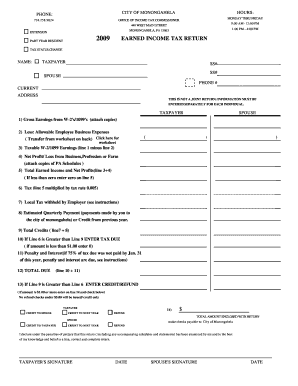
2009 PART YEAR RESIDENT EARNED INCOME TAX RETURN TAX STATUS CHANGE NAME: TAXPAYER SS# SS# SPOUSE PHONE # CURRENT ADDRESS THIS IS NOT A JOINT RETURN: INFORMATION MUST BE ENTERED SEPARATELY FOR EACH INDIVIDUAL. TAXPAYER SPOUSE 1) Gross Earnings from W-2's/1099's (attach copies) 2) Less: Allowable Employee Business Expenses ( Transfer from worksheet on back) Click here for ( ) ( ) worksheet 3) Taxable W-2/1099 Earnings (line 1 minus line 2) 4) Net Profit/ Loss from Business,Profe.

How it works

  1. Open form

    Open form follow the instructions

  2. Easily sign form

    Easily sign the form with your finger

  3. Share form

    Send filled & signed form or save

How to fill out and sign MONDAY THRU FRIDAY online?

Get your online template and fill it in using progressive features. Enjoy smart fillable fields and interactivity.Follow the simple instructions below:

Experience all the benefits of submitting and completing documents online. Using our service filling out MONDAY THRU FRIDAY only takes a couple of minutes. We make that possible through giving you access to our feature-rich editor effective at altering/fixing a document?s original text, inserting special boxes, and e-signing.

Execute MONDAY THRU FRIDAY in a couple of moments by following the recommendations below:

  1. Pick the document template you need from our library of legal form samples.
  2. Select the Get form key to open it and move to editing.
  3. Complete the requested boxes (these are yellow-colored).
  4. The Signature Wizard will help you put your e-signature right after you have finished imputing details.
  5. Put the date.
  6. Look through the entire document to ensure you?ve filled in all the data and no corrections are needed.
  7. Hit Done and save the ecompleted document to your device.

Send your MONDAY THRU FRIDAY in a digital form as soon as you finish completing it. Your data is securely protected, since we adhere to the newest security criteria. Become one of numerous satisfied users that are already filling in legal templates from their houses.

Tips on how to fill out, edit and sign MONDAY THRU FRIDAY online

How to fill out and sign MONDAY THRU FRIDAY online?

Get your online template and fill it in using progressive features. Enjoy smart fillable fields and interactivity.Follow the simple instructions below:

Experience all the benefits of submitting and completing documents online. Using our service filling out MONDAY THRU FRIDAY only takes a couple of minutes. We make that possible through giving you access to our feature-rich editor effective at altering/fixing a document?s original text, inserting special boxes, and e-signing.

Execute MONDAY THRU FRIDAY in a couple of moments by following the recommendations below:

  1. Pick the document template you need from our library of legal form samples.
  2. Select the Get form key to open it and move to editing.
  3. Complete the requested boxes (these are yellow-colored).
  4. The Signature Wizard will help you put your e-signature right after you have finished imputing details.
  5. Put the date.
  6. Look through the entire document to ensure you?ve filled in all the data and no corrections are needed.
  7. Hit Done and save the ecompleted document to your device.

Send your MONDAY THRU FRIDAY in a digital form as soon as you finish completing it. Your data is securely protected, since we adhere to the newest security criteria. Become one of numerous satisfied users that are already filling in legal templates from their houses.

How to edit MONDAY THRU FRIDAY: customize forms online

Take full advantage of our extensive online document editor while preparing your paperwork. Fill out the MONDAY THRU FRIDAY, point out the most significant details, and effortlessly make any other essential modifications to its content.

Completing paperwork electronically is not only time-saving but also gives an opportunity to modify the template according to your requirements. If you’re about to work on MONDAY THRU FRIDAY, consider completing it with our robust online editing solutions. Whether you make a typo or enter the requested details into the wrong area, you can instantly make adjustments to the form without the need to restart it from the beginning as during manual fill-out. Apart from that, you can point out the vital data in your document by highlighting certain pieces of content with colors, underlining them, or circling them.

Adhere to these quick and simple steps to fill out and adjust your MONDAY THRU FRIDAY online:

  1. Open the form in the editor.
  2. Enter the necessary information in the empty fields using Text, Check, and Cross tools.
  3. Adhere to the form navigation to avoid missing any mandatory fields in the template.
  4. Circle some of the significant details and add a URL to it if needed.
  5. Use the Highlight or Line tools to point out the most significant pieces of content.
  6. Decide on colors and thickness for these lines to make your form look professional.
  7. Erase or blackout the facts you don’t want to be visible to other people.
  8. Substitute pieces of content containing errors and type in text that you need.
  9. Finish editing with the Done button as soon as you make certain everything is correct in the form.

Our extensive online solutions are the most effective way to complete and modify MONDAY THRU FRIDAY based on your requirements. Use it to prepare personal or business paperwork from anyplace. Open it in a browser, make any changes in your forms, and get back to them anytime in the future - they all will be securely stored in the cloud.

Get form

Experience a faster way to fill out and sign forms on the web. Access the most extensive library of templates available.
Get form

Related content

44 U.S.C. Ch. 15) and the regulations of the...
FEDERAL REGISTER Published daily, Monday through Friday, (not published on Saturdays...
Learn more
DAYS OF THE WEEK CODES: M Monday T Tuesday W ...
Page 1. DAYS OF THE WEEK CODES: M. Monday. T. Tuesday. W. Wednesday. R. Thursday. F...
Learn more
Minimum time charges: Monday through Friday-lour/...
Minimum time charges: Monday through Friday-lour/Saturday, Sunday & Holidays - 3 hours·...
Learn more

Related links form

TriStateNutrLacDCADBeede.doc. The Michigan Dairy Review Is Published In January, April, January And Required Elements Checklist How Will The Points Be Administrated? - Miami Dade College OSU Minigrant Request Guidelines, 2003 - Msu

Questions & Answers

Get answers to your most pressing questions about US Legal Forms API.

Contact support

Monday to Friday comprises five days in total, which includes Monday, Tuesday, Wednesday, Thursday, and Friday. This definition applies to the typical workweek in the United States. Understanding this can help you plan your workloads and schedules efficiently throughout the week.

To write Monday through Friday correctly, you can phrase it as 'Monday to Friday' for formal settings or 'Monday thru Friday' for a more informal approach. Always ensure that your audience understands your choice, as clarity is key. Deliver your information accurately to help readers navigate their schedules.

You can use either 'Monday through Friday' or 'Monday thru Friday,' depending on your audience and context. 'Through' is more appropriate for formal writing, while 'thru' fits casual use. Remember, both versions convey the same meaning, which is the workweek in the US.

To fill Monday thru Friday in Excel, start by entering 'Monday' in the first cell and 'Friday' in the last cell of your desired range. Then, highlight the cells and use the fill handle to drag down, and Excel will automatically fill in the other weekdays in between. This simple method saves time and keeps your data organized.

When writing Monday through Friday, you can choose to use the words 'Monday to Friday' or 'Monday thru Friday.' Both are acceptable, but 'thru' is often used in informal contexts. If you want to ensure clarity, especially in formal writing, opting for 'Monday to Friday' is recommended.

Get This Form Now!

Use professional pre-built templates to fill in and sign documents online faster. Get access to thousands of forms.
Get form
If you believe that this page should be taken down, please follow our DMCA take down processhere.

Industry-leading security and compliance

US Legal Forms protects your data by complying with industry-specific security standards.
  • In businnes since 1997
    25+ years providing professional legal documents.
  • Accredited business
    Guarantees that a business meets BBB accreditation standards in the US and Canada.
  • Secured by Braintree
    Validated Level 1 PCI DSS compliant payment gateway that accepts most major credit and debit card brands from across the globe.
Get MONDAY THRU FRIDAY
Get form
  • Adoption
  • Bankruptcy
  • Contractors
  • Divorce
  • Home Sales
  • Employment
  • Identity Theft
  • Incorporation
  • Landlord Tenant
  • Living Trust
  • Name Change
  • Personal Planning
  • Small Business
  • Wills & Estates
  • Packages A-Z
  • Affidavits
  • Bankruptcy
  • Bill of Sale
  • Corporate - LLC
  • Divorce
  • Employment
  • Identity Theft
  • Internet Technology
  • Landlord Tenant
  • Living Wills
  • Name Change
  • Power of Attorney
  • Real Estate
  • Small Estates
  • Wills
  • All Forms
  • Forms A-Z
  • Form Library
  • Legal Hub
  • About Us
  • Help Portal
  • Legal Resources
  • Blog
  • Affiliates
  • Contact Us
  • Delete My Account
  • Site Map
  • Industries
  • Forms in Spanish
  • Localized Forms
  • State-specific Forms
  • Forms Kit
  • Real Estate Handbook
  • All Guides
  • Notarize
  • Incorporation services
  • For Consumers
  • For Small Business
  • For Attorneys
  • USLegal
  • FormsPass
  • pdfFiller
  • signNow
  • altaFlow
  • DocHub
  • Instapage
Form Packages
  • Adoption
  • Bankruptcy
  • Contractors
  • Divorce
  • Home Sales
  • Employment
  • Identity Theft
  • Incorporation
  • Landlord Tenant
  • Living Trust
  • Name Change
  • Personal Planning
  • Small Business
  • Wills & Estates
  • Packages A-Z
Form Categories
  • Affidavits
  • Bankruptcy
  • Bill of Sale
  • Corporate - LLC
  • Divorce
  • Employment
  • Identity Theft
  • Internet Technology
  • Landlord Tenant
  • Living Wills
  • Name Change
  • Power of Attorney
  • Real Estate
  • Small Estates
  • Wills
  • All Forms
  • Forms A-Z
  • Form Library
Customer Service
  • Legal Hub
  • About Us
  • Help Portal
  • Legal Resources
  • Blog
  • Affiliates
  • Contact Us
  • Delete My Account
  • Site Map
  • Industries
  • Forms in Spanish
  • Localized Forms
  • State-specific Forms
  • Forms Kit
Legal Guides
  • Real Estate Handbook
  • All Guides
Prepared for you
  • Notarize
  • Incorporation services
Our Customers
  • For Consumers
  • For Small Business
  • For Attorneys
Our Sites
  • USLegal
  • FormsPass
  • pdfFiller
  • signNow
  • altaFlow
  • DocHub
  • Instapage
Social Media
Call us now toll free:
+1 833 426 79 33
As seen in:
© Copyright 1999-2026 airSlate Legal Forms, Inc. 3720 Flowood Dr, Flowood, Mississippi 39232
  • Your Privacy Choices
  • Terms of Service
  • Privacy Notice
  • Content Takedown Policy
  • Bug Bounty Program