Loading
Form preview
  • US Legal Forms
  • Form Library
  • More Forms
  • More Multi-State Forms
  • Dod Internal/external Position Vacancy Announcement 2019

Get Dod Internal/external Position Vacancy Announcement 2019-2026

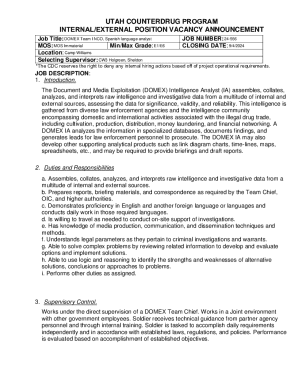
Ng Supervisor: CW3 Holgreen, Sheldon JOB NUMBER: 24-556 CLOSING DATE: 9/4/2024 *The CDC reserves the right to deny any internal hiring actions based off of project operational requirements. JOB DESCRIPTION: 1. Introduction. The Document and Media Exploitation (DOMEX) Intelligence Analyst (IA) assembles, collates, analyzes, and interprets raw intelligence and investigative data from a multitude of internal and external sources, assessing the data for significance, validity, and reliability. T.

How it works

  1. Open form

    Open form follow the instructions

  2. Easily sign form

    Easily sign the form with your finger

  3. Share form

    Send filled & signed form or save

How to fill out and sign DOD Internal/External Position Vacancy Announcement online?

Get your online template and fill it in using progressive features. Enjoy smart fillable fields and interactivity.Follow the simple instructions below:

The preparing of lawful papers can be costly and time-consuming. However, with our preconfigured web templates, everything gets simpler. Now, using a DOD Internal/External Position Vacancy Announcement takes no more than 5 minutes. Our state browser-based samples and crystal-clear recommendations remove human-prone mistakes.

Adhere to our simple steps to have your DOD Internal/External Position Vacancy Announcement well prepared quickly:

  1. Select the template in the library.
  2. Complete all required information in the necessary fillable fields. The user-friendly drag&drop user interface makes it easy to include or move areas.
  3. Ensure everything is filled in properly, without any typos or missing blocks.
  4. Place your electronic signature to the PDF page.
  5. Click Done to confirm the adjustments.
  6. Save the data file or print out your copy.
  7. Send immediately to the recipient.

Make use of the quick search and powerful cloud editor to produce a precise DOD Internal/External Position Vacancy Announcement. Get rid of the routine and produce papers online!

Tips on how to fill out, edit and sign DOD Internal/External Position Vacancy Announcement online

How to fill out and sign DOD Internal/External Position Vacancy Announcement online?

Get your online template and fill it in using progressive features. Enjoy smart fillable fields and interactivity.Follow the simple instructions below:

The preparing of lawful papers can be costly and time-consuming. However, with our preconfigured web templates, everything gets simpler. Now, using a DOD Internal/External Position Vacancy Announcement takes no more than 5 minutes. Our state browser-based samples and crystal-clear recommendations remove human-prone mistakes.

Adhere to our simple steps to have your DOD Internal/External Position Vacancy Announcement well prepared quickly:

  1. Select the template in the library.
  2. Complete all required information in the necessary fillable fields. The user-friendly drag&drop user interface makes it easy to include or move areas.
  3. Ensure everything is filled in properly, without any typos or missing blocks.
  4. Place your electronic signature to the PDF page.
  5. Click Done to confirm the adjustments.
  6. Save the data file or print out your copy.
  7. Send immediately to the recipient.

Make use of the quick search and powerful cloud editor to produce a precise DOD Internal/External Position Vacancy Announcement. Get rid of the routine and produce papers online!

How to edit DOD Internal/External Position Vacancy Announcement: customize forms online

Your quickly editable and customizable DOD Internal/External Position Vacancy Announcement template is within reach. Make the most of our library with a built-in online editor.

Do you put off completing DOD Internal/External Position Vacancy Announcement because you simply don't know where to start and how to move forward? We understand how you feel and have a great solution for you that has nothing nothing to do with overcoming your procrastination!

Our online catalog of ready-to-use templates allows you to search through and pick from thousands of fillable forms adapted for a variety of use cases and scenarios. But getting the document is just scratching the surface. We offer you all the necessary features to fill out, sign, and modify the form of your choosing without leaving our website.

All you need to do is to open the form in the editor. Check the verbiage of DOD Internal/External Position Vacancy Announcement and verify whether it's what you’re searching for. Start off modifying the form by taking advantage of the annotation features to give your form a more organized and neater look.

  • Add checkmarks, circles, arrows and lines.
  • Highlight, blackout, and fix the existing text.
  • If the form is meant for other people too, you can add fillable fields and share them for others to fill out.
  • As soon as you’re through modifying the template, you can get the document in any available format or choose any sharing or delivery options.

Summing up, along with DOD Internal/External Position Vacancy Announcement, you'll get:

  • A powerful suite of editing} and annotation features.
  • A built-in legally-binding eSignature solution.
  • The option to generate documents from scratch or based on the pre-uploaded template.
  • Compatibility with various platforms and devices for increased convenience.
  • Numerous possibilities for protecting your documents.
  • An array of delivery options for easier sharing and sending out documents.
  • Compliance with eSignature frameworks regulating the use of eSignature in online operations.

With our full-featured solution, your completed documents are always legally binding and entirely encrypted. We guarantee to protect your most delicate information.

Get what is needed to produce a professional-seeking DOD Internal/External Position Vacancy Announcement. Make the best choice and attempt our program now!

Get form

Experience a faster way to fill out and sign forms on the web. Access the most extensive library of templates available.
Get form

Related content

UTAH COUNTERDRUG PROGRAM INTERNAL/EXTERNAL ...
Aug 26, 2024 — FTNGD-CD INTERNAL/EXTERNAL POSITION VACANCY ANNOUNCEMENT. CONT. JOB...
Learn more
USAJOBS Help Center - How to...
USAJOBS posts all federal job opportunities with a position description and instructions...
Learn more
DoD-2023-OS-0063] RIN 0790-AL
Dec 22, 2023 — The interim rule became effective on 30 November 2020, establishing a...
Learn more

Related links form

SG Nanyang Technological University India Connect Research Internship Programme Application 2017 Canada CRA T3012A 2024 HK ICICI Bank Relationship Form 2021 Canada Purolator Shippers Declaration For Dangerous Goods 2018

Questions & Answers

Get answers to your most pressing questions about US Legal Forms API.

Contact support

Expressing interest in an internal job posting involves reaching out to your supervisor or the HR department to communicate your intent. You may also need to submit a formal application as outlined in the job announcement. By showing your enthusiasm and alignment with the DOD Internal/External Position Vacancy Announcement process, you increase your chances of being considered for the opportunity.

To apply for an internal posting, carefully follow the application instructions provided in the job announcement. Typically, this involves submitting an updated resume and any other required documentation. Emphasizing your existing knowledge of the organization can make your application stand out in the context of the DOD Internal/External Position Vacancy Announcement.

Announcing an internal job posting effectively requires a thoughtful approach. Start by using internal channels like emails or team meetings to ensure all employees are informed. Highlight the benefits of the position and encourage employees to explore the opportunity, keeping in mind the DOD Internal/External Position Vacancy Announcement guidelines for clarity and reach.

To post a job internally, start by drafting a clear description of the role, qualifications, and application instructions. Next, share this posting via your company's internal communication channels, such as email or an intranet. By aligning with the DOD Internal/External Position Vacancy Announcement, you can increase visibility and encourage employee applications.

A clear and concise subject line for an internal job posting might read, 'Internal Job Opportunity: Job Title'. This format ensures employees recognize the email's purpose immediately. Keeping the focus on the DOD Internal/External Position Vacancy Announcement can also help maintain consistency in content and process.

Yes, many employers must post job openings externally, especially in federal agencies. This requirement enhances transparency and encourages a diverse applicant pool. Adhering to the DOD Internal/External Position Vacancy Announcement guidelines gives employers an opportunity to find suitable candidates beyond their existing workforce.

To create a vacancy post template, start with a header that includes the position title and an engaging introduction. Follow this with sections for job responsibilities, qualifications, and application instructions, ensuring that the DOD Internal/External Position Vacancy Announcement is prominently featured. Keep your template adaptable for different roles while maintaining clarity and consistency.

To announce an internal job posting, communicate directly with your existing staff through internal newsletters or bulletin boards, emphasizing the details in the DOD Internal/External Position Vacancy Announcement. It is also helpful to hold a meeting or information session for employees, explaining the benefits of the position and addressing any questions. Ensuring that current employees are informed fosters a transparent work environment.

A vacancy announcement typically includes the job title, a brief description of duties, required qualifications, and the application deadline. Additionally, you should specify the details of the DOD Internal/External Position Vacancy Announcement process, including how candidates can apply and any pertinent contact information. This clarity helps applicants understand the steps they need to take.

To post a job vacancy, first create a compelling DOD Internal/External Position Vacancy Announcement that highlights the role's essential aspects. Utilize online job boards, your company's website, and social media channels to reach a broader audience. Always ensure your post is visible to both internal and external candidates to attract diverse talent.

Get This Form Now!

Use professional pre-built templates to fill in and sign documents online faster. Get access to thousands of forms.
Get form
If you believe that this page should be taken down, please follow our DMCA take down processhere.

Industry-leading security and compliance

US Legal Forms protects your data by complying with industry-specific security standards.
  • In businnes since 1997
    25+ years providing professional legal documents.
  • Accredited business
    Guarantees that a business meets BBB accreditation standards in the US and Canada.
  • Secured by Braintree
    Validated Level 1 PCI DSS compliant payment gateway that accepts most major credit and debit card brands from across the globe.
Get DOD Internal/External Position Vacancy Announcement
Get form
  • Adoption
  • Bankruptcy
  • Contractors
  • Divorce
  • Home Sales
  • Employment
  • Identity Theft
  • Incorporation
  • Landlord Tenant
  • Living Trust
  • Name Change
  • Personal Planning
  • Small Business
  • Wills & Estates
  • Packages A-Z
  • Affidavits
  • Bankruptcy
  • Bill of Sale
  • Corporate - LLC
  • Divorce
  • Employment
  • Identity Theft
  • Internet Technology
  • Landlord Tenant
  • Living Wills
  • Name Change
  • Power of Attorney
  • Real Estate
  • Small Estates
  • Wills
  • All Forms
  • Forms A-Z
  • Form Library
  • Legal Hub
  • About Us
  • Help Portal
  • Legal Resources
  • Blog
  • Affiliates
  • Contact Us
  • Delete My Account
  • Site Map
  • Industries
  • Forms in Spanish
  • Localized Forms
  • State-specific Forms
  • Forms Kit
  • Real Estate Handbook
  • All Guides
  • Notarize
  • Incorporation services
  • For Consumers
  • For Small Business
  • For Attorneys
  • USLegal
  • FormsPass
  • pdfFiller
  • signNow
  • altaFlow
  • DocHub
  • Instapage
Form Packages
  • Adoption
  • Bankruptcy
  • Contractors
  • Divorce
  • Home Sales
  • Employment
  • Identity Theft
  • Incorporation
  • Landlord Tenant
  • Living Trust
  • Name Change
  • Personal Planning
  • Small Business
  • Wills & Estates
  • Packages A-Z
Form Categories
  • Affidavits
  • Bankruptcy
  • Bill of Sale
  • Corporate - LLC
  • Divorce
  • Employment
  • Identity Theft
  • Internet Technology
  • Landlord Tenant
  • Living Wills
  • Name Change
  • Power of Attorney
  • Real Estate
  • Small Estates
  • Wills
  • All Forms
  • Forms A-Z
  • Form Library
Customer Service
  • Legal Hub
  • About Us
  • Help Portal
  • Legal Resources
  • Blog
  • Affiliates
  • Contact Us
  • Delete My Account
  • Site Map
  • Industries
  • Forms in Spanish
  • Localized Forms
  • State-specific Forms
  • Forms Kit
Legal Guides
  • Real Estate Handbook
  • All Guides
Prepared for you
  • Notarize
  • Incorporation services
Our Customers
  • For Consumers
  • For Small Business
  • For Attorneys
Our Sites
  • USLegal
  • FormsPass
  • pdfFiller
  • signNow
  • altaFlow
  • DocHub
  • Instapage
Social Media
Call us now toll free:
+1 833 426 79 33
As seen in:
© Copyright 1999-2026 airSlate Legal Forms, Inc. 3720 Flowood Dr, Flowood, Mississippi 39232
  • Your Privacy Choices
  • Terms of Service
  • Privacy Notice
  • Content Takedown Policy
  • Bug Bounty Program