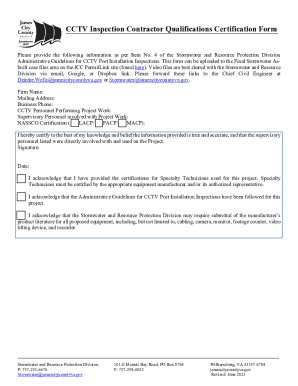
Get Va Cctv Inspection Contractor Qualifications Certification Form - James City County 2023-2026
How it works
-

Open form follow the instructions
-

Easily sign the form with your finger
-

Send filled & signed form or save
How to fill out and sign VA CCTV Inspection Contractor Qualifications Certification Form - James City County online?
Get your online template and fill it in using progressive features. Enjoy smart fillable fields and interactivity.Follow the simple instructions below:Experience all the key benefits of submitting and completing forms on the internet. Using our service filling out VA CCTV Inspection Contractor Qualifications Certification Form - James City County only takes a few minutes. We make that possible by offering you access to our feature-rich editor capable of transforming/correcting a document?s original textual content, adding unique boxes, and e-signing.
Execute VA CCTV Inspection Contractor Qualifications Certification Form - James City County in just a few moments by using the instructions below:
- Select the template you need in the library of legal form samples.
- Click the Get form key to open the document and start editing.
- Fill out all the required fields (they will be marked in yellow).
- The Signature Wizard will allow you to insert your e-autograph right after you?ve finished imputing details.
- Put the relevant date.
- Look through the whole form to be certain you have completed all the information and no corrections are required.
- Press Done and download the filled out document to your gadget.
Send your VA CCTV Inspection Contractor Qualifications Certification Form - James City County in an electronic form when you finish filling it out. Your information is well-protected, because we keep to the newest security criteria. Become one of millions of happy users who are already completing legal documents straight from their homes.
Tips on how to fill out, edit and sign VA CCTV Inspection Contractor Qualifications Certification Form - James City County online
How to fill out and sign VA CCTV Inspection Contractor Qualifications Certification Form - James City County online?
Get your online template and fill it in using progressive features. Enjoy smart fillable fields and interactivity.Follow the simple instructions below:
Experience all the key benefits of submitting and completing forms on the internet. Using our service filling out VA CCTV Inspection Contractor Qualifications Certification Form - James City County only takes a few minutes. We make that possible by offering you access to our feature-rich editor capable of transforming/correcting a document?s original textual content, adding unique boxes, and e-signing.
Execute VA CCTV Inspection Contractor Qualifications Certification Form - James City County in just a few moments by using the instructions below:
- Select the template you need in the library of legal form samples.
- Click the Get form key to open the document and start editing.
- Fill out all the required fields (they will be marked in yellow).
- The Signature Wizard will allow you to insert your e-autograph right after you?ve finished imputing details.
- Put the relevant date.
- Look through the whole form to be certain you have completed all the information and no corrections are required.
- Press Done and download the filled out document to your gadget.
Send your VA CCTV Inspection Contractor Qualifications Certification Form - James City County in an electronic form when you finish filling it out. Your information is well-protected, because we keep to the newest security criteria. Become one of millions of happy users who are already completing legal documents straight from their homes.
How to edit VA CCTV Inspection Contractor Qualifications Certification Form - James City County: customize forms online
Put the right document management capabilities at your fingertips. Execute VA CCTV Inspection Contractor Qualifications Certification Form - James City County with our trusted solution that combines editing and eSignature functionality}.
If you want to complete and sign VA CCTV Inspection Contractor Qualifications Certification Form - James City County online without hassle, then our online cloud-based solution is the ideal solution. We offer a wealthy template-based library of ready-to-use forms you can edit and fill out online. Moreover, you don't need to print out the document or use third-party options to make it fillable. All the necessary features will be available at your disposal once you open the document in the editor.
Let’s go through our online editing capabilities and their main features. The editor features a self-explanatory interface, so it won't take much time to learn how to utilize it. We’ll take a look at three main parts that let you:
- Edit and annotate the template
- Organize your documents
- Prepare them for sharing
The top toolbar has the features that help you highlight and blackout text, without pictures and graphic aspects (lines, arrows and checkmarks etc.), add your signature to, initialize, date the form, and more.
Use the toolbar on the left if you would like to re-order the form or/and remove pages.
If you want to make the document fillable for other people and share it, you can use the tools on the right and add different fillable fields, signature and date, text box, etc.).
Aside from the capabilities mentioned above, you can protect your document with a password, add a watermark, convert the file to the needed format, and much more.
Our editor makes modifying and certifying the VA CCTV Inspection Contractor Qualifications Certification Form - James City County very simple. It enables you to make basically everything concerning working with documents. In addition, we always ensure that your experience editing documents is secure and compliant with the main regulatory criteria. All these factors make using our tool even more pleasant.
Get VA CCTV Inspection Contractor Qualifications Certification Form - James City County, apply the necessary edits and tweaks, and get it in the desired file format. Give it a try today!