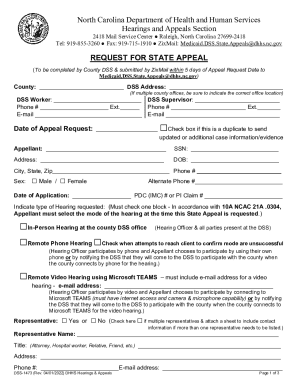
S dhhs.nc.gov REQUEST FOR STATE APPEAL (To be completed by County DSS & submitted by ZixMail within 5 days of Appeal Request Date to Medicaid.DSS.State.Appeals dhhs.nc.gov) County: DSS Address: (If multiple county offices, be sure to indicate the correct office location) DSS Worker: DSS Supervisor: Phone # Ext. Phone # Ext.
Open form follow the instructions
Easily sign the form with your finger
Send filled & signed form or save
How to fill out and sign NC DSS-1473 online?
Get your online template and fill it in using progressive features. Enjoy smart fillable fields and interactivity.Follow the simple instructions below:
Are you looking for a quick and efficient tool to fill out NC DSS-1473 at a reasonable price? Our service will provide you with an extensive library of templates that are available for submitting on the internet. It only takes a couple of minutes.
Stick to these simple steps to get NC DSS-1473 prepared for submitting:
- Choose the sample you require in our library of templates.
- Open the template in the online editing tool.
- Read the instructions to learn which data you have to include.
- Choose the fillable fields and put the requested info.
- Add the relevant date and insert your electronic signature once you fill in all other fields.
- Check the document for misprints as well as other errors. If you need to correct some information, the online editing tool and its wide range of instruments are available for you.
- Save the new template to your computer by hitting Done.
- Send the electronic document to the parties involved.
Submitting NC DSS-1473 does not really have to be complicated any longer. From now on simply get through it from home or at your business office right from your smartphone or desktop.
Tips on how to fill out, edit and sign NC DSS-1473 online
How to fill and sign NC DSS-1473
Get your online template and fill it in using progressive features. Enjoy smart fillable fields and interactivity.Follow the simple instructions below:
Are you looking for a quick and efficient tool to fill out NC DSS-1473 at a reasonable price? Our service will provide you with an extensive library of templates that are available for submitting on the internet. It only takes a couple of minutes.
Stick to these simple steps to get NC DSS-1473 prepared for submitting:
- Choose the sample you require in our library of templates.
- Open the template in the online editing tool.
- Read the instructions to learn which data you have to include.
- Choose the fillable fields and put the requested info.
- Add the relevant date and insert your electronic signature once you fill in all other fields.
- Check the document for misprints as well as other errors. If you need to correct some information, the online editing tool and its wide range of instruments are available for you.
- Save the new template to your computer by hitting Done.
- Send the electronic document to the parties involved.
Submitting NC DSS-1473 does not really have to be complicated any longer. From now on simply get through it from home or at your business office right from your smartphone or desktop.
How to edit NC DSS-1473
Finishing papers is easy with smart online tools. Eliminate paperwork with easily downloadable NC DSS-1473 templates you can edit online and print.
Preparing papers and documents must be more accessible, whether it is a day-to-day component of one’s profession or occasional work. When a person must file a NC DSS-1473, studying regulations and instructions on how to complete a form properly and what it should include may take a lot of time and effort. Nonetheless, if you find the proper NC DSS-1473 template, finishing a document will stop being a challenge with a smart editor at hand.
Discover a wider range of functions you can add to your document flow routine. No need to print, complete, and annotate forms manually. With a smart modifying platform, all the essential document processing functions are always at hand. If you want to make your work process with NC DSS-1473 forms more efficient, find the template in the catalog, select it, and see a simpler way to fill it in.
- If you need to add text in a random part of the form or insert a text field, use the Text and Text field tools and expand the text in the form as much as you want.
- Take advantage of the Highlight instrument to stress the important parts of the form. If you need to hide or remove some text pieces, utilize the Blackout or Erase tools.
- Customize the form by adding default graphic components to it. Use the Circle, Check, and Cross tools to add these components to the forms, if needed.
- If you need additional annotations, use the Sticky note tool and place as many notes on the forms page as required.
- If the form needs your initials or date, the editor has tools for that too. Reduce the risk of errors by using the Initials and Date tools.
- It is also possible to add custom visual components to the form. Use the Arrow, Line, and Draw tools to customize the document.
The more tools you are familiar with, the better it is to work with NC DSS-1473. Try the solution that offers everything necessary to find and edit forms in a single tab of your browser and forget about manual paperwork.
How to fill and sign NC DSS-1473
Get your online template and fill it in using progressive features. Enjoy smart fillable fields and interactivity.Follow the simple instructions below:
Are you looking for a quick and efficient tool to fill out NC DSS-1473 at a reasonable price? Our service will provide you with an extensive library of templates that are available for submitting on the internet. It only takes a couple of minutes.
Stick to these simple steps to get NC DSS-1473 prepared for submitting:
- Choose the sample you require in our library of templates.
- Open the template in the online editing tool.
- Read the instructions to learn which data you have to include.
- Choose the fillable fields and put the requested info.
- Add the relevant date and insert your electronic signature once you fill in all other fields.
- Check the document for misprints as well as other errors. If you need to correct some information, the online editing tool and its wide range of instruments are available for you.
- Save the new template to your computer by hitting Done.
- Send the electronic document to the parties involved.
Submitting NC DSS-1473 does not really have to be complicated any longer. From now on simply get through it from home or at your business office right from your smartphone or desktop.
Experience a faster way to fill out and sign forms on the web. Access the most extensive library of templates available.
Related content
NC Department of Health and Human Services 2001 Mail Service Center Raleigh, NC...
(vii) a copy of the DSS-1473B Addendum & Medical Evidence if the appeal is an Expedited...
When the timer reaches zero, the the switch in the timer reverts to the NC position. This...
Get answers to your most pressing questions about US Legal Forms API.
What is the timely filing limit for Medicaid in NC?
In North Carolina, the timely filing limit for Medicaid is generally one year from the date of service. It is essential to use accurate forms like the NC DSS-1473 to facilitate successful claims. Staying within this limit helps you prevent denied claims and ensures you receive prompt payment. Reviewing this limit regularly can keep your operations running smoothly and efficiently.
What is the timely filing limit for Medicaid?
The timely filing limit for Medicaid is critical to understand for proper billing practices. Typically, you must submit your claims within one year from the date services were provided. For North Carolina, using the NC DSS-1473 form can help streamline this process. Compliance with these limits guarantees that you secure necessary reimbursements without unnecessary complications.
What is the timely filing for NC Medicaid?
The timely filing for NC Medicaid requires submissions of claims to be made within a specified time frame. Generally, claims must be submitted within 12 months of the date of service. It is important to ensure your documentation, like the NC DSS-1473, is complete to avoid delays in processing. This timely filing helps maintain your eligibility and ensures you receive the benefits you deserve.
How to contact DSS in NC?
To contact the Department of Social Services in North Carolina, you can find the appropriate phone number or email address on their official website. Visiting your local DSS office is another option if you prefer in-person assistance. For questions specifically regarding the NC DSS-1473 form, their staff can guide you through the process to ensure you receive the support you need.
What documents do I need to apply for NC Medicaid?
When applying for NC Medicaid, you'll need to provide several key documents. Commonly required items include proof of identity, income verification, and residency information. Having these documents ready will give you a smoother experience with the NC DSS-1473 form and ensure that your application is processed efficiently.
What is NC Medicaid called now?
NC Medicaid is often referred to as NC Medicaid Managed Care, which signifies its shift towards managed care systems. This change aims to enhance care coordination and improve health outcomes for recipients. Familiarizing yourself with the NC DSS-1473 specifics will help you understand how these changes might affect your benefits.
What is the monthly income limit for Medicaid in North Carolina?
The monthly income limit for Medicaid in North Carolina can vary based on family size and category. Generally, for an individual, the limit is approximately 133% of the Federal Poverty Level. To determine your eligibility, consider reviewing the NC DSS-1473 guidelines to keep updated with any changes in limit thresholds.
What are the steps to apply for Medicaid?
Applying for Medicaid involves several steps. First, gather your personal information and necessary documents, such as income verification. Then, you can fill out the NC DSS-1473 form online or make a visit to your local DSS office to complete the application in person. Finally, submit your application and wait for approval.
How do I contact NC Medicaid?
You can contact NC Medicaid directly by calling their customer service number or visiting their official website for more details. If you need help with the NC DSS-1473 form, customer service representatives are available to answer questions and guide you through the application process. It's important to keep this information handy for any inquiries.
How do I apply for Medicaid in NC DSS?
To apply for Medicaid in NC DSS, you can visit your local Department of Social Services (DSS) office or apply online through the NC Medicaid website. Additionally, you can complete a paper application and submit it by mail. Using the NC DSS-1473 form simplifies the process and helps ensure you provide all necessary information.
Use professional pre-built templates to fill in and sign documents online faster. Get access to thousands of forms.
If you believe that this page should be taken down, please follow our DMCA take down process here.