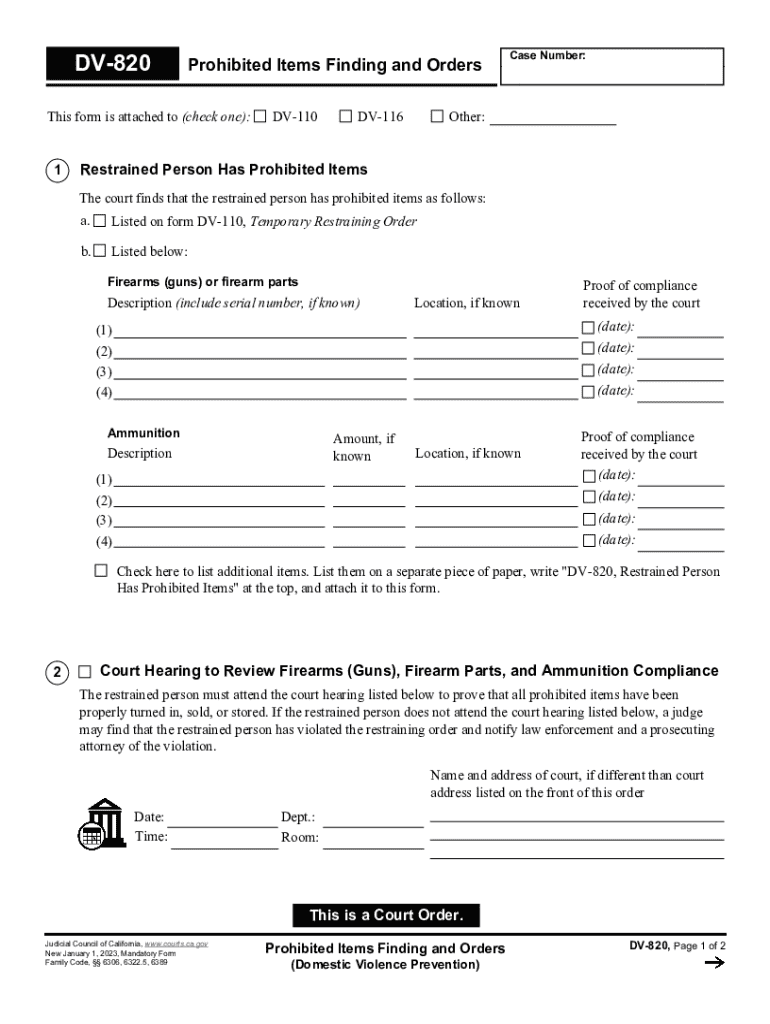
Restrained person has prohibited items as follows: a. Listed on form DV-110, Temporary Restraining Order b. Listed below: Firearms (guns) or firearm parts Description (include serial number, if known) Location, if known Proof of compliance received by the court (1) (date): (2) (3) (4) (date): (date): (date): Ammunition Amount, if known Description Location, if known (1) Proof of compliance received by the court (date): (2) (3) (date): (4) (date): (date): Check here to list.
Loading

Open form follow the instructions

Easily sign the form with your finger

Send filled & signed form or save
How to fill out and sign CA DV-820 online?
Get your online template and fill it in using progressive features. Enjoy smart fillable fields and interactivity.Follow the simple instructions below:
Choosing a legal professional, creating a scheduled visit and coming to the business office for a private meeting makes completing a CA DV-820 from beginning to end stressful. US Legal Forms helps you to rapidly generate legally-compliant papers based on pre-built web-based templates.
Prepare your docs within a few minutes using our simple step-by-step instructions:
- Get the CA DV-820 you want.
- Open it with online editor and begin altering.
- Fill in the empty fields; concerned parties names, addresses and numbers etc.
- Customize the template with exclusive fillable areas.
- Include the particular date and place your e-signature.
- Click on Done following twice-checking all the data.
- Download the ready-produced document to your system or print it as a hard copy.
Easily produce a CA DV-820 without having to involve specialists. There are already more than 3 million users making the most of our unique library of legal documents. Join us today and get access to the #1 catalogue of online templates. Test it yourself!
Tips on how to fill out, edit and sign CA DV-820 online
How to fill and sign CA DV-820
Get your online template and fill it in using progressive features. Enjoy smart fillable fields and interactivity.Follow the simple instructions below:
Choosing a legal professional, creating a scheduled visit and coming to the business office for a private meeting makes completing a CA DV-820 from beginning to end stressful. US Legal Forms helps you to rapidly generate legally-compliant papers based on pre-built web-based templates.
Prepare your docs within a few minutes using our simple step-by-step instructions:
- Get the CA DV-820 you want.
- Open it with online editor and begin altering.
- Fill in the empty fields; concerned parties names, addresses and numbers etc.
- Customize the template with exclusive fillable areas.
- Include the particular date and place your e-signature.
- Click on Done following twice-checking all the data.
- Download the ready-produced document to your system or print it as a hard copy.
Easily produce a CA DV-820 without having to involve specialists. There are already more than 3 million users making the most of our unique library of legal documents. Join us today and get access to the #1 catalogue of online templates. Test it yourself!
How to edit CA DV-820
Enjoy the user friendliness of the multi-featured online editor while filling out your CA DV-820. Make use of the variety of tools to rapidly complete the blanks and provide the required information right away.
Preparing paperwork is time-taking and pricey unless you have ready-made fillable templates and complete them electronically. The best way to deal with the CA DV-820 is to use our professional and multi-functional online editing tools. We provide you with all the important tools for fast document fill-out and allow you to make any adjustments to your templates, adapting them to any demands. Besides that, you can make comments on the updates and leave notes for other people involved.
Here’s what you can do with your CA DV-820 in our editor:
- Complete the blanks utilizing Text, Cross, Check, Initials, Date, and Sign tools.
- Highlight significant information with a favorite color or underline them.
- Hide sensitive details with the Blackout option or simply erase them.
- Add images to visualize your CA DV-820.
- Substitute the original text with the one corresponding with your requirements.
- Add comments or sticky notes to communicate with others on the updates.
- Place additional fillable fields and assign them to exact people.
- Protect the template with watermarks, place dates, and bates numbers.
- Share the paperwork in various ways and save it on your device or the cloud in different formats after you finish modifying.
Working with CA DV-820 in our robust online editor is the quickest and most efficient way to manage, submit, and share your documentation the way you need it from anywhere. The tool works from the cloud so that you can utilize it from any place on any internet-connected device. All templates you create or complete are safely kept in the cloud, so you can always access them whenever needed and be confident of not losing them. Stop wasting time on manual document completion and eliminate papers; make it all on the web with minimum effort.
How to fill and sign CA DV-820
Get your online template and fill it in using progressive features. Enjoy smart fillable fields and interactivity.Follow the simple instructions below:
Choosing a legal professional, creating a scheduled visit and coming to the business office for a private meeting makes completing a CA DV-820 from beginning to end stressful. US Legal Forms helps you to rapidly generate legally-compliant papers based on pre-built web-based templates.
Prepare your docs within a few minutes using our simple step-by-step instructions:
- Get the CA DV-820 you want.
- Open it with online editor and begin altering.
- Fill in the empty fields; concerned parties names, addresses and numbers etc.
- Customize the template with exclusive fillable areas.
- Include the particular date and place your e-signature.
- Click on Done following twice-checking all the data.
- Download the ready-produced document to your system or print it as a hard copy.
Easily produce a CA DV-820 without having to involve specialists. There are already more than 3 million users making the most of our unique library of legal documents. Join us today and get access to the #1 catalogue of online templates. Test it yourself!
Experience a faster way to fill out and sign forms on the web. Access the most extensive library of templates available.
Related content
Court Hearing to Review Firearms (Guns), Firearm Parts, and Ammunition Compliance. The...
by G Cillié · 1932 · Cited by 100 — Ca in the Sun has been given by the writer (M.N...
Conecte o cabo DV primeiramente ao dispositivo e depois à filmadora. • Conecte o cabo...
Get answers to your most pressing questions about US Legal Forms API.
What is the best way to win a restraining order?
The best way to secure a restraining order is to present a compelling case with clear evidence. Gather documentation, witness statements, and any communication that supports your claims. Being thorough and honest during the proceedings can also significantly impact the outcome. Using resources like the CA DV-820 can ensure you have the correct forms ready, enhancing your chances of success.
What is the process to file a restraining order in California?
Filing a restraining order in California involves several key steps. First, you fill out the necessary forms, including the CA DV-820 for domestic violence cases. After completing the paperwork, you will file it with the court and attend a hearing where a judge reviews your case. Having guidance through this process is crucial, and legal forms platforms can simplify filling out requirements.
How hard is it to drop a protection order?
Dropping a protection order can vary in difficulty, depending on the court's requirements. Generally, you need to file a motion with the court and may need to provide a valid reason for the request. It’s advisable to consult with a legal professional to navigate this process smoothly. They can ensure that all legal aspects are properly addressed, particularly if your case involves the CA DV-820.
What is required to get a restraining order in SC?
To obtain a restraining order in South Carolina, you must fill out specific forms and submit them to the court. You need to provide clear evidence of harassment or threats. Additionally, a hearing is usually scheduled where both parties can present their sides. Using comprehensive resources can guide you through this process effectively, including using tools like the CA DV-820 form to ensure you cover all necessary steps.
What is the burden of proof for a restraining order in CT?
In Connecticut, the burden of proof for obtaining a restraining order lies with the applicant. You must demonstrate that there is a clear and present danger to your safety or emotional well-being. This typically involves providing evidence of prior incidents or threats. Understanding these requirements can help you prepare a strong case when using forms like the CA DV-820.
What are the grounds for denying a RO?
A restraining order may be denied based on insufficient evidence or lack of a credible threat. If the court finds that the request does not meet the legal standards for the CA DV-820, it may not grant the order. It's important to present strong evidence and documentation to support your claims. Each case is unique, so consulting a legal expert can enhance your chances of a favorable decision.
What is the most common restraining order?
The most common type of restraining order is a domestic violence restraining order, often referred to as a DVRO. This legal document can protect individuals from abuse or threats by a partner or family member. In California, the CA DV-820 form is frequently used to request such an order, ensuring legal protections are put in place swiftly. It aims to keep you safe in challenging situations.
Use professional pre-built templates to fill in and sign documents online faster. Get access to thousands of forms.
If you believe that this page should be taken down, please follow our DMCA take down process here.