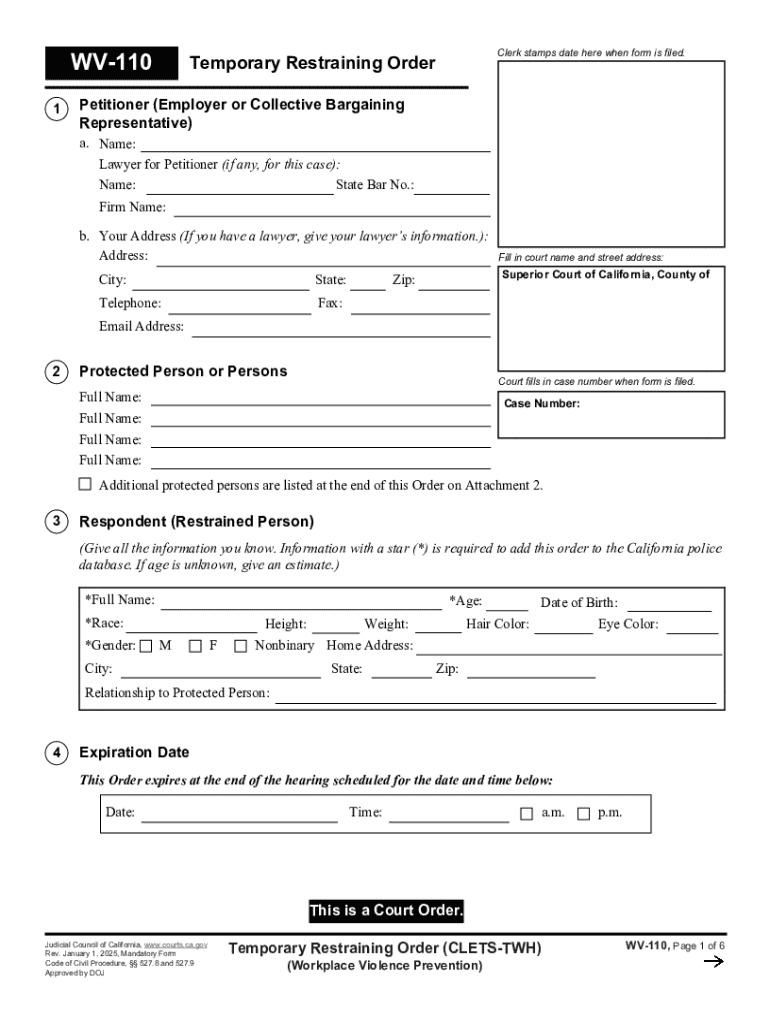
WV-110 1 Clerk stamps date here when form is filed. Temporary Restraining Order Petitioner (Employer or Collective Bargaining Representative) a. Name: Lawyer for Petitioner (if any, for this case):.
Loading

Open form follow the instructions

Easily sign the form with your finger

Send filled & signed form or save
How to fill out and sign WV-110 Temporary Restraining Order online?
Get your online template and fill it in using progressive features. Enjoy smart fillable fields and interactivity.Follow the simple instructions below:
Getting a authorized expert, making a scheduled visit and going to the business office for a personal meeting makes finishing a WV-110 Temporary Restraining Order from beginning to end tiring. US Legal Forms allows you to quickly generate legally valid documents according to pre-built browser-based blanks.
Prepare your docs in minutes using our easy step-by-step guide:
- Get the WV-110 Temporary Restraining Order you require.
- Open it using the online editor and start editing.
- Fill out the empty areas; concerned parties names, places of residence and phone numbers etc.
- Customize the blanks with exclusive fillable fields.
- Add the date and place your e-signature.
- Click on Done following twice-examining all the data.
- Download the ready-made record to your system or print it out as a hard copy.
Easily produce a WV-110 Temporary Restraining Order without having to involve professionals. There are already more than 3 million people making the most of our unique library of legal forms. Join us today and get access to the top library of browser-based samples. Try it yourself!
Tips on how to fill out, edit and sign WV-110 Temporary Restraining Order online
How to fill and sign WV-110 Temporary Restraining Order
Get your online template and fill it in using progressive features. Enjoy smart fillable fields and interactivity.Follow the simple instructions below:
Getting a authorized expert, making a scheduled visit and going to the business office for a personal meeting makes finishing a WV-110 Temporary Restraining Order from beginning to end tiring. US Legal Forms allows you to quickly generate legally valid documents according to pre-built browser-based blanks.
Prepare your docs in minutes using our easy step-by-step guide:
- Get the WV-110 Temporary Restraining Order you require.
- Open it using the online editor and start editing.
- Fill out the empty areas; concerned parties names, places of residence and phone numbers etc.
- Customize the blanks with exclusive fillable fields.
- Add the date and place your e-signature.
- Click on Done following twice-examining all the data.
- Download the ready-made record to your system or print it out as a hard copy.
Easily produce a WV-110 Temporary Restraining Order without having to involve professionals. There are already more than 3 million people making the most of our unique library of legal forms. Join us today and get access to the top library of browser-based samples. Try it yourself!
How to edit WV-110 Temporary Restraining Order
Fill out and sign your WV-110 Temporary Restraining Order quickly and error-free. Find and edit, and sign customizable form templates in a comfort of a single tab.
Your document workflow can be considerably more efficient if everything required for modifying and handling the flow is organized in one place. If you are searching for a WV-110 Temporary Restraining Order form sample, this is a place to get it and fill it out without looking for third-party solutions. With this intelligent search engine and editing tool, you won’t need to look any further.
Simply type the name of the WV-110 Temporary Restraining Order or any other form and find the right template. If the sample seems relevant, you can start modifying it right on the spot by clicking Get form. No need to print or even download it. Hover and click on the interactive fillable fields to insert your details and sign the form in a single editor.
Use more modifying tools to customize your template:
- Check interactive checkboxes in forms by clicking on them. Check other areas of the WV-110 Temporary Restraining Order form text by using the Cross, Check, and Circle tools
- If you need to insert more text into the document, use the Text tool or add fillable fields with the respective button. You may also specify the content of each fillable field.
- Add images to forms with the Image button. Upload images from your device or capture them with your computer camera.
- Add custom graphic elements to the document. Use Draw, Line, and Arrow tools to draw on the form.
- Draw over the text in the document if you want to conceal it or stress it. Cover text fragments with theErase and Highlight, or Blackout instrument.
- Add custom elements such as Initials or Date with the respective tools. They will be generated automatically.
- Save the form on your computer or convert its format to the one you want.
When equipped with a smart forms catalog and a powerful document modifying solution, working with documentation is easier. Find the form you need, fill it out immediately, and sign it on the spot without downloading it. Get your paperwork routine simplified with a solution tailored for modifying forms.
How to fill and sign WV-110 Temporary Restraining Order
Get your online template and fill it in using progressive features. Enjoy smart fillable fields and interactivity.Follow the simple instructions below:
Getting a authorized expert, making a scheduled visit and going to the business office for a personal meeting makes finishing a WV-110 Temporary Restraining Order from beginning to end tiring. US Legal Forms allows you to quickly generate legally valid documents according to pre-built browser-based blanks.
Prepare your docs in minutes using our easy step-by-step guide:
- Get the WV-110 Temporary Restraining Order you require.
- Open it using the online editor and start editing.
- Fill out the empty areas; concerned parties names, places of residence and phone numbers etc.
- Customize the blanks with exclusive fillable fields.
- Add the date and place your e-signature.
- Click on Done following twice-examining all the data.
- Download the ready-made record to your system or print it out as a hard copy.
Easily produce a WV-110 Temporary Restraining Order without having to involve professionals. There are already more than 3 million people making the most of our unique library of legal forms. Join us today and get access to the top library of browser-based samples. Try it yourself!
Experience a faster way to fill out and sign forms on the web. Access the most extensive library of templates available.
Related content
This Order must be entered into the California Restraining and Protective Order System...
Proof of service of form WV-110, Temporary Restraining Order, was presented to the court...
... restraining orders that were designed to keep protesters away from Massey Energy...
Get answers to your most pressing questions about US Legal Forms API.
How to properly write a restraining order?
To write a restraining order effectively, begin by outlining the specific incidents of distress and fear you have experienced. Include dates, locations, and descriptions of each event to support your case. You may consider using the resources available on the uslegalforms platform to access templates and guidance for completing the WV-110 Temporary Restraining Order, ensuring all necessary information is included.
What qualifies for a restraining order in Connecticut?
In Connecticut, you may qualify for a restraining order if you have experienced threats, harassment, or domestic violence. It's essential to demonstrate a pattern of abusive behavior or immediate danger to establish the need for protection. Filing for a WV-110 Temporary Restraining Order can help ensure your safety and provide legal recourse against the aggressor.
What to say in a restraining order hearing?
During a restraining order hearing, it’s crucial to present your case clearly and confidently. Start by stating your relationship with the respondent and detail the incidents that led you to seek a WV-110 Temporary Restraining Order. Be honest about your feelings of fear or vulnerability, as these emotions can help establish why the order is necessary.
What is an example of a restraining order statement?
A restraining order statement typically includes your account of the events leading to the need for protection, highlighting specific incidents of abuse or threats. For instance, you might state, 'On three occasions, I felt threatened by the respondent's aggressive behavior, which caused me to fear for my safety.' This clear example sets the foundation for requesting a WV-110 Temporary Restraining Order.
What is required for a restraining order in CA?
In California, obtaining a restraining order, such as the WV-110 Temporary Restraining Order, requires you to show evidence of harassment, abuse, or threats. You must fill out specific forms, provide details about the incidents, and declare your need for protection. Filing this request involves submitting your form to the court, where a judge will review your case before granting the order.
Use professional pre-built templates to fill in and sign documents online faster. Get access to thousands of forms.
If you believe that this page should be taken down, please follow our DMCA take down process here.