We use cookies to improve security, personalize the user experience, enhance our marketing activities (including cooperating with our marketing partners) and for other business use.
Click "here" to read our Cookie Policy. By clicking "Accept" you agree to the use of cookies. Read less
Read more
Accept
Loading
Form preview
  • US Legal Forms
  • Form Library
  • More Forms
  • More Multi-State Forms
  • Dod Nstc Form 1610 - Eval (e7-e9) Input Sheet 2021

Get Dod Nstc Form 1610 - Eval (e7-e9) Input Sheet 2021-2025

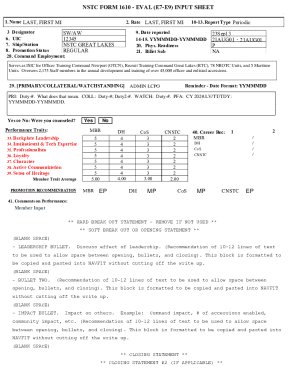
Status REGULAR 28. Command Employment: 9. Date reported 14-15. YYMMMDD-YYMMMDD 20. Phys. Readiness 21. Billet Sub 23Sep13 21AUG01 - 21AUG01 P NA Serves as ISIC for Officer Training Command Newport (OTCN), Recruit Training Command Great Lakes (RTC), 78 NROTC Units, and 5 Maritime Units. Oversees 2,175 Staff members in the annual development and training of over 45,000 officer and enlisted accessions. 29. PRIMARY/COLLATERAL/WATCHSTANDING Reminder - Date Format: YYMMMDD ADMIN LCPO PRI: Dut.

How it works

  1. Open form

    Open form follow the instructions

  2. Easily sign form

    Easily sign the form with your finger

  3. Share form

    Send filled & signed form or save

How to fill out and sign DOD NSTC Form 1610 - Eval (E7-E9) Input Sheet online?

Get your online template and fill it in using progressive features. Enjoy smart fillable fields and interactivity.Follow the simple instructions below:

Business, legal, tax and other e-documents require a high level of compliance with the law and protection. Our forms are regularly updated according to the latest amendments in legislation. Plus, with us, all of the data you provide in the DOD NSTC Form 1610 - Eval (E7-E9) Input Sheet is protected against loss or damage via industry-leading encryption.

The following tips will help you fill in DOD NSTC Form 1610 - Eval (E7-E9) Input Sheet quickly and easily:

  1. Open the form in the feature-rich online editing tool by clicking Get form.
  2. Complete the required fields which are colored in yellow.
  3. Press the green arrow with the inscription Next to jump from one field to another.
  4. Go to the e-autograph tool to e-sign the form.
  5. Put the relevant date.
  6. Check the entire document to ensure that you haven?t skipped anything important.
  7. Click Done and save your new template.

Our platform enables you to take the entire procedure of submitting legal papers online. Consequently, you save hours (if not days or even weeks) and get rid of additional payments. From now on, submit DOD NSTC Form 1610 - Eval (E7-E9) Input Sheet from home, office, and even on the move.

Tips on how to fill out, edit and sign DOD NSTC Form 1610 - Eval (E7-E9) Input Sheet online

How to fill out and sign DOD NSTC Form 1610 - Eval (E7-E9) Input Sheet online?

Get your online template and fill it in using progressive features. Enjoy smart fillable fields and interactivity.Follow the simple instructions below:

Business, legal, tax and other e-documents require a high level of compliance with the law and protection. Our forms are regularly updated according to the latest amendments in legislation. Plus, with us, all of the data you provide in the DOD NSTC Form 1610 - Eval (E7-E9) Input Sheet is protected against loss or damage via industry-leading encryption.

The following tips will help you fill in DOD NSTC Form 1610 - Eval (E7-E9) Input Sheet quickly and easily:

  1. Open the form in the feature-rich online editing tool by clicking Get form.
  2. Complete the required fields which are colored in yellow.
  3. Press the green arrow with the inscription Next to jump from one field to another.
  4. Go to the e-autograph tool to e-sign the form.
  5. Put the relevant date.
  6. Check the entire document to ensure that you haven?t skipped anything important.
  7. Click Done and save your new template.

Our platform enables you to take the entire procedure of submitting legal papers online. Consequently, you save hours (if not days or even weeks) and get rid of additional payments. From now on, submit DOD NSTC Form 1610 - Eval (E7-E9) Input Sheet from home, office, and even on the move.

How to edit DOD NSTC Form 1610 - Eval (E7-E9) Input Sheet: customize forms online

Fill out and sign your DOD NSTC Form 1610 - Eval (E7-E9) Input Sheet quickly and error-free. Get and edit, and sign customizable form samples in a comfort of a single tab.

Your document workflow can be much more efficient if everything you need for editing and handling the flow is organized in one place. If you are looking for a DOD NSTC Form 1610 - Eval (E7-E9) Input Sheet form sample, this is a place to get it and fill it out without looking for third-party solutions. With this intelligent search engine and editing tool, you won’t need to look any further.

Simply type the name of the DOD NSTC Form 1610 - Eval (E7-E9) Input Sheet or any other form and find the right sample. If the sample seems relevant, you can start editing it right on the spot by clicking Get form. No need to print or even download it. Hover and click on the interactive fillable fields to insert your information and sign the form in a single editor.

Use more editing tools to customize your template:

  • Check interactive checkboxes in forms by clicking on them. Check other areas of the DOD NSTC Form 1610 - Eval (E7-E9) Input Sheet form text by using the Cross, Check, and Circle tools
  • If you need to insert more textual content into the file, use the Text tool or add fillable fields with the respective button. You can also specify the content of each fillable field.
  • Add images to forms with the Image button. Upload images from your device or capture them with your computer camera.
  • Add custom visual elements to the document. Use Draw, Line, and Arrow tools to draw on the document.
  • Draw over the text in the document if you wish to conceal it or stress it. Cover text fragments with theErase and Highlight, or Blackout tool.
  • Add custom elements such as Initials or Date with the respective tools. They will be generated automatically.
  • Save the form on your computer or convert its format to the one you want.

When equipped with a smart forms catalog and a powerful document editing solution, working with documentation is easier. Find the form you require, fill it out right away, and sign it on the spot without downloading it. Get your paperwork routine simplified with a solution designed for editing forms.

Get form

Experience a faster way to fill out and sign forms on the web. Access the most extensive library of templates available.
Get form

Related content

DoD SSN Fraud Prevention Data Call - ALL RESPONSES
Evaluation & Counseling Record (E1-E6). NAVPERS 1616/27. E7-E9 - NAVPERS 1616/27. NAVPERS...
Learn more
Senior Enlisted Leader Smart Packet – Fourth...
May 3, 2019 — NAVY EVALUATIONS. BUPERSINST 1610.10D. The system utilizes a FITREP for...
Learn more
Simple Audio Projects to Build
Jul 3, 1983 — (send off for entry form now). Kits to build all sorts of projects...
Learn more

Related links form

CA DWC Form 9783 2007 ZA KwaZulu-Natal Law Society Complaint Affidavit 2012 IRS Letter 3572 2003 TX Fire Pump Check List - Montgomery County 2011

Questions & Answers

Get answers to your most pressing questions about US Legal Forms API.

Contact support

When writing an observed report and marking 'Not Observed' (NOB) in the promotion recommendation block, you can use a total of six evaluated traits. This ensures that you maintain a fair evaluation process while highlighting the traits you have observed. Familiarity with the DOD NSTC Form 1610 - Eval (E7-E9) Input Sheet aids in effectively documenting these evaluations.

NAVPERS 1616-26 is used for enlisted evaluations from E1 to E6 ranks. This form focuses on performance but does not cover E7 to E9 evaluations, making it vital to use the correct forms depending on one's rank. For E7 to E9, utilize the DOD NSTC Form 1610 - Eval (E7-E9) Input Sheet for relevant assessments.

Your RSCA, or Retention and Career Counseling Action, can typically be found on the Navy portal. Navigate to the career management section after logging in for access. Utilize the DOD NSTC Form 1610 - Eval (E7-E9) Input Sheet for insights and to align your evaluations with RSCA recommendations for better outcomes.

NAVPERS 1616-27 is an assessment form designated for performance evaluations specifically for the E7 to E9 ranks. This document plays a key role in tracking a sailor's career performance. Essentially, it works hand-in-hand with the DOD NSTC Form 1610 - Eval (E7-E9) Input Sheet to provide comprehensive evaluation options.

The NAVPERS 1070/613 form is used to track administrative remarks. This form is crucial for documenting all assessments made regarding a sailor's performance. To complement this, you can utilize the DOD NSTC Form 1610 - Eval (E7-E9) Input Sheet to provide structured evaluations for E7 to E9 personnel.

You can find your Fitrep in the Navy portal under the 'Performance Evaluation' section once you log in. Be sure to check regularly as Fitreps are essential for your career progression. If you are working with the DOD NSTC Form 1610 - Eval (E7-E9) Input Sheet, compare your Fitrep data to ensure accuracy in your evaluations.

In the Navy, evaluations include fitness reports, regular reports, and periodic evaluations. These assessments help determine performance and potential for advancement. The DOD NSTC Form 1610 - Eval (E7-E9) Input Sheet is specifically tailored for E7 to E9 evaluations, ensuring these input sheets accurately reflect your service accomplishments.

To locate your evals on your Navy portal, log in to the official Navy personnel page. Once logged in, navigate to the 'Performance Evaluation' section where you can review all your evaluations. If you need the DOD NSTC Form 1610 - Eval (E7-E9) Input Sheet, it’s also useful to have it handy for reference during your evaluations.

Proofreading a Navy eval requires careful attention to detail. Begin by reviewing the content for clarity, coherence, and alignment with the DOD NSTC Form 1610 - Eval (E7-E9) Input Sheet. Check for grammar, spelling, and formatting errors, ensuring all necessary information is included and accurately represented. Utilizing tools like US Legal Forms can provide additional resources to streamline the proofreading process and enhance the quality of evaluations.

To run a Navy continuity report, start by gathering the necessary information from personnel records. You will need to input data accurately into the system while ensuring it aligns with the guidelines of the DOD NSTC Form 1610 - Eval (E7-E9) Input Sheet. This process may involve reviewing performance evaluations and organizing the data for effective presentation. Ensuring precise data entry will facilitate a comprehensive continuity report that reflects the capabilities of your personnel.

Get This Form Now!

Use professional pre-built templates to fill in and sign documents online faster. Get access to thousands of forms.
Get form
If you believe that this page should be taken down, please follow our DMCA take down processhere.

Industry-leading security and compliance

US Legal Forms protects your data by complying with industry-specific security standards.
  • In businnes since 1997
    25+ years providing professional legal documents.
  • Accredited business
    Guarantees that a business meets BBB accreditation standards in the US and Canada.
  • Secured by Braintree
    Validated Level 1 PCI DSS compliant payment gateway that accepts most major credit and debit card brands from across the globe.
Get DOD NSTC Form 1610 - Eval (E7-E9) Input Sheet
Get form
Form Packages
Adoption
Bankruptcy
Contractors
Divorce
Home Sales
Employment
Identity Theft
Incorporation
Landlord Tenant
Living Trust
Name Change
Personal Planning
Small Business
Wills & Estates
Packages A-Z
Form Categories
Affidavits
Bankruptcy
Bill of Sale
Corporate - LLC
Divorce
Employment
Identity Theft
Internet Technology
Landlord Tenant
Living Wills
Name Change
Power of Attorney
Real Estate
Small Estates
Wills
All Forms
Forms A-Z
Form Library
Customer Service
Terms of Service
Privacy Notice
Legal Hub
Content Takedown Policy
Bug Bounty Program
About Us
Help Portal
Legal Resources
Blog
Affiliates
Contact Us
Delete My Account
Site Map
Industries
Forms in Spanish
Localized Forms
State-specific Forms
Forms Kit
Legal Guides
Real Estate Handbook
All Guides
Prepared for You
Notarize
Incorporation services
Our Customers
For Consumers
For Small Business
For Attorneys
Our Sites
US Legal Forms
USLegal
FormsPass
pdfFiller
signNow
airSlate WorkFlow
DocHub
Instapage
Social Media
Call us now toll free:
+1 833 426 79 33
As seen in:
  • USA Today logo picture
  • CBC News logo picture
  • LA Times logo picture
  • The Washington Post logo picture
  • AP logo picture
  • Forbes logo picture
© Copyright 1997-2025
airSlate Legal Forms, Inc.
3720 Flowood Dr, Flowood, Mississippi 39232
Form Packages
Adoption
Bankruptcy
Contractors
Divorce
Home Sales
Employment
Identity Theft
Incorporation
Landlord Tenant
Living Trust
Name Change
Personal Planning
Small Business
Wills & Estates
Packages A-Z
Form Categories
Affidavits
Bankruptcy
Bill of Sale
Corporate - LLC
Divorce
Employment
Identity Theft
Internet Technology
Landlord Tenant
Living Wills
Name Change
Power of Attorney
Real Estate
Small Estates
Wills
All Forms
Forms A-Z
Form Library
Customer Service
Terms of Service
Privacy Notice
Legal Hub
Content Takedown Policy
Bug Bounty Program
About Us
Help Portal
Legal Resources
Blog
Affiliates
Contact Us
Delete My Account
Site Map
Industries
Forms in Spanish
Localized Forms
State-specific Forms
Forms Kit
Legal Guides
Real Estate Handbook
All Guides
Prepared for You
Notarize
Incorporation services
Our Customers
For Consumers
For Small Business
For Attorneys
Our Sites
US Legal Forms
USLegal
FormsPass
pdfFiller
signNow
airSlate WorkFlow
DocHub
Instapage
Social Media
Call us now toll free:
+1 833 426 79 33
As seen in:
  • USA Today logo picture
  • CBC News logo picture
  • LA Times logo picture
  • The Washington Post logo picture
  • AP logo picture
  • Forbes logo picture
© Copyright 1997-2025
airSlate Legal Forms, Inc.
3720 Flowood Dr, Flowood, Mississippi 39232