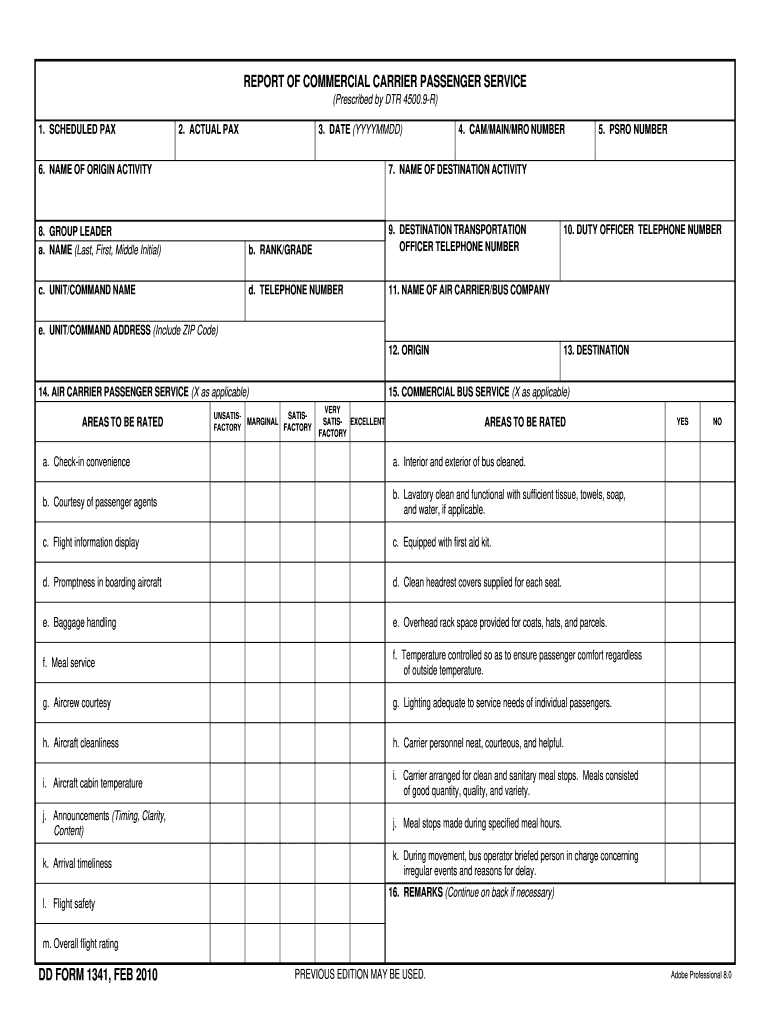
REPORT OF COMMERCIAL CARRIER PASSENGER SERVICE (Prescribed by DTR 4500.9-R) 1. SCHEDULED PAX 2. ACTUAL PAX 3. DATE (YYYYMMDD) 6. NAME OF ORIGIN ACTIVITY 4. CAM/MAIN/MRO NUMBER 5. PSRO NUMBER 7. NAME.
Loading

Open form follow the instructions

Easily sign the form with your finger

Send filled & signed form or save
How to fill out the DD 1341 online
The DD 1341 is a crucial form used to report the service provided by commercial carriers for passenger transport. This guide will assist users in accurately completing the form online, ensuring all necessary information is provided.
Follow the steps to effectively fill out the DD 1341 online
- Click ‘Get Form’ button to obtain the form and open it in the editor.
- Fill in the scheduled passenger count in the 'Scheduled PAX' field to indicate the number of passengers expected to travel.
- Enter the actual number of passengers in the 'Actual PAX' field, documenting the number of passengers who traveled.
- Provide the date of travel in the 'Date (YYYYMMDD)' field to ensure accurate record keeping.
- Complete the ‘Name of Origin Activity’ field to identify the location where the journey began.
- Fill in the 'CAM/Main/MRO Number' and 'PSRO Number' fields accordingly for identification purposes.
- Specify the 'Name of Destination Activity' to indicate where the passengers are headed.
- In the 'Group Leader' section, provide the leader's name, rank or grade, and contact information.
- Enter the 'Name of Air Carrier/Bus Company' used for the travel service.
- Fill in the 'Duty Officer Telephone Number' for a primary contact person.
- Complete the 'Unit/Command Address' section including the ZIP code for mailing purposes.
- Use the 'Origin' and 'Destination' fields to identify departure and arrival locations.
- Rate the air carrier and commercial bus service based on the provided categories by marking 'X' in the appropriate boxes.
- Provide remarks or additional comments in the 'Remarks' section if necessary.
- Lastly, review all information for accuracy, and then save changes, download, print, or share the completed form as needed.
Complete your DD 1341 online today for efficient document management!
Experience a faster way to fill out and sign forms on the web. Access the most extensive library of templates available.
Related content
§ 1341. Lewdness; class B misdemeanor. A person is guilty of lewdness when the person...
Important Note: The MOJAVE team, working with the OVRO 40m AGN monitoring team checks and...
This manual describes how to use the YS1000's communication functions, including Ethernet...
Get answers to your most pressing questions about US Legal Forms API.
What is a DD 93 in the military?
A DD 93, known as the 'Record of Emergency Data,' serves as a critical document for military personnel. It contains essential information in case of an emergency, including beneficiary details and medical information. Keeping this form up to date, along with others like the DD 1341, is vital for service members' and their families' welfare.
What is a DD Form 441 used for?
A DD Form 441 is designed as the 'Military Property Inventory' form. It lists equipment and supplies, helping maintain accountability and control over military assets. Utilizing this form is essential for commanders to ensure that their units manage resources effectively.
What is a DD form for?
DD forms serve multiple functions within the structure of the Department of Defense. They facilitate processes like application, request, or reporting for military personnel. Using the correct DD form, including the DD 1341, ensures that service members meet administrative requirements efficiently.
What is a DD 1343?
A DD 1343 is specifically known as the 'Application for Travel Allowances.' Service members use this form to request reimbursement for travel expenses incurred while on official duty. It ensures that military personnel receive fair compensation for necessary travel costs associated with their service.
What does the dd form stand for?
The 'DD' in DD form stands for 'Department of Defense.' These forms serve various administrative and legal purposes. The DD forms are crucial for service members as they navigate their military careers, ensuring the necessary documentation is in order.
How to fill out dd form 1351 2 ppm?
To fill out the DD Form 1351 for 2 PPM, you first need to gather all relevant documents, including your travel orders and receipts. Begin by clearly entering your personal information in the designated sections, ensuring your details match official records. Next, detail the travel dates, locations, and expenses incurred during your move. For specific guidance, you might consider using US Legal Forms, which provides templates and instructions to help you accurately complete the DD Form 1341.
Where can I get DD Form 2058?
The DD Form 2058, State of Legal Residence Certificate, can be found in the Finance Office and is used by the Defense Finance and Accounting Service (DFAS) to indicate that you have changed your domicile for military pay purposes.
Where can I find Department of Defense forms?
A: You may download DoD directives, instructions, manuals, pubs, forms, and other issuances from the Official DoD Issuances website sponsored by Washington Headquarters Services. Once you locate an issuance, you can often download it in one of several different formats.
What is the DD Form 2058?
The purpose of this certificate is to obtain information with respect to your legal residence/domicile for the purpose of determining the State for which income taxes are to be withheld from your "wages" as defined by Section 3401(a) of the Internal Revenue Code of 1954.
Where can I get dd2766?
Where can I find DD 2766? DD 2766 is available through the Navy supply system using S/N 0102-LF-984- 8400 and the DD 2766C is available using S/N 0102-LF-984-9600 ordering through the Navy Forms OnLine Web site at: , these forms may not be reproduced; they must be used in the card stock format.
Use professional pre-built templates to fill in and sign documents online faster. Get access to thousands of forms.
If you believe that this page should be taken down, please follow our DMCA take down process here.