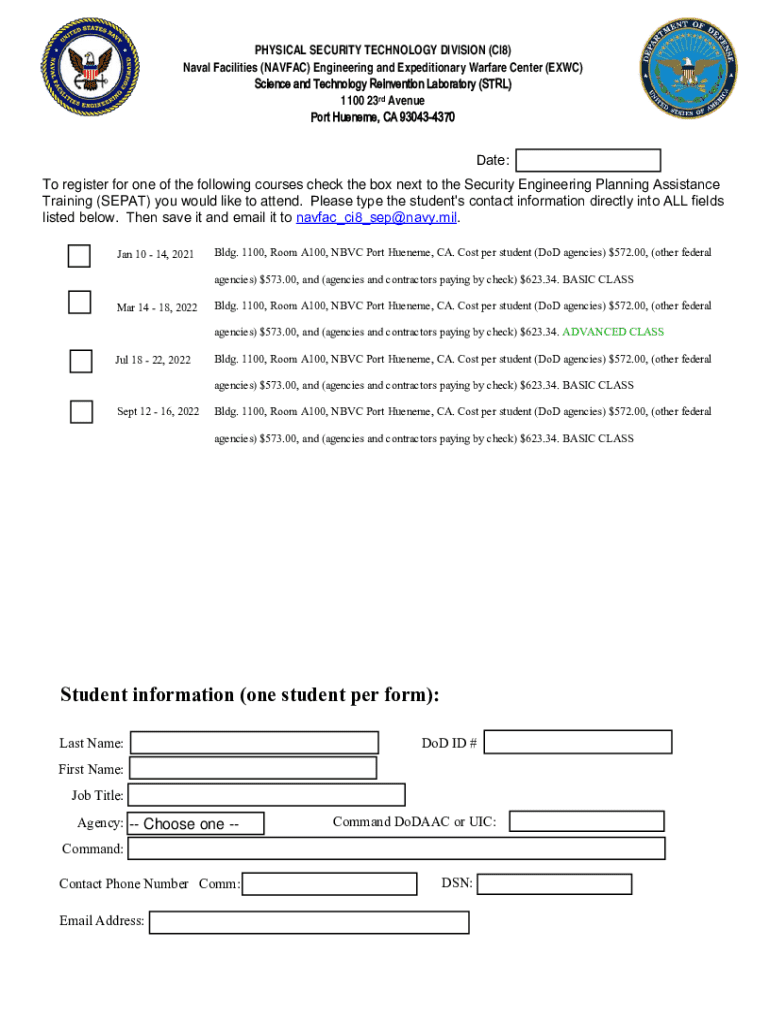
Hueneme, CA 93043-4370 Date: To register for one of the following courses check the box next to the Security Engineering Planning Assistance Training (SEPAT) you would like to attend. Please type the student's contact information directly into ALL fields listed below. Then save it and email it to navfac ci8 sep navy.mil. Jan 10 - 14, 2021 Bldg. 1100, Room A100, NBVC Port Hueneme, CA. Cost per student (DoD agencies) $572.00, (other federal agencies) $573.00, and (agencies and contractors payin.

Open form follow the instructions

Easily sign the form with your finger

Send filled & signed form or save
How to fill out and sign Registration Form For Security Engineering Planning Assistance Training online?
Get your online template and fill it in using progressive features. Enjoy smart fillable fields and interactivity.Follow the simple instructions below:
Experience all the advantages of submitting and completing documents online. With our platform completing Registration Form For Security Engineering Planning Assistance Training only takes a few minutes. We make that possible by offering you access to our full-fledged editor capable of altering/fixing a document?s original textual content, inserting special fields, and e-signing.
Complete Registration Form For Security Engineering Planning Assistance Training within several moments by following the guidelines below:
- Pick the template you will need from our collection of legal form samples.
- Click on the Get form key to open it and start editing.
- Submit all of the necessary boxes (they will be yellow-colored).
- The Signature Wizard will help you insert your electronic signature after you?ve finished imputing information.
- Put the date.
- Check the whole template to make certain you?ve completed all the data and no changes are required.
- Press Done and save the ecompleted template to your gadget.
Send the new Registration Form For Security Engineering Planning Assistance Training in a digital form when you finish completing it. Your information is well-protected, since we keep to the most up-to-date security requirements. Join millions of happy clients who are already filling out legal forms straight from their apartments.
Tips on how to fill out, edit and sign Registration Form For Security Engineering Planning Assistance Training online
How to fill and sign Registration Form For Security Engineering Planning Assistance Training
Get your online template and fill it in using progressive features. Enjoy smart fillable fields and interactivity.Follow the simple instructions below:
Experience all the advantages of submitting and completing documents online. With our platform completing Registration Form For Security Engineering Planning Assistance Training only takes a few minutes. We make that possible by offering you access to our full-fledged editor capable of altering/fixing a document?s original textual content, inserting special fields, and e-signing.
Complete Registration Form For Security Engineering Planning Assistance Training within several moments by following the guidelines below:
- Pick the template you will need from our collection of legal form samples.
- Click on the Get form key to open it and start editing.
- Submit all of the necessary boxes (they will be yellow-colored).
- The Signature Wizard will help you insert your electronic signature after you?ve finished imputing information.
- Put the date.
- Check the whole template to make certain you?ve completed all the data and no changes are required.
- Press Done and save the ecompleted template to your gadget.
Send the new Registration Form For Security Engineering Planning Assistance Training in a digital form when you finish completing it. Your information is well-protected, since we keep to the most up-to-date security requirements. Join millions of happy clients who are already filling out legal forms straight from their apartments.
How to edit Registration Form For Security Engineering Planning Assistance Training
Forget an old-fashioned paper-based way of executing Registration Form For Security Engineering Planning Assistance Training. Have the document completed and certified in minutes with our top-notch online editor.
Are you forced to modify and fill out Registration Form For Security Engineering Planning Assistance Training? With a robust editor like ours, you can complete this task in only minutes without the need to print and scan documents over and over again. We offer fully editable and straightforward document templates that will become a start and help you complete the necessary document template online.
All forms, by default, come with fillable fields you can complete once you open the template. Nevertheless, if you need to polish the existing content of the form or insert a new one, you can choose from a variety of editing and annotation options. Highlight, blackout, and comment on the document; include checkmarks, lines, text boxes, graphics and notes, and comments. Moreover, you can swiftly certify the template with a legally-binding signature. The completed form can be shared with other people, stored, imported to external programs, or converted into any popular format.
You’ll never go wrong by choosing our web-based solution to complete Registration Form For Security Engineering Planning Assistance Training because it's:
- Easy to set up and utilize, even for users who haven’t filled the documents electronically before.
- Robust enough to accommodate multiple editing needs and document types.
- Safe and secure, making your editing experience safeguarded every time.
- Available for different devices, making it stress-free to complete the document from anywhere.
- Capable of creating forms based on ready-made templates.
- Compatible with various document formats: PDF, DOC, DOCX, PPT and JPEG etc.
Don't waste time completing your Registration Form For Security Engineering Planning Assistance Training obsolete way - with pen and paper. Use our full-featured solution instead. It gives you a comprehensive suite of editing options, built-in eSignature capabilities, and ease of use. What makes it stand out is the team collaboration options - you can collaborate on forms with anyone, build a well-organized document approval flow from the ground up, and a lot more. Try our online solution and get the best value for your money!
How to fill and sign Registration Form For Security Engineering Planning Assistance Training
Get your online template and fill it in using progressive features. Enjoy smart fillable fields and interactivity.Follow the simple instructions below:
Experience all the advantages of submitting and completing documents online. With our platform completing Registration Form For Security Engineering Planning Assistance Training only takes a few minutes. We make that possible by offering you access to our full-fledged editor capable of altering/fixing a document?s original textual content, inserting special fields, and e-signing.
Complete Registration Form For Security Engineering Planning Assistance Training within several moments by following the guidelines below:
- Pick the template you will need from our collection of legal form samples.
- Click on the Get form key to open it and start editing.
- Submit all of the necessary boxes (they will be yellow-colored).
- The Signature Wizard will help you insert your electronic signature after you?ve finished imputing information.
- Put the date.
- Check the whole template to make certain you?ve completed all the data and no changes are required.
- Press Done and save the ecompleted template to your gadget.
Send the new Registration Form For Security Engineering Planning Assistance Training in a digital form when you finish completing it. Your information is well-protected, since we keep to the most up-to-date security requirements. Join millions of happy clients who are already filling out legal forms straight from their apartments.
Experience a faster way to fill out and sign forms on the web. Access the most extensive library of templates available.
Related content
Agency Certifying Officials are certifying the employee has completed the requirements for...
You will find our most up to date forms and information here. Questions? Please call the...
The organization applies best practices in systems and security engineering and documents...
Use professional pre-built templates to fill in and sign documents online faster. Get access to thousands of forms.
If you believe that this page should be taken down, please follow our DMCA take down process here.