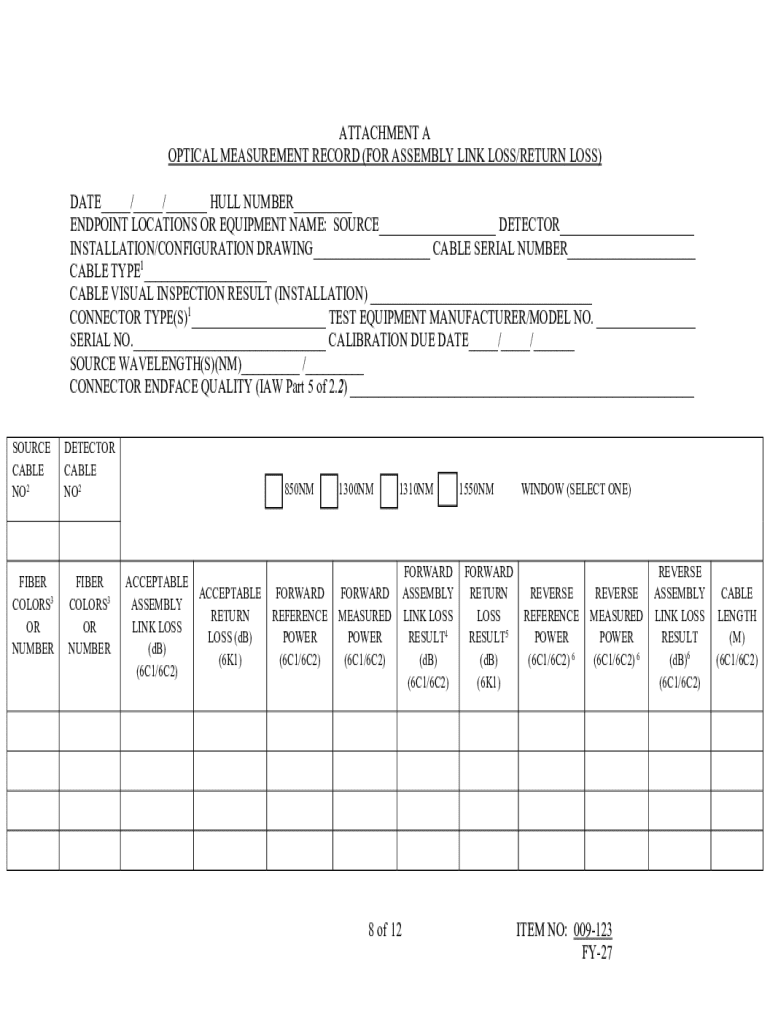
Iber Optic Cabling Systems Requirements and Measurements 2.2 MIL-STD-2042, Fiber Optic Cable Topology Installation Standard Methods for Surface Ships and Submarines 2.3 MIL-STD-2003, Electric Plant Installation Standard Methods for Surface Ships and Submarines 2.4 IA PUB-5239/31, Information Assurance Shipboard Red/Black Installation Publication 2.5 CNSSAM TEMPEST/01-13, (U) RED/BLACK Installation Guidance 2.6 S9086-PF-STM-010/CH-408; Fiber Optic Cable Topology 2.7 S9AA0-AB-GOS-010, General.
Loading

Open form follow the instructions

Easily sign the form with your finger

Send filled & signed form or save
How to fill out and sign NAVSEA Standard Item 009-123 online?
Get your online template and fill it in using progressive features. Enjoy smart fillable fields and interactivity.Follow the simple instructions below:
Have you been seeking a fast and practical tool to fill out NAVSEA Standard Item 009-123 at a reasonable cost? Our service will provide you with a rich variety of forms that are offered for completing online. It only takes a few minutes.
Keep to these simple actions to get NAVSEA Standard Item 009-123 prepared for submitting:
- Select the document you require in our library of legal templates.
- Open the form in our online editing tool.
- Read the instructions to learn which details you will need to give.
- Click on the fillable fields and include the necessary information.
- Add the date and insert your electronic autograph as soon as you fill in all of the boxes.
- Double-check the completed document for misprints along with other errors. If you need to correct some information, the online editor and its wide variety of tools are ready for your use.
- Save the completed form to your device by clicking on Done.
- Send the electronic document to the intended recipient.
Submitting NAVSEA Standard Item 009-123 doesn?t need to be stressful any longer. From now on easily get through it from home or at your office straight from your mobile or desktop computer.
Tips on how to fill out, edit and sign NAVSEA Standard Item 009-123 online
How to fill and sign NAVSEA Standard Item 009-123
Get your online template and fill it in using progressive features. Enjoy smart fillable fields and interactivity.Follow the simple instructions below:
Have you been seeking a fast and practical tool to fill out NAVSEA Standard Item 009-123 at a reasonable cost? Our service will provide you with a rich variety of forms that are offered for completing online. It only takes a few minutes.
Keep to these simple actions to get NAVSEA Standard Item 009-123 prepared for submitting:
- Select the document you require in our library of legal templates.
- Open the form in our online editing tool.
- Read the instructions to learn which details you will need to give.
- Click on the fillable fields and include the necessary information.
- Add the date and insert your electronic autograph as soon as you fill in all of the boxes.
- Double-check the completed document for misprints along with other errors. If you need to correct some information, the online editor and its wide variety of tools are ready for your use.
- Save the completed form to your device by clicking on Done.
- Send the electronic document to the intended recipient.
Submitting NAVSEA Standard Item 009-123 doesn?t need to be stressful any longer. From now on easily get through it from home or at your office straight from your mobile or desktop computer.
How to edit NAVSEA Standard Item 009-123
Take advantage of the functionality of the multi-featured online editor while filling out your NAVSEA Standard Item 009-123. Use the variety of tools to rapidly fill out the blanks and provide the required data in no time.
Preparing documents is time-taking and expensive unless you have ready-to-use fillable templates and complete them electronically. The best way to cope with the NAVSEA Standard Item 009-123 is to use our professional and multi-functional online editing tools. We provide you with all the necessary tools for fast document fill-out and allow you to make any adjustments to your forms, adapting them to any demands. In addition to that, you can comment on the changes and leave notes for other parties involved.
Here’s what you can do with your NAVSEA Standard Item 009-123 in our editor:
- Fill out the blanks utilizing Text, Cross, Check, Initials, Date, and Sign options.
- Highlight crucial information with a favorite color or underline them.
- Hide sensitive details using the Blackout option or simply remove them.
- Import pictures to visualize your NAVSEA Standard Item 009-123.
- Replace the original text using the one corresponding with your needs.
- Add comments or sticky notes to communicate with others about the updates.
- Create extra fillable areas and assign them to specific people.
- Protect the template with watermarks, add dates, and bates numbers.
- Share the paperwork in various ways and save it on your device or the cloud in different formats after you finish editing.
Dealing with NAVSEA Standard Item 009-123 in our powerful online editor is the quickest and most efficient way to manage, submit, and share your documentation the way you need it from anywhere. The tool operates from the cloud so that you can access it from any place on any internet-connected device. All forms you generate or fill out are safely stored in the cloud, so you can always access them whenever needed and be confident of not losing them. Stop wasting time on manual document completion and get rid of papers; make it all online with minimum effort.
How to fill and sign NAVSEA Standard Item 009-123
Get your online template and fill it in using progressive features. Enjoy smart fillable fields and interactivity.Follow the simple instructions below:
Have you been seeking a fast and practical tool to fill out NAVSEA Standard Item 009-123 at a reasonable cost? Our service will provide you with a rich variety of forms that are offered for completing online. It only takes a few minutes.
Keep to these simple actions to get NAVSEA Standard Item 009-123 prepared for submitting:
- Select the document you require in our library of legal templates.
- Open the form in our online editing tool.
- Read the instructions to learn which details you will need to give.
- Click on the fillable fields and include the necessary information.
- Add the date and insert your electronic autograph as soon as you fill in all of the boxes.
- Double-check the completed document for misprints along with other errors. If you need to correct some information, the online editor and its wide variety of tools are ready for your use.
- Save the completed form to your device by clicking on Done.
- Send the electronic document to the intended recipient.
Submitting NAVSEA Standard Item 009-123 doesn?t need to be stressful any longer. From now on easily get through it from home or at your office straight from your mobile or desktop computer.
Experience a faster way to fill out and sign forms on the web. Access the most extensive library of templates available.
Related content
These courses must offer NAVSEA Certification that is in accordance with FY22 NAVSEA...
Apr 21, 2025 — ... NAVSEA Drawing 8477552B, which meets the requirements of NAVSEA...
Get answers to your most pressing questions about US Legal Forms API.
What is the CAGE code for NAVSEA?
The CAGE code for NAVSEA, which stands for Commercial and Government Entity code, serves as a unique identifier for the agency within government procurement systems. This code streamlines processes and ensures accurate identification of contracts and responsibilities. To understand how the NAVSEA Standard Item 009-123 fits within the context of these operations, it's essential to work with documented standards and contractual obligations.
What is a standard in the Navy?
A standard in the Navy refers to an established guideline or requirement designed to ensure uniformity and quality across all naval operations. These standards help maintain safety, efficiency, and performance while fostering a culture of excellence within the Navy. The NAVSEA Standard Item 009-123 exemplifies these standards by providing essential instructions that personnel must follow.
What is the purpose of the NAVSEA Note 5000?
The NAVSEA Note 5000 provides supplemental information and guidelines to enhance existing NAVSEA Standard Items, serving as a reference for ongoing projects. It aims to clarify procedures and improve understanding within the naval community about compliance with established standards. By referring to NAVSEA Standard Item 009-123, users can better apply the full intent of NAVSEA Note 5000 in their operations.
What is a NAVSEA Standard Item?
A NAVSEA Standard Item serves as a guideline or specification for various procedures and requirements within naval operations. These items offer clear instructions for contractors and naval personnel to follow to ensure safety and quality. For precise implementation, the NAVSEA Standard Item 009-123 outlines crucial practices that must be adhered to during project execution.
What is the meaning of NAVSEA?
NAVSEA stands for the Naval Sea Systems Command, which oversees the development and procurement of naval ships, submarines, and their systems. This organization plays a vital role in integrating technology and ensuring that all naval operations meet high standards. By adhering to the NAVSEA Standard Item 009-123, teams can ensure compliance with necessary regulations and maintain operational effectiveness.
What is a reasonable accommodation in the NAVSEA?
A reasonable accommodation in the NAVSEA refers to adjustments or modifications made to accommodate employees' needs without causing undue hardship on the agency. This can include changes in work schedules, job duties, or physical workspace to support individuals with disabilities. Understanding the NAVSEA Standard Item 009-123 helps ensure that these accommodations align with established guidelines and best practices, promoting inclusivity in the workplace.
What is a reasonable accommodation in NAVSEA?
A reasonable accommodation within the context of NAVSEA refers to adjustments or modifications provided to ensure that all personnel can perform their duties effectively. These accommodations may include changes in work schedules, job responsibilities, or physical workspace. By understanding the implications of standards such as NAVSEA Standard Item 009-123, personnel can advocate for these necessary adjustments, ensuring a more inclusive work environment.
What is the size of a fiber optic cable?
The size of a fiber optic cable can vary, but it typically consists of a core surrounded by cladding, which is usually about the diameter of a human hair. The specifications for fiber optic cables are crucial in military operations, especially for communication systems. By adhering to guidelines such as NAVSEA Standard Item 009-123, the Navy ensures reliability and performance in all fiber optic applications.
What command does NAVSEA fall under?
NAVSEA, or the Naval Sea Systems Command, falls under the United States Navy. Its primary function is to manage the design, construction, and maintenance of naval ships and submarines. By adhering to frameworks like the NAVSEA Standard Item 009-123, NAVSEA ensures operational efficiency and safety in its maritime efforts.
Use professional pre-built templates to fill in and sign documents online faster. Get access to thousands of forms.
If you believe that this page should be taken down, please follow our DMCA take down process here.