Loading
Form preview
  • US Legal Forms
  • Other Templates
  • More Forms
  • More Multi-State Forms
  • Va Henry County Parks & Recreation Photo Release Form 2017

Get Va Henry County Parks & Recreation Photo Release Form 2017-2026

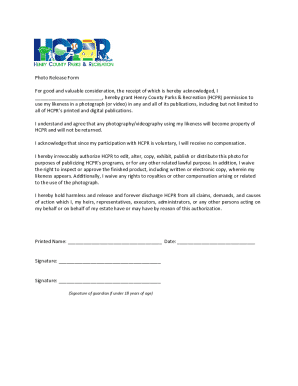
Keness in a photograph (or video) in any and all of its publications, including but not limited to all of HCPR s printed and digital publications. I understand and agree that any photography/videography using my likeness will become property of HCPR and will not be returned. I acknowledge that since my participation with HCPR is voluntary, I will receive no compensation. I hereby irrevocably authorize HCPR to edit, alter, copy, exhibit, publish or distribute this photo for purposes of publiciz.

How it works

  1. Open form

    Open form follow the instructions

  2. Easily sign form

    Easily sign the form with your finger

  3. Share form

    Send filled & signed form or save

How to fill out and sign VA Henry County Parks & Recreation Photo Release Form online?

Get your online template and fill it in using progressive features. Enjoy smart fillable fields and interactivity.Follow the simple instructions below:

Legal, tax, business and other e-documents require a high level of protection and compliance with the legislation. Our templates are regularly updated according to the latest amendments in legislation. Plus, with our service, all the data you include in your VA Henry County Parks & Recreation Photo Release Form is well-protected from loss or damage with the help of top-notch encryption.

The tips below can help you fill out VA Henry County Parks & Recreation Photo Release Form quickly and easily:

  1. Open the template in the feature-rich online editing tool by hitting Get form.
  2. Complete the necessary fields which are marked in yellow.
  3. Hit the arrow with the inscription Next to move on from box to box.
  4. Use the e-autograph tool to add an electronic signature to the form.
  5. Put the relevant date.
  6. Double-check the entire e-document to be sure that you haven?t skipped anything important.
  7. Click Done and save the resulting document.

Our service allows you to take the entire procedure of submitting legal documents online. Due to this, you save hours (if not days or even weeks) and get rid of additional payments. From now on, fill out VA Henry County Parks & Recreation Photo Release Form from your home, office, and even on the go.

Tips on how to fill out, edit and sign VA Henry County Parks & Recreation Photo Release Form online

How to fill out and sign VA Henry County Parks & Recreation Photo Release Form online?

Get your online template and fill it in using progressive features. Enjoy smart fillable fields and interactivity.Follow the simple instructions below:

Legal, tax, business and other e-documents require a high level of protection and compliance with the legislation. Our templates are regularly updated according to the latest amendments in legislation. Plus, with our service, all the data you include in your VA Henry County Parks & Recreation Photo Release Form is well-protected from loss or damage with the help of top-notch encryption.

The tips below can help you fill out VA Henry County Parks & Recreation Photo Release Form quickly and easily:

  1. Open the template in the feature-rich online editing tool by hitting Get form.
  2. Complete the necessary fields which are marked in yellow.
  3. Hit the arrow with the inscription Next to move on from box to box.
  4. Use the e-autograph tool to add an electronic signature to the form.
  5. Put the relevant date.
  6. Double-check the entire e-document to be sure that you haven?t skipped anything important.
  7. Click Done and save the resulting document.

Our service allows you to take the entire procedure of submitting legal documents online. Due to this, you save hours (if not days or even weeks) and get rid of additional payments. From now on, fill out VA Henry County Parks & Recreation Photo Release Form from your home, office, and even on the go.

How to edit VA Henry County Parks & Recreation Photo Release Form: customize forms online

Find the right VA Henry County Parks & Recreation Photo Release Form template and edit it on the spot. Simplify your paperwork with a smart document editing solution for online forms.

Your day-to-day workflow with documents and forms can be more efficient when you have everything that you need in one place. For instance, you can find, get, and edit VA Henry County Parks & Recreation Photo Release Form in a single browser tab. If you need a particular VA Henry County Parks & Recreation Photo Release Form, it is simple to find it with the help of the smart search engine and access it instantly. You do not need to download it or look for a third-party editor to edit it and add your details. All the tools for efficient work go in a single packaged solution.

This editing solution allows you to personalize, fill, and sign your VA Henry County Parks & Recreation Photo Release Form form right on the spot. Once you find a suitable template, click on it to go to the editing mode. Once you open the form in the editor, you have all the needed instruments at your fingertips. You can easily fill in the dedicated fields and erase them if needed with the help of a simple yet multifunctional toolbar. Apply all the modifications instantly, and sign the form without leaving the tab by just clicking the signature field. After that, you can send or print out your document if required.

Make more custom edits with available instruments.

  • Annotate your document with the Sticky note tool by putting a note at any spot within the document.
  • Add required visual components, if required, with the Circle, Check, or Cross instruments.
  • Modify or add text anywhere in the document using Texts and Text box instruments. Add content with the Initials or Date tool.
  • Modify the template text with the Highlight and Blackout, or Erase instruments.
  • Add custom visual components with the Arrow and Line, or Draw tools.

Discover new possibilities in streamlined and trouble-free paperwork. Find the VA Henry County Parks & Recreation Photo Release Form you need in minutes and fill it in in the same tab. Clear the mess in your paperwork once and for all with the help of online forms.

Get form

Experience a faster way to fill out and sign forms on the web. Access the most extensive library of templates available.
Get form

Related content

Photo Release Form
I hereby irrevocably authorize HCPR to edit, alter, copy, exhibit, publish or distribute...
Learn more
Resources in Art and Architecture on the Web:...
Aug 27, 2025 — "The 10,000 images in this digital collection capture the parks'...
Learn more
EPA Ecological Risk Assessment
Jun 5, 1997 — The policies and procedures set forth here are intended as guidance to...
Learn more

Related links form

AU NSW Land Registry Services 07DL 2023 TX 50-115 2023 MT MV7 2023 AU MS015 2024

Questions & Answers

Get answers to your most pressing questions about US Legal Forms API.

Contact support

Yes, you typically need a photo release form if you plan to use someone’s image for commercial or promotional purposes. This form protects both the photographer and the individual by providing clear terms of consent. The VA Henry County Parks & Recreation Photo Release Form ensures you have the proper permissions documented, helping avoid potential legal issues in the future.

Making a photo consent form is similar to creating a photo release form, as both require clear definitions of permission for image use. Focus on clarity regarding the uses and rights granted to the organization, while including contact information for any inquiries. The VA Henry County Parks & Recreation Photo Release Form can be an ideal choice for those seeking a structured layout to guide their consent form creation.

To create a photo release form, gather the necessary information, including the names of the parties involved and specific usage rights. Clearly state the nature of the activities associated with the photos and seek legal guidance if needed. Utilizing resources such as the VA Henry County Parks & Recreation Photo Release Form provided by USLegalForms can assist you in crafting a compliant and effective document.

Creating a photo release form involves outlining key components like the names of the individuals, the purpose of image use, and signature lines for consent. You can research standard formats or use template services. Using the VA Henry County Parks & Recreation Photo Release Form template can streamline your process and ensure you cover all necessary legal bases.

To create a release form, start by defining its purpose and what it will cover. Make sure to include details such as the name of the individual granting permission, the specific uses of the image, and any compensation or agreement terms. Platforms like USLegalForms offer templates for the VA Henry County Parks & Recreation Photo Release Form, simplifying the process for you.

A photo release statement typically indicates the permission granted by an individual to use their image for specific purposes. For instance, a VA Henry County Parks & Recreation Photo Release Form allows the parks department to capture images during events and use those images for promotional material. The statement should clearly mention the intended use and assure that the individual understands these terms before signing.

A photo release consent form is a legal document that grants permission for a photographer to use images of an individual for specified purposes. The VA Henry County Parks & Recreation Photo Release Form serves this function, allowing organizations to use images while protecting individuals' rights. This form is essential for maintaining professionalism and transparency in photography practices.

When writing a photography release form, provide a brief introduction outlining the intent of the document. Include specifics about the photo, the photographer, and how the images will be utilized. Using the VA Henry County Parks & Recreation Photo Release Form as a template can streamline this process, ensuring all important aspects are addressed.

To write a consent form for a photo, begin by stating the purpose of the form clearly. Include details such as the individual's name, the context in which the photo will be used, and any limits on usage. Incorporating the VA Henry County Parks & Recreation Photo Release Form ensures that all necessary elements are covered, protecting the rights of both parties.

To fill out a photo release form, start by providing your name and contact information at the top. Then, indicate where and how the images will be used, such as for websites, brochures, or social media. Finally, sign and date the VA Henry County Parks & Recreation Photo Release Form to confirm your consent, making sure to keep a copy for your records.

Get This Form Now!

Use professional pre-built templates to fill in and sign documents online faster. Get access to thousands of forms.
Get form
If you believe that this page should be taken down, please follow our DMCA take down processhere.
Get VA Henry County Parks & Recreation Photo Release Form
Get form
  • Adoption
  • Bankruptcy
  • Contractors
  • Divorce
  • Home Sales
  • Employment
  • Identity Theft
  • Incorporation
  • Landlord Tenant
  • Living Trust
  • Name Change
  • Personal Planning
  • Small Business
  • Wills & Estates
  • Packages A-Z
  • Affidavits
  • Bankruptcy
  • Bill of Sale
  • Corporate - LLC
  • Divorce
  • Employment
  • Identity Theft
  • Internet Technology
  • Landlord Tenant
  • Living Wills
  • Name Change
  • Power of Attorney
  • Real Estate
  • Small Estates
  • Wills
  • All Forms
  • Forms A-Z
  • Other Templates
  • Legal Hub
  • About Us
  • Help Portal
  • Legal Resources
  • Blog
  • Affiliates
  • Contact Us
  • Delete My Account
  • Site Map
  • Industries
  • Forms in Spanish
  • Localized Forms
  • State-specific Forms
  • Forms Kit
  • Real Estate Handbook
  • All Guides
  • Notarize
  • Incorporation services
  • For Consumers
  • For Small Business
  • For Attorneys
  • USLegal
  • FormsPass
  • pdfFiller
  • signNow
  • altaFlow
  • DocHub
  • Instapage
Form Packages
  • Adoption
  • Bankruptcy
  • Contractors
  • Divorce
  • Home Sales
  • Employment
  • Identity Theft
  • Incorporation
  • Landlord Tenant
  • Living Trust
  • Name Change
  • Personal Planning
  • Small Business
  • Wills & Estates
  • Packages A-Z
Form Categories
  • Affidavits
  • Bankruptcy
  • Bill of Sale
  • Corporate - LLC
  • Divorce
  • Employment
  • Identity Theft
  • Internet Technology
  • Landlord Tenant
  • Living Wills
  • Name Change
  • Power of Attorney
  • Real Estate
  • Small Estates
  • Wills
  • All Forms
  • Forms A-Z
  • Other Templates
Customer Service
  • Legal Hub
  • About Us
  • Help Portal
  • Legal Resources
  • Blog
  • Affiliates
  • Contact Us
  • Delete My Account
  • Site Map
  • Industries
  • Forms in Spanish
  • Localized Forms
  • State-specific Forms
  • Forms Kit
Legal Guides
  • Real Estate Handbook
  • All Guides
Prepared for you
  • Notarize
  • Incorporation services
Our Customers
  • For Consumers
  • For Small Business
  • For Attorneys
Our Sites
  • USLegal
  • FormsPass
  • pdfFiller
  • signNow
  • altaFlow
  • DocHub
  • Instapage
Social Media
Call us now toll free:
+1 833 426 79 33
As seen in:
© Copyright 1999-2026 airSlate Legal Forms, Inc. 17 Station Street, Ste. 203, Brookline, MA 02445
  • Your Privacy Choices
  • Terms of Service
  • Privacy Notice
  • Content Takedown Policy
  • Bug Bounty Program