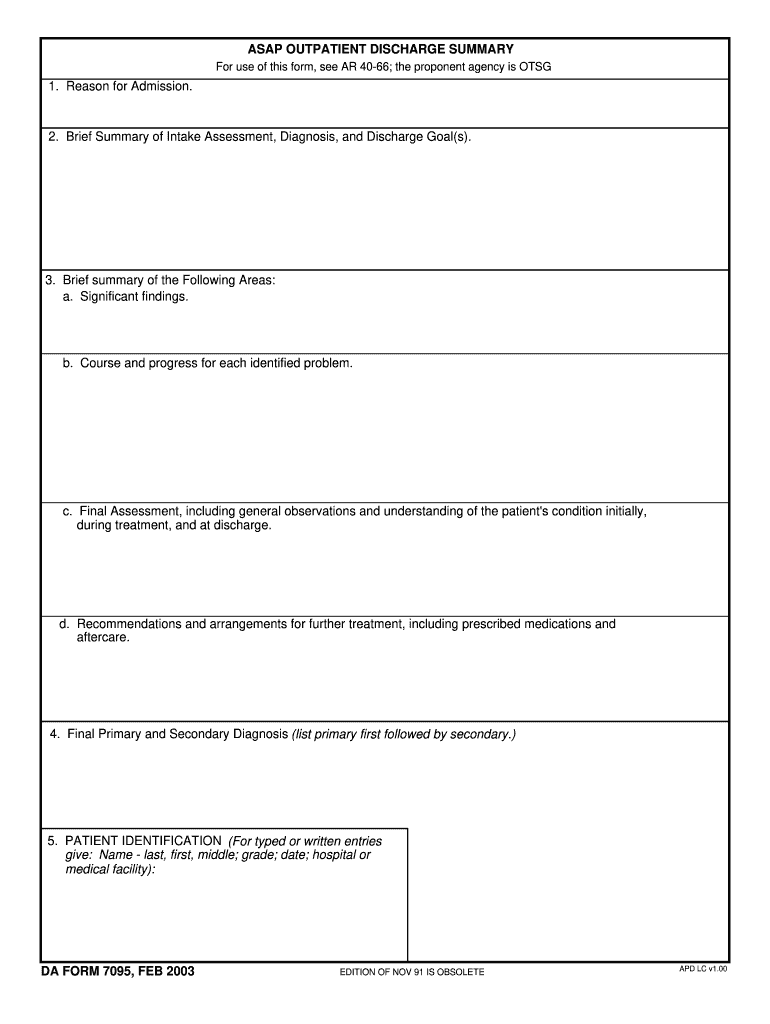
ASAP OUTPATIENT DISCHARGE SUMMARY For use of this form, see AR 40-66; the proponent agency is OTSG 1. Reason for Admission. 2. Brief Summary of Intake Assessment, Diagnosis, and Discharge Goal(s).
Loading

Open form follow the instructions

Easily sign the form with your finger

Send filled & signed form or save
How to fill out the DA 7095 online
The DA 7095 is an essential outpatient discharge summary form that records critical information about a patient's treatment journey. This guide will provide you with clear, step-by-step instructions on how to accurately complete the form online.
Follow the steps to effectively complete your discharge summary
- Click ‘Get Form’ button to obtain the form and open it in the editor.
- Begin by filling out the 'Reason for Admission' section. Clearly state the primary reason the patient was admitted to the medical facility, ensuring that your description is concise and relevant.
- In the 'Brief Summary of Intake Assessment, Diagnosis, and Discharge Goal(s)' section, provide an overview of the patient's initial assessment, any diagnoses made, and the goals set for their discharge.
- Proceed to the 'Brief Summary of the Following Areas' section. Here, detail significant findings, outline the course and progress of each identified problem, provide a final assessment of the patient’s condition, and include specific recommendations for any further treatment and aftercare.
- In the 'Final Primary and Secondary Diagnosis' section, list the primary diagnosis followed by any secondary diagnoses. Ensure that the primary diagnosis is clearly distinguished as it is critical for future references.
- Complete the 'Patient Identification' section with the patient's details. For both typed and handwritten entries, provide the patient's last name, first name, middle name, grade, date, and the name of the hospital or medical facility. Ensure all details are accurate to prevent any complications.
- Once you have filled out all sections of the form, review your entries for any errors or missing information. After confirming that everything is accurate, you can save the changes, download the completed form, print it, or share it as needed.
Start filling out your DA 7095 online today to ensure a smooth discharge process.
Experience a faster way to fill out and sign forms on the web. Access the most extensive library of templates available.
Related content
7 days ago — The Orange Book lists controlled substances and regulated chemicals...
Computer Architecture studies (i) the techniques used to design and implement the...
Microsoft Windows ou Windows NT 4.0 é necessário para usar esta impressora. Consulte os...
Get answers to your most pressing questions about US Legal Forms API.
How to fill out a 2062?
To complete a 2062, begin by entering the details of the items being transferred, such as their description and quantities. Both the issuer and the recipient must sign the document to confirm the transaction. By maintaining clear and organized records through this form, accountability is enhanced. For further assistance, check out the resources available in DA 7095 to support this process.
How to fill out the new DA form 5960?
Filling out the DA form 5960 requires specific personal and financial information from the applicant. Make sure to read each section carefully to provide accurate data. Review the completed form for any errors before submission to avoid delays. For a smoother experience with related forms, looking into the DA 7095 can help simplify your understanding.
How to fill a hand receipt?
To fill out a hand receipt, start by gathering all necessary details of the property being issued. Clearly list the items, including identification numbers and quantities. Ensure both the issuer and receiver understand their responsibilities by signing the receipt. Utilizing templates and guidance from platforms like DA 7095 can streamline this process effectively.
Is a 2062 a sub-hand receipt?
Yes, a 2062 can be considered a form of a sub-hand receipt. It details specific items issued to an individual and is part of a broader hand receipt management process. Understanding its role in property accountability is important for military personnel. For comprehensive management practices, refer to resources related to DA 7095 for additional insights.
Who signs the 2062?
The 2062 form requires the signature of the individual receiving the property and the person responsible for issuing it. This two-signature process ensures that both parties acknowledge the transfer. Proper documentation of these signatures helps maintain accurate records. If you’re looking to streamline your processes, you might want to look into how DA 7095 integrates with property management strategies.
What is a 2062 hand receipt number?
A 2062 hand receipt number serves as a unique identifier for property being issued. This number tracks the transfer of items and ensures accountability within military units. It is essential for maintaining accurate records, which can be crucial for audits. For those dealing with related documents, understanding the DA 7095 process can be beneficial.
How to fill out a DA 5500 form?
To fill out a DA 5500 form, you should first gather the necessary information related to the individual concerned. Carefully enter this data into the form, ensuring accuracy to prevent future complications. After completing the form, review all entries for correctness. If you need further assistance, consider exploring resources on DA 7095 to guide you through any related processes.
Use professional pre-built templates to fill in and sign documents online faster. Get access to thousands of forms.
If you believe that this page should be taken down, please follow our DMCA take down process here.