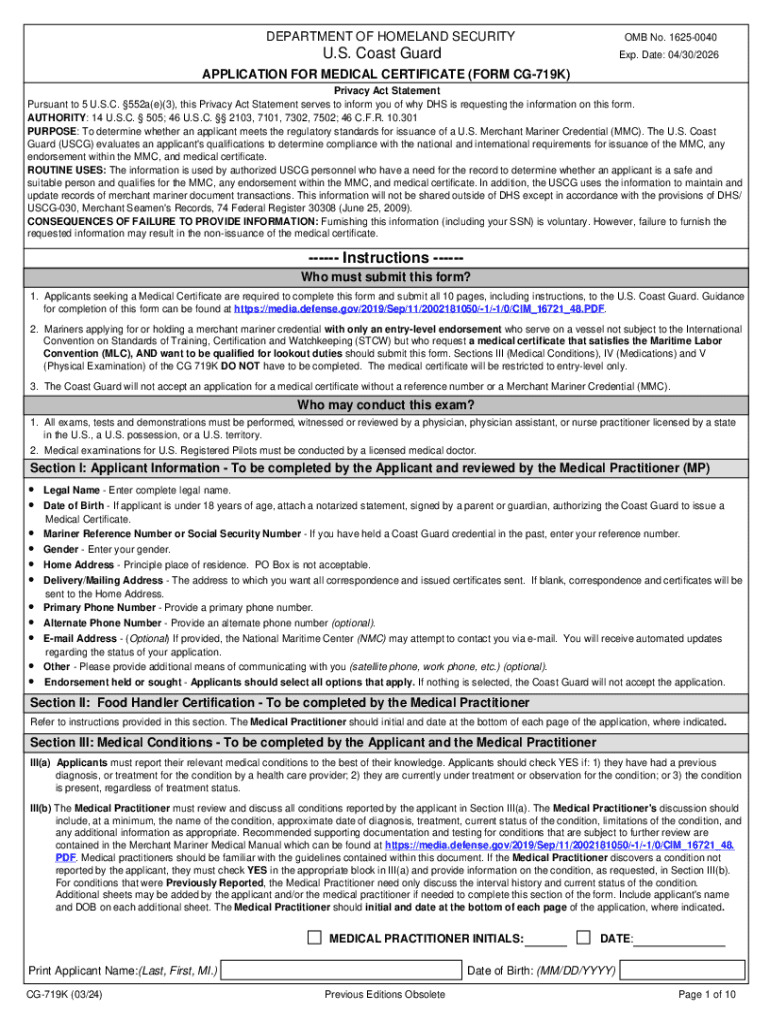
This Privacy Act Statement serves to inform you of why DHS is requesting the information on this form. AUTHORITY: 14 U.S.C. 505; 46 U.S.C. 2103, 7101, 7302, 7502; 46 C.F.R. 10.301 PURPOSE: To determine whether an applicant meets the regulatory standards for issuance of a U.S. Merchant Mariner Credential (MMC). The U.S. Coast Guard (USCG) evaluates an applicant's qualifications to determine compliance with the national and international requirements for issuance of the MMC, any endorsemen.

Open form follow the instructions

Easily sign the form with your finger

Send filled & signed form or save
How to fill out and sign Date: 04/30/2026 online?
Get your online template and fill it in using progressive features. Enjoy smart fillable fields and interactivity.Follow the simple instructions below:
The prep of lawful documents can be costly and time-consuming. However, with our preconfigured web templates, everything gets simpler. Now, using a Date: 04/30/2026 requires a maximum of 5 minutes. Our state browser-based samples and simple recommendations remove human-prone errors.
Comply with our easy steps to get your Date: 04/30/2026 ready quickly:
- Select the web sample in the library.
- Type all necessary information in the required fillable fields. The intuitive drag&drop graphical user interface makes it simple to include or relocate areas.
- Ensure everything is completed correctly, without any typos or absent blocks.
- Use your e-signature to the page.
- Click Done to save the changes.
- Save the record or print out your PDF version.
- Distribute immediately towards the recipient.
Make use of the fast search and innovative cloud editor to create an accurate Date: 04/30/2026. Get rid of the routine and produce documents online!
Tips on how to fill out, edit and sign Date: 04/30/2026 online
How to fill and sign Date: 04/30/2026
Get your online template and fill it in using progressive features. Enjoy smart fillable fields and interactivity.Follow the simple instructions below:
The prep of lawful documents can be costly and time-consuming. However, with our preconfigured web templates, everything gets simpler. Now, using a Date: 04/30/2026 requires a maximum of 5 minutes. Our state browser-based samples and simple recommendations remove human-prone errors.
Comply with our easy steps to get your Date: 04/30/2026 ready quickly:
- Select the web sample in the library.
- Type all necessary information in the required fillable fields. The intuitive drag&drop graphical user interface makes it simple to include or relocate areas.
- Ensure everything is completed correctly, without any typos or absent blocks.
- Use your e-signature to the page.
- Click Done to save the changes.
- Save the record or print out your PDF version.
- Distribute immediately towards the recipient.
Make use of the fast search and innovative cloud editor to create an accurate Date: 04/30/2026. Get rid of the routine and produce documents online!
How to edit Date: 04/30/2026
Make the most of our extensive online document editor while completing your forms. Fill out the Date: 04/30/2026, point out the most significant details, and easily make any other necessary modifications to its content.
Completing documentation electronically is not only time-saving but also comes with a possibility to modify the sample in accordance with your requirements. If you’re about to manage the Date: 04/30/2026, consider completing it with our robust online editing solutions. Whether you make a typo or enter the requested data into the wrong area, you can rapidly make changes to the document without the need to restart it from the beginning as during manual fill-out. Apart from that, you can stress on the vital data in your paperwork by highlighting specific pieces of content with colors, underlining them, or circling them.
Follow these quick and simple actions to fill out and edit your Date: 04/30/2026 online:
- Open the file in the editor.
- Type in the required information in the blank areas using Text, Check, and Cross tools.
- Adhere to the document navigation to avoid missing any mandatory areas in the sample.
- Circle some of the crucial details and add a URL to it if needed.
- Use the Highlight or Line options to point out the most significant facts.
- Choose colors and thickness for these lines to make your form look professional.
- Erase or blackout the details you don’t want to be visible to other people.
- Substitute pieces of content containing mistakes and type in text that you need.
- Finish modifcations with the Done key after you make sure everything is correct in the document.
Our robust online solutions are the most effective way to fill out and customize Date: 04/30/2026 in accordance with your needs. Use it to manage personal or professional documentation from anyplace. Open it in a browser, make any alterations in your forms, and get back to them anytime in the future - they all will be safely stored in the cloud.
How to fill and sign Date: 04/30/2026
Get your online template and fill it in using progressive features. Enjoy smart fillable fields and interactivity.Follow the simple instructions below:
The prep of lawful documents can be costly and time-consuming. However, with our preconfigured web templates, everything gets simpler. Now, using a Date: 04/30/2026 requires a maximum of 5 minutes. Our state browser-based samples and simple recommendations remove human-prone errors.
Comply with our easy steps to get your Date: 04/30/2026 ready quickly:
- Select the web sample in the library.
- Type all necessary information in the required fillable fields. The intuitive drag&drop graphical user interface makes it simple to include or relocate areas.
- Ensure everything is completed correctly, without any typos or absent blocks.
- Use your e-signature to the page.
- Click Done to save the changes.
- Save the record or print out your PDF version.
- Distribute immediately towards the recipient.
Make use of the fast search and innovative cloud editor to create an accurate Date: 04/30/2026. Get rid of the routine and produce documents online!
Experience a faster way to fill out and sign forms on the web. Access the most extensive library of templates available.
Related content
Expiration Date: 04/30/2026. CW-1 Application for Temporary Employment Certification. Form...
Get answers to your most pressing questions about US Legal Forms API.
How to write April 24th?
To write April 24th, you can simply state it as 'April 24.' Alternatively, in a more casual context, you could say '24th of April.' Both formats are understandable, but sticking to one style is vital for clarity. For legal matters, U.S. Legal Forms can provide examples on how to format dates correctly in documents.
Is it May 30th or 30th of May?
In American usage, 'May 30th' is the more common format, placing the month before the day. However, '30th of May' is often used in British English. Depending on your audience, you can choose either format, but consistency matters. For legal documents, U.S. Legal Forms helps clarify the preferred formatting.
Do you write July 1 or July 1st?
In most contexts, 'July 1' is the standard and preferred way to write the date. However, 'July 1st' is also acceptable, especially in informal writing or when emphasizing the day. Clarity and consistency are essential when documenting dates. U.S. Legal Forms offers guidance on which format is best for specific legal scenarios.
Is it April 13 or 13 April?
In American English, the preferred form is 'April 13.' This format places the month before the day, making it clear for readers. However, both formats are acceptable in different contexts, so be sure to match your choice with your audience. Tools like U.S. Legal Forms can help standardize date formats across your documents.
How to write date 30?
Writing the date 30 can be done by simply stating '30' after the month, such as in April 30. Alternatively, in numeric form, it can be expressed as 04/30/2026. It's crucial to be consistent in your documentation to avoid confusion. For legal documents, U.S. Legal Forms provides precise templates to ensure accuracy.
How to write 31st in date?
To write the 31st in a date, you can express it as '31st' when it follows the month. For instance, you would write March 31st or in numeral format as 03/31/2026. This approach ensures that your date is easily understood. Using U.S. Legal Forms can offer further guidance on formatting dates in various contexts.
How to write the 30th date?
When writing the 30th date, you have a couple of options. You can write it as '30th' after the month or use a numeral with the month and year. For example, you might write April 30th or just as 04/30/2026 for clarity. Maintaining consistency in your documents reinforces professionalism.
How to properly fill out a date?
To properly fill out a date, start with the month, followed by the day, and then the year. For example, to represent April 30, 2026, write it as 04/30/2026. This format is clear and universally understood. Using a reliable resource like U.S. Legal Forms can help you fill out dates correctly in various documents.
What day is April 15th on in 2026?
In 2026, April 15th is a Wednesday. This mid-week marker often serves as a reminder for financial planning, especially with tax deadlines around this time. Being aware of this date helps you stay organized and prepared, ensuring you meet important obligations. Consider it also an opportunity to take a midday break and assess your goals for the rest of the month.
What day does April 25 fall on in 2026?
April 25, 2026, falls on a Saturday. This weekend means you have the chance to enjoy leisure and relaxation, making it a perfect time for family activities or personal projects. If you're considering hosting an event, doing it on a Saturday allows the maximum number of attendees to join. Utilize this time wisely, as it offers a break from the usual hustle.
Use professional pre-built templates to fill in and sign documents online faster. Get access to thousands of forms.
If you believe that this page should be taken down, please follow our DMCA take down process here.