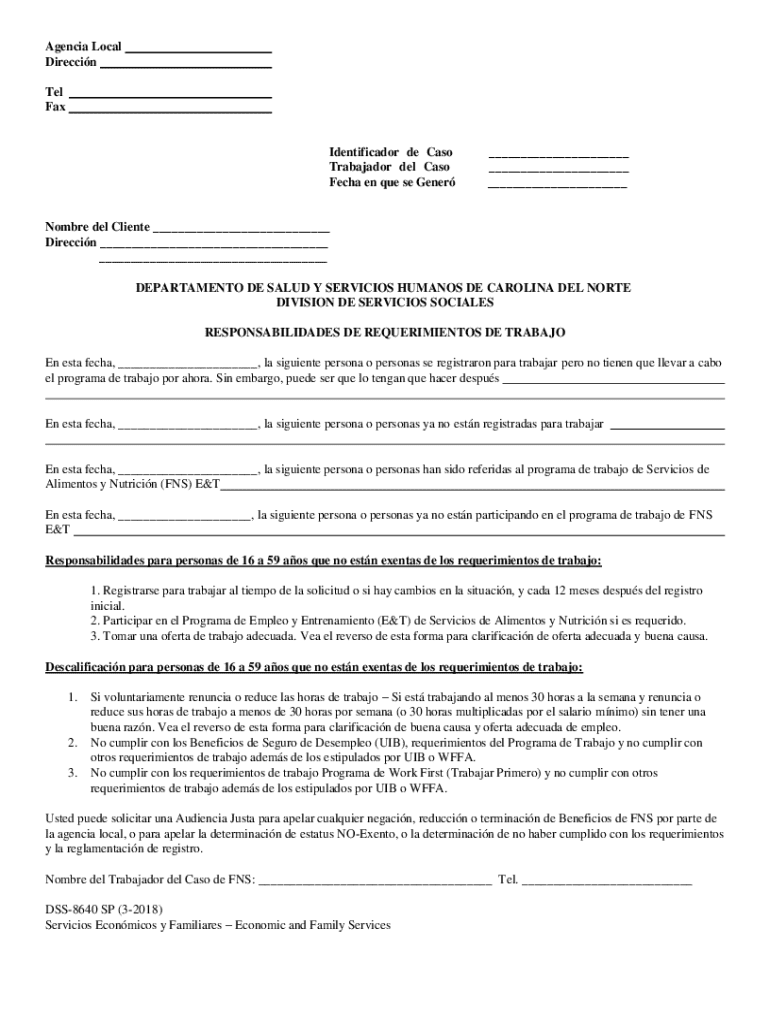
Direcci n DEPARTAMENTO DE SALUD Y SERVICIOS HUMANOS DE CAROLINA DEL NORTE DIVISION DE SERVICIOS SOCIALES RESPONSABILIDADES DE REQUERIMIENTOS DE TRABAJO En esta fecha, , la siguiente persona o personas se registraron para trabajar pero no tienen que llevar a cabo el programa de trabajo por ahora. Sin embargo, puede ser que lo tengan que hacer despu s En esta fecha,.
Loading

Open form follow the instructions

Easily sign the form with your finger

Send filled & signed form or save
How to fill out and sign NC DSS-8640 SP online?
Get your online template and fill it in using progressive features. Enjoy smart fillable fields and interactivity.Follow the simple instructions below:
Legal, business, tax and other documents need a high level of compliance with the legislation and protection. Our documents are updated on a regular basis according to the latest legislative changes. Plus, with our service, all the details you provide in the NC DSS-8640 SP is well-protected from loss or damage through industry-leading file encryption.
The following tips can help you fill in NC DSS-8640 SP easily and quickly:
- Open the document in the full-fledged online editor by hitting Get form.
- Complete the necessary boxes which are yellow-colored.
- Click the green arrow with the inscription Next to move from box to box.
- Use the e-autograph tool to e-sign the template.
- Insert the relevant date.
- Check the whole template to be sure that you have not skipped anything important.
- Click Done and download your new template.
Our service allows you to take the whole process of executing legal documents online. Due to this, you save hours (if not days or weeks) and eliminate unnecessary expenses. From now on, fill out NC DSS-8640 SP from your home, office, as well as on the go.
Tips on how to fill out, edit and sign NC DSS-8640 SP online
How to fill and sign NC DSS-8640 SP
Get your online template and fill it in using progressive features. Enjoy smart fillable fields and interactivity.Follow the simple instructions below:
Legal, business, tax and other documents need a high level of compliance with the legislation and protection. Our documents are updated on a regular basis according to the latest legislative changes. Plus, with our service, all the details you provide in the NC DSS-8640 SP is well-protected from loss or damage through industry-leading file encryption.
The following tips can help you fill in NC DSS-8640 SP easily and quickly:
- Open the document in the full-fledged online editor by hitting Get form.
- Complete the necessary boxes which are yellow-colored.
- Click the green arrow with the inscription Next to move from box to box.
- Use the e-autograph tool to e-sign the template.
- Insert the relevant date.
- Check the whole template to be sure that you have not skipped anything important.
- Click Done and download your new template.
Our service allows you to take the whole process of executing legal documents online. Due to this, you save hours (if not days or weeks) and eliminate unnecessary expenses. From now on, fill out NC DSS-8640 SP from your home, office, as well as on the go.
How to edit NC DSS-8640 SP
Make the best use of our powerful online document editor while completing your paperwork. Complete the NC DSS-8640 SP, point out the most important details, and effortlessly make any other essential modifications to its content.
Preparing documents electronically is not only time-saving but also gives a possibility to modify the sample according to your requirements. If you’re about to work on NC DSS-8640 SP, consider completing it with our robust online editing solutions. Whether you make an error or enter the requested data into the wrong area, you can instantly make adjustments to the form without the need to restart it from the beginning as during manual fill-out. Apart from that, you can stress on the crucial information in your paperwork by highlighting specific pieces of content with colors, underlining them, or circling them.
Follow these quick and simple steps to complete and edit your NC DSS-8640 SP online:
- Open the form in the editor.
- Enter the necessary information in the empty fields using Text, Check, and Cross tools.
- Adhere to the document navigation not to miss any required fields in the sample.
- Circle some of the important details and add a URL to it if needed.
- Use the Highlight or Line options to point out the most important pieces of content.
- Select colors and thickness for these lines to make your form look professional.
- Erase or blackout the data you don’t want to be visible to other people.
- Substitute pieces of content that contain mistakes and type in text that you need.
- End up modifcations with the Done option after you ensure everything is correct in the document.
Our robust online solutions are the best way to complete and customize NC DSS-8640 SP based on your requirements. Use it to manage personal or business documents from anywhere. Open it in a browser, make any changes in your documents, and get back to them at any moment in the future - they all will be securely kept in the cloud.
How to fill and sign NC DSS-8640 SP
Get your online template and fill it in using progressive features. Enjoy smart fillable fields and interactivity.Follow the simple instructions below:
Legal, business, tax and other documents need a high level of compliance with the legislation and protection. Our documents are updated on a regular basis according to the latest legislative changes. Plus, with our service, all the details you provide in the NC DSS-8640 SP is well-protected from loss or damage through industry-leading file encryption.
The following tips can help you fill in NC DSS-8640 SP easily and quickly:
- Open the document in the full-fledged online editor by hitting Get form.
- Complete the necessary boxes which are yellow-colored.
- Click the green arrow with the inscription Next to move from box to box.
- Use the e-autograph tool to e-sign the template.
- Insert the relevant date.
- Check the whole template to be sure that you have not skipped anything important.
- Click Done and download your new template.
Our service allows you to take the whole process of executing legal documents online. Due to this, you save hours (if not days or weeks) and eliminate unnecessary expenses. From now on, fill out NC DSS-8640 SP from your home, office, as well as on the go.
Experience a faster way to fill out and sign forms on the web. Access the most extensive library of templates available.
Related content
DSS-5095: NC DSS Child Placement and Payment System Adoption Assistance ... DSS-8640: Work...
Jan 20, 2017 — This determination is necessary only for documents which Defendant...
Get answers to your most pressing questions about US Legal Forms API.
How do I file a complaint against DSS in NC?
If you wish to file a complaint against the Department of Social Services in North Carolina, you can start by visiting the NC DHHS website. There, you will find guidelines for submitting complaints and who to contact for assistance. Utilizing resources related to the NC DSS-8640 SP can also help ensure your concerns are addressed properly.
Who is over DSS in NC?
The leadership of the Department of Social Services in North Carolina is overseen by the Secretary of the Department of Health and Human Services. This position ensures that the DSS adheres to state regulations and provides services effectively. For questions regarding the NC DSS-8640 SP, understanding this hierarchy can provide clarity on how decisions are made.
How to contact DSS in NC?
To contact the Department of Social Services in North Carolina, you can visit their official website for local office information. Each county has a DSS office that can assist you with your inquiries. If you need specific assistance related to the NC DSS-8640 SP, don’t hesitate to reach out directly for guidance.
What does DSS stand for in North Carolina?
In North Carolina, DSS stands for the Department of Social Services. This department is responsible for a wide range of services, including child welfare, food assistance, and health programs. Understanding the role of the DSS can enhance your ability to navigate options like the NC DSS-8640 SP.
Who is above DSS in NC?
In North Carolina, the Department of Social Services (DSS) operates under the North Carolina Department of Health and Human Services (DHHS). The DHHS oversees all services that support the health and welfare of residents. Therefore, if you have concerns or need assistance, you can look to the DHHS as the supervising body above the NC DSS-8640 SP.
Use professional pre-built templates to fill in and sign documents online faster. Get access to thousands of forms.
If you believe that this page should be taken down, please follow our DMCA take down process here.