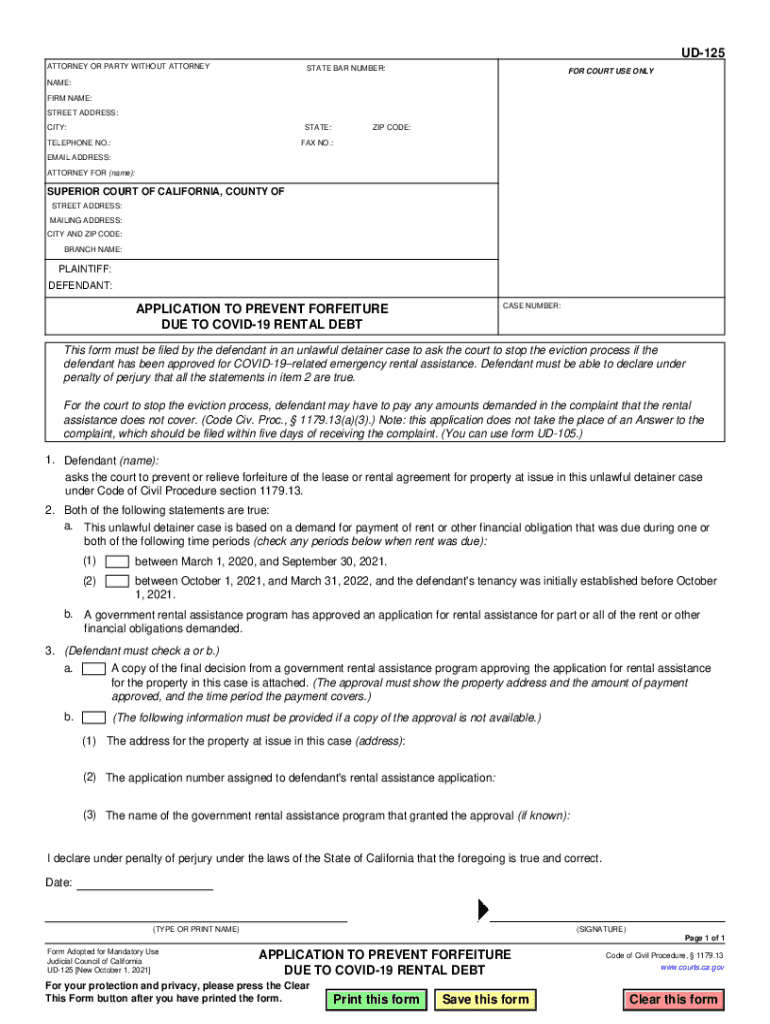
Ame): SUPERIOR COURT OF CALIFORNIA, COUNTY OF STREET ADDRESS: MAILING ADDRESS: CITY AND ZIP CODE: BRANCH NAME: PLAINTIFF: DEFENDANT: CASE NUMBER: APPLICATION TO PREVENT FORFEITURE DUE TO COVID-19 RENTAL DEBT This form must be filed by the defendant in an unlawful detainer case to ask the court to stop the eviction process if the defendant has been approved for COVID-19 related emergency rental assistance. Defendant must be able to declare under penalty of perjury that all the statements in.
Loading

Open form follow the instructions

Easily sign the form with your finger

Send filled & signed form or save
How to fill out and sign CA UD-125 online?
Get your online template and fill it in using progressive features. Enjoy smart fillable fields and interactivity.Follow the simple instructions below:
The preparing of legal papers can be high-priced and time-consuming. However, with our pre-built online templates, things get simpler. Now, working with a CA UD-125 takes not more than 5 minutes. Our state-specific browser-based blanks and crystal-clear instructions eradicate human-prone errors.
Adhere to our easy steps to have your CA UD-125 ready quickly:
- Choose the web sample from the catalogue.
- Complete all required information in the required fillable fields. The intuitive drag&drop graphical user interface allows you to include or relocate fields.
- Check if everything is filled out correctly, without typos or absent blocks.
- Use your e-signature to the page.
- Click Done to confirm the adjustments.
- Save the record or print out your copy.
- Submit instantly towards the receiver.
Take advantage of the quick search and powerful cloud editor to generate an accurate CA UD-125. Eliminate the routine and produce papers on the web!
Tips on how to fill out, edit and sign CA UD-125 online
How to fill and sign CA UD-125
Get your online template and fill it in using progressive features. Enjoy smart fillable fields and interactivity.Follow the simple instructions below:
The preparing of legal papers can be high-priced and time-consuming. However, with our pre-built online templates, things get simpler. Now, working with a CA UD-125 takes not more than 5 minutes. Our state-specific browser-based blanks and crystal-clear instructions eradicate human-prone errors.
Adhere to our easy steps to have your CA UD-125 ready quickly:
- Choose the web sample from the catalogue.
- Complete all required information in the required fillable fields. The intuitive drag&drop graphical user interface allows you to include or relocate fields.
- Check if everything is filled out correctly, without typos or absent blocks.
- Use your e-signature to the page.
- Click Done to confirm the adjustments.
- Save the record or print out your copy.
- Submit instantly towards the receiver.
Take advantage of the quick search and powerful cloud editor to generate an accurate CA UD-125. Eliminate the routine and produce papers on the web!
How to edit CA UD-125
Take full advantage of our extensive online document editor while preparing your forms. Fill out the CA UD-125, emphasize on the most important details, and effortlessly make any other necessary adjustments to its content.
Completing documentation electronically is not only time-saving but also gives an opportunity to alter the template according to your demands. If you’re about to manage the CA UD-125, consider completing it with our extensive online editing tools. Whether you make a typo or enter the requested details into the wrong field, you can instantly make adjustments to the document without the need to restart it from the beginning as during manual fill-out. Aside from that, you can stress on the essential data in your paperwork by highlighting certain pieces of content with colors, underlining them, or circling them.
Adhere to these quick and simple actions to complete and adjust your CA UD-125 online:
- Open the form in the editor.
- Enter the necessary information in the blank areas using Text, Check, and Cross tools.
- Follow the document navigation to avoid missing any required areas in the template.
- Circle some of the significant details and add a URL to it if needed.
- Use the Highlight or Line options to point out the most important pieces of content.
- Decide on colors and thickness for these lines to make your sample look professional.
- Erase or blackout the details you don’t want to be visible to other people.
- Replace pieces of content containing errors and type in text that you need.
- Finish editing with the Done button after you make certain everything is correct in the document.
Our extensive online solutions are the simplest way to fill out and modify CA UD-125 based on your needs. Use it to prepare personal or business documentation from anywhere. Open it in a browser, make any changes in your documents, and return to them at any moment in the future - they all will be securely kept in the cloud.
How to fill and sign CA UD-125
Get your online template and fill it in using progressive features. Enjoy smart fillable fields and interactivity.Follow the simple instructions below:
The preparing of legal papers can be high-priced and time-consuming. However, with our pre-built online templates, things get simpler. Now, working with a CA UD-125 takes not more than 5 minutes. Our state-specific browser-based blanks and crystal-clear instructions eradicate human-prone errors.
Adhere to our easy steps to have your CA UD-125 ready quickly:
- Choose the web sample from the catalogue.
- Complete all required information in the required fillable fields. The intuitive drag&drop graphical user interface allows you to include or relocate fields.
- Check if everything is filled out correctly, without typos or absent blocks.
- Use your e-signature to the page.
- Click Done to confirm the adjustments.
- Save the record or print out your copy.
- Submit instantly towards the receiver.
Take advantage of the quick search and powerful cloud editor to generate an accurate CA UD-125. Eliminate the routine and produce papers on the web!
Experience a faster way to fill out and sign forms on the web. Access the most extensive library of templates available.
Related content
This form must be filed by the defendant in an unlawful detainer case to ask the court to...
California Tenants – A Guide to Residential Tenants' and Landlords' Rights and...
Feb 2, 2017 — A temperatura superficial máxima do aquecimento é de. 180 °C. Potência...
Get answers to your most pressing questions about US Legal Forms API.
How long do I have to respond to an unlawful detainer in California?
You must respond to an unlawful detainer within five days in California. This response period starts from the day you receive the eviction notice. Adhering to the timeline outlined in the CA UD-125 is crucial to keeping your right to contest the eviction alive. Act promptly to prepare your answer to prevent possible default.
What is the eviction hardship extension in California?
The eviction hardship extension in California provides additional protection for tenants experiencing financial difficulties. This extension allows delayed action on evictions under certain circumstances related to hardships. It is vital to be aware of the provisions specified in the CA UD-125 to see if your situation qualifies for such relief. Staying informed can help you navigate the complexities of eviction laws.
How do you beat an unlawful detainer in California?
Beating an unlawful detainer in California requires presenting a strong defense in your answer. You can argue procedural errors or lack of evidence from the landlord, which can weaken their case. Utilize resources that lay out the expectations of the CA UD-125, and consider consultation with legal professionals. Having a solid understanding of your rights will empower you as you face the eviction process.
How many days do you have to answer an unlawful detainer in California?
In California, you typically have five days to answer an unlawful detainer after being served with the complaint. This short time frame emphasizes the importance of acting swiftly and preparing your answer in accordance with the CA UD-125. Failing to respond within this period may result in a default judgment against you. Make sure to mark your calendar to avoid missing this important deadline.
How to answer an unlawful detainer in California?
Answering an unlawful detainer in California involves drafting a formal answer to the landlord's complaint. Start by clearly stating your defenses and the reasons you believe the eviction is unjust. This document should adhere to the protocols outlined in the CA UD-125. Consulting legal resources or services can help ensure your answer is precise, which is vital to your case.
How do you answer an unlawful detainer in California?
To answer an unlawful detainer in California, you should prepare a specific legal document in response to the landlord's complaint. This document is known as an answer and must be filed with the court. Including your defense arguments is crucial, as this is your opportunity to dispute the claims against you regarding the CA UD-125. Ensure you meet all legal requirements when submitting your answer.
What is the best proof of address for DMV?
The best proof of address for the DMV typically includes documents like recent utility bills, mortgage statements, or lease agreements. Ensure that whatever document you choose is recent and contains your current address to comply with DMV requirements. A well-prepared proof of address can greatly assist in the application process for your CA ID. For clarity on what documents you can use, visit US Legal Forms for tailored advice.
Can I get my CA ID online?
You can start the application process for your CA ID online via the DMV's official website. This allows you to fill out the necessary forms, including CA UD-125, from the comfort of your home. Just remember, you will still need to visit a DMV office for identity verification. For an easier experience, consider checking resources on US Legal Forms that provide additional support.
How to get a CA identification number?
To obtain a CA identification number, you will need to apply through the California DMV. You can apply online, by mail, or in person, depending on your preference and convenience. During this process, your identification number will be issued once your application is approved. If you require help filling out the CA UD-125 form, US Legal Forms can guide you step by step.
What is proof of residency for California ID?
Proof of residency for a California ID can include documents such as a utility bill, a lease agreement, or bank statements that display your name and address. The DMV accepts a variety of documents to verify your residency, but they must be current. Always make sure your documents align with the requirements outlined by the DMV, especially when completing the CA UD-125 application. For more precise information, US Legal Forms offers detailed resources.
Use professional pre-built templates to fill in and sign documents online faster. Get access to thousands of forms.
If you believe that this page should be taken down, please follow our DMCA take down process here.