Loading
Form preview
  • US Legal Forms
  • Other Templates
  • More Forms
  • More Multi-State Forms
  • Ca Lm.010 - County Of Butte 2018

Get Ca Lm.010 - County Of Butte 2018-2026

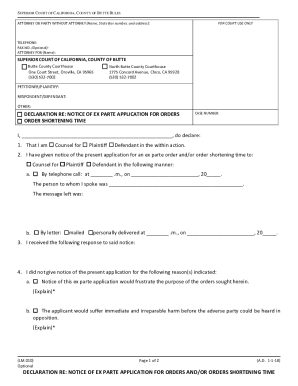
FOR (Name): SUPERIOR COURT OF CALIFORNIA, COUNTY OF BUTTE Butte County Courthouse One Court Street, Oroville, CA 95965 (530) 532-7002 North Butte County Courthouse 1775 Concord Avenue, Chico, CA 95928 (530) 532-7002 PETITIONER/PLAINTIFF: RESPONDENT/DEFENDANT: OTHER: DECLARATION RE: NOTICE OF EX PARTE APPLICATION FOR ORDERS ORDER SHORTENING TIME CASE NUMBER: I, , do declare: 1. That I am Counsel for Plaintiff Defendant in the.

How it works

  1. Open form

    Open form follow the instructions

  2. Easily sign form

    Easily sign the form with your finger

  3. Share form

    Send filled & signed form or save

How to fill out and sign CA LM.010 - County Of Butte online?

Get your online template and fill it in using progressive features. Enjoy smart fillable fields and interactivity.Follow the simple instructions below:

The preparation of legal papers can be costly and time-consuming. However, with our predesigned online templates, everything gets simpler. Now, creating a CA LM.010 - County Of Butte requires no more than 5 minutes. Our state online blanks and simple instructions eliminate human-prone faults.

Adhere to our easy steps to have your CA LM.010 - County Of Butte well prepared rapidly:

  1. Choose the template from the catalogue.
  2. Enter all required information in the necessary fillable fields. The user-friendly drag&drop interface makes it easy to include or move fields.
  3. Make sure everything is filled in appropriately, without typos or lacking blocks.
  4. Use your electronic signature to the page.
  5. Simply click Done to confirm the adjustments.
  6. Save the document or print your copy.
  7. Distribute immediately towards the receiver.

Use the quick search and powerful cloud editor to generate a correct CA LM.010 - County Of Butte. Eliminate the routine and make papers on the web!

Tips on how to fill out, edit and sign CA LM.010 - County Of Butte online

How to fill out and sign CA LM.010 - County Of Butte online?

Get your online template and fill it in using progressive features. Enjoy smart fillable fields and interactivity.Follow the simple instructions below:

The preparation of legal papers can be costly and time-consuming. However, with our predesigned online templates, everything gets simpler. Now, creating a CA LM.010 - County Of Butte requires no more than 5 minutes. Our state online blanks and simple instructions eliminate human-prone faults.

Adhere to our easy steps to have your CA LM.010 - County Of Butte well prepared rapidly:

  1. Choose the template from the catalogue.
  2. Enter all required information in the necessary fillable fields. The user-friendly drag&drop interface makes it easy to include or move fields.
  3. Make sure everything is filled in appropriately, without typos or lacking blocks.
  4. Use your electronic signature to the page.
  5. Simply click Done to confirm the adjustments.
  6. Save the document or print your copy.
  7. Distribute immediately towards the receiver.

Use the quick search and powerful cloud editor to generate a correct CA LM.010 - County Of Butte. Eliminate the routine and make papers on the web!

How to edit CA LM.010 - County Of Butte: customize forms online

Use our comprehensive editor to turn a simple online template into a completed document. Continue reading to learn how to edit CA LM.010 - County Of Butte online easily.

Once you find an ideal CA LM.010 - County Of Butte, all you have to do is adjust the template to your needs or legal requirements. Apart from completing the fillable form with accurate data, you may want to erase some provisions in the document that are irrelevant to your case. Alternatively, you might want to add some missing conditions in the original template. Our advanced document editing features are the best way to fix and adjust the document.

The editor allows you to modify the content of any form, even if the document is in PDF format. It is possible to add and erase text, insert fillable fields, and make further changes while keeping the initial formatting of the document. Also you can rearrange the structure of the document by changing page order.

You don’t need to print the CA LM.010 - County Of Butte to sign it. The editor comes along with electronic signature functionality. Most of the forms already have signature fields. So, you only need to add your signature and request one from the other signing party with a few clicks.

Follow this step-by-step guide to make your CA LM.010 - County Of Butte:

  1. Open the preferred template.
  2. Use the toolbar to adjust the form to your preferences.
  3. Complete the form providing accurate details.
  4. Click on the signature field and add your eSignature.
  5. Send the document for signature to other signers if needed.

Once all parties complete the document, you will get a signed copy which you can download, print, and share with other people.

Our services allow you to save tons of your time and reduce the chance of an error in your documents. Streamline your document workflows with effective editing capabilities and a powerful eSignature solution.

Get form

Experience a faster way to fill out and sign forms on the web. Access the most extensive library of templates available.
Get form

Related content

Superior Court of California,
SUPERIOR COURT OF CALIFORNIA, COUNTY OF BUTTE RULES. (LM.010). Page 1 of 2. (A.D. 1-1-18)...
Learn more
Academic Programs - Courses - Butte College
Recommended Prep: ACCT 20 or BCIS 80 or BCIS 85 and Reading Level IV; English Level III;...
Learn more
REVIEW ARTICLE
by LA Rocha · 2017 · Cited by 17 — ABSTRACT. Background: The number of...
Learn more

Related links form

IRS 944 Instructions (SP) 2024 NARA SF 180 2024 MA DoR M-4868 2024 MA CRASH102 2024

Questions & Answers

Get answers to your most pressing questions about US Legal Forms API.

Contact support

The executive officer of the Butte County Court oversees court operations and ensures that justice is served efficiently. Typically, this individual manages administrative staff, budgetary concerns, and the logistics of court schedules. For detailed inquiries about services or processes related to CA LM.010 - County Of Butte, you can visit the court's official website or contact their office directly.

The process of petition involves several steps, starting with defining the purpose and drafting the petition itself. For issues under CA LM.010 - County Of Butte, you must gather signatures, file the petition with the court, and possibly attend a hearing. Throughout this process, it's helpful to use platforms like uslegalforms to access templates and guidance tailored to your situation.

Filing confidential documents in California requires you to follow specific procedures to protect sensitive information. Under CA LM.010 - County Of Butte, prepare your documents according to court guidelines, clearly marking them as confidential. Submit them to the court while ensuring that you comply with any additional privacy stipulations.

Starting a petition properly involves defining your objective and gathering supporting materials. For those utilizing CA LM.010 - County Of Butte, create a well-structured document outlining your request and reasons. Engage community members to sign the petition, which can strengthen your case when presenting it to the court.

Filing a petition means submitting a formal request to a court for a specific action or decision. In the realm of CA LM.010 - County Of Butte, this could involve requesting changes, approvals, or relief from a legal requirement. By filing a petition, you initiate legal proceedings in accordance with state laws.

To file a default in California, you must first ensure that the other party has not responded within the required time. In cases under CA LM.010 - County Of Butte, submit a Request for Entry of Default to the court. This indicates that the other party has not taken action. After filing, you can then pursue a default judgment.

Filing an answer in California requires you to respond to a complaint within the specified time frame. In the context of CA LM.010 - County Of Butte, prepare your answer by addressing each point in the complaint. Once completed, file the answer with the court and serve a copy to the opposing party. Make sure to keep a copy for your records.

To start a petition in California, first determine the purpose of your petition. Gather relevant information and ensure you meet the requirements outlined in CA LM.010 - County Of Butte. Create a clear and concise document stating your request and gather signatures to demonstrate support. If necessary, file the petition with the appropriate county court.

Butte County, CA, falls under the 3rd congressional district. This district plays an important role in representing the needs and interests of the residents. By engaging with local representatives, residents can voice their concerns and remain informed about services that impact the community. For more information on local governance and resources available in CA LM.010 - County Of Butte, you might consider using platforms like uslegalforms.

The area code for Butte County, CA, is 530. This area code serves a diverse range of communities within the county. If you need to contact someone or access services via phone in Butte County, knowing the area code is essential. Make sure to include the area code when dialing to ensure you reach the right connection within CA LM.010 - County Of Butte.

Get This Form Now!

Use professional pre-built templates to fill in and sign documents online faster. Get access to thousands of forms.
Get form
If you believe that this page should be taken down, please follow our DMCA take down processhere.
Get CA LM.010 - County Of Butte
Get form
  • Adoption
  • Bankruptcy
  • Contractors
  • Divorce
  • Home Sales
  • Employment
  • Identity Theft
  • Incorporation
  • Landlord Tenant
  • Living Trust
  • Name Change
  • Personal Planning
  • Small Business
  • Wills & Estates
  • Packages A-Z
  • Affidavits
  • Bankruptcy
  • Bill of Sale
  • Corporate - LLC
  • Divorce
  • Employment
  • Identity Theft
  • Internet Technology
  • Landlord Tenant
  • Living Wills
  • Name Change
  • Power of Attorney
  • Real Estate
  • Small Estates
  • Wills
  • All Forms
  • Forms A-Z
  • Other Templates
  • Legal Hub
  • About Us
  • Help Portal
  • Legal Resources
  • Blog
  • Affiliates
  • Contact Us
  • Delete My Account
  • Site Map
  • Industries
  • Forms in Spanish
  • Localized Forms
  • State-specific Forms
  • Forms Kit
  • Real Estate Handbook
  • All Guides
  • Notarize
  • Incorporation services
  • For Consumers
  • For Small Business
  • For Attorneys
  • USLegal
  • FormsPass
  • pdfFiller
  • signNow
  • altaFlow
  • DocHub
  • Instapage
Form Packages
  • Adoption
  • Bankruptcy
  • Contractors
  • Divorce
  • Home Sales
  • Employment
  • Identity Theft
  • Incorporation
  • Landlord Tenant
  • Living Trust
  • Name Change
  • Personal Planning
  • Small Business
  • Wills & Estates
  • Packages A-Z
Form Categories
  • Affidavits
  • Bankruptcy
  • Bill of Sale
  • Corporate - LLC
  • Divorce
  • Employment
  • Identity Theft
  • Internet Technology
  • Landlord Tenant
  • Living Wills
  • Name Change
  • Power of Attorney
  • Real Estate
  • Small Estates
  • Wills
  • All Forms
  • Forms A-Z
  • Other Templates
Customer Service
  • Legal Hub
  • About Us
  • Help Portal
  • Legal Resources
  • Blog
  • Affiliates
  • Contact Us
  • Delete My Account
  • Site Map
  • Industries
  • Forms in Spanish
  • Localized Forms
  • State-specific Forms
  • Forms Kit
Legal Guides
  • Real Estate Handbook
  • All Guides
Prepared for you
  • Notarize
  • Incorporation services
Our Customers
  • For Consumers
  • For Small Business
  • For Attorneys
Our Sites
  • USLegal
  • FormsPass
  • pdfFiller
  • signNow
  • altaFlow
  • DocHub
  • Instapage
Social Media
Call us now toll free:
+1 833 426 79 33
As seen in:
© Copyright 1999-2026 airSlate Legal Forms, Inc. 17 Station Street, Ste. 203, Brookline, MA 02445
  • Your Privacy Choices
  • Terms of Service
  • Privacy Notice
  • Content Takedown Policy
  • Bug Bounty Program