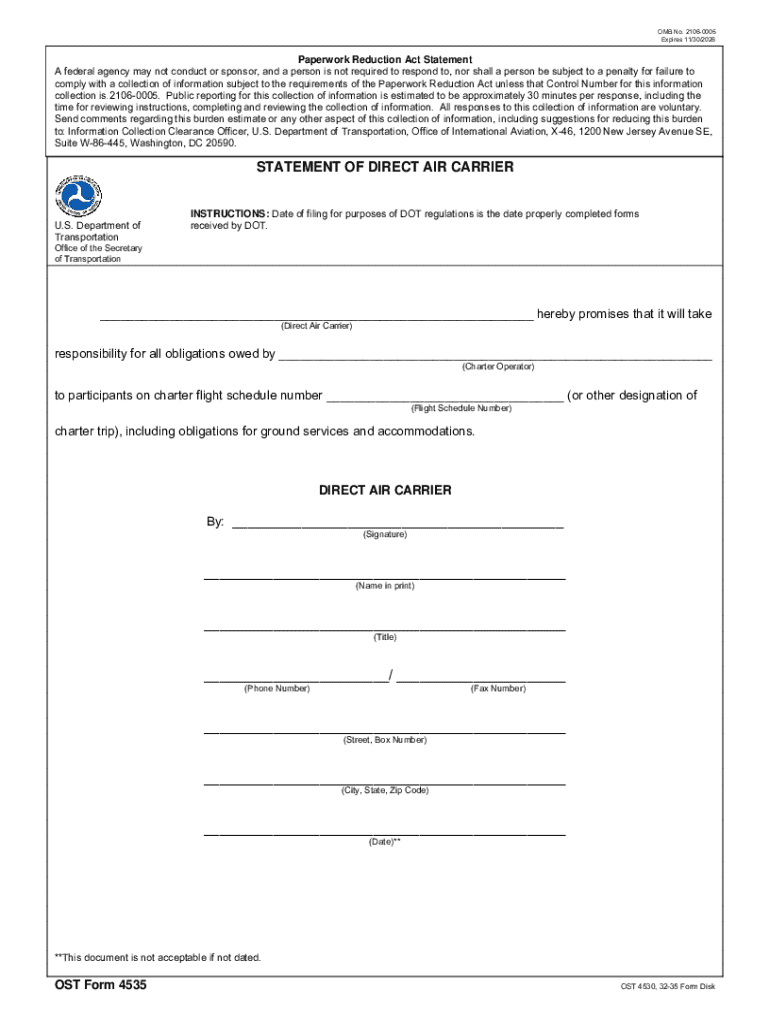
Lty for failure to comply with a collection of information subject to the requirements of the Paperwork Reduction Act unless that Control Number for this information collection is. 2106-0005. Public reporting for this collection of information is estimated to be approximately 30 minutes per response, including the time for reviewing instructions, completing and reviewing the collection of information. All responses to this collection of information are voluntary. Send comments regarding this bur.
Loading

Open form follow the instructions

Easily sign the form with your finger

Send filled & signed form or save
How to fill out and sign DOT OST Form 4535 online?
Get your online template and fill it in using progressive features. Enjoy smart fillable fields and interactivity.Follow the simple instructions below:
Have you been looking for a quick and efficient solution to fill out DOT OST Form 4535 at a reasonable price? Our platform provides you with a wide variety of forms that are available for completing online. It takes only a couple of minutes.
Stick to these simple steps to get DOT OST Form 4535 prepared for submitting:
- Get the form you want in our library of templates.
- Open the document in the online editor.
- Read the recommendations to determine which info you must provide.
- Choose the fillable fields and add the requested data.
- Add the relevant date and insert your electronic autograph once you fill in all of the fields.
- Look at the document for misprints and other mistakes. If there?s a need to change something, the online editor along with its wide variety of tools are ready for your use.
- Save the new template to your computer by clicking on Done.
- Send the electronic document to the parties involved.
Filling out DOT OST Form 4535 does not need to be stressful anymore. From now on comfortably cope with it from home or at the office straight from your mobile device or PC.
Tips on how to fill out, edit and sign DOT OST Form 4535 online
How to fill and sign DOT OST Form 4535
Get your online template and fill it in using progressive features. Enjoy smart fillable fields and interactivity.Follow the simple instructions below:
Have you been looking for a quick and efficient solution to fill out DOT OST Form 4535 at a reasonable price? Our platform provides you with a wide variety of forms that are available for completing online. It takes only a couple of minutes.
Stick to these simple steps to get DOT OST Form 4535 prepared for submitting:
- Get the form you want in our library of templates.
- Open the document in the online editor.
- Read the recommendations to determine which info you must provide.
- Choose the fillable fields and add the requested data.
- Add the relevant date and insert your electronic autograph once you fill in all of the fields.
- Look at the document for misprints and other mistakes. If there?s a need to change something, the online editor along with its wide variety of tools are ready for your use.
- Save the new template to your computer by clicking on Done.
- Send the electronic document to the parties involved.
Filling out DOT OST Form 4535 does not need to be stressful anymore. From now on comfortably cope with it from home or at the office straight from your mobile device or PC.
How to edit DOT OST Form 4535
Go with a reliable file editing solution you can rely on. Edit, complete, and certify DOT OST Form 4535 safely online.
Too often, editing forms, like DOT OST Form 4535, can be a challenge, especially if you got them online or via email but don’t have access to specialized software. Of course, you can find some workarounds to get around it, but you can end up getting a document that won't meet the submission requirements. Using a printer and scanner isn’t a way out either because it's time- and resource-consuming.
We provide a simpler and more efficient way of completing forms. A comprehensive catalog of document templates that are easy to edit and certify, and then make fillable for some individuals. Our solution extends way beyond a set of templates. One of the best aspects of using our option is that you can edit DOT OST Form 4535 directly on our website.
Since it's an online-based option, it saves you from having to get any software. Plus, not all corporate rules permit you to install it on your corporate computer. Here's how you can easily and safely complete your forms with our platform.
- Click the Get Form > you’ll be immediately taken to our editor.
- Once opened, you can kick off the editing process.
- Select checkmark or circle, line, arrow and cross and other choices to annotate your form.
- Pick the date field to add a particular date to your document.
- Add text boxes, images and notes and more to complement the content.
- Utilize the fillable fields option on the right to add fillable {fields.
- Select Sign from the top toolbar to generate and add your legally-binding signature.
- Click DONE and save, print, and share or get the output.
Say goodbye to paper and other ineffective ways of completing your DOT OST Form 4535 or other forms. Use our tool instead that includes one of the richest libraries of ready-to-customize forms and a powerful file editing option. It's easy and secure, and can save you lots of time! Don’t take our word for it, try it out yourself!
How to fill and sign DOT OST Form 4535
Get your online template and fill it in using progressive features. Enjoy smart fillable fields and interactivity.Follow the simple instructions below:
Have you been looking for a quick and efficient solution to fill out DOT OST Form 4535 at a reasonable price? Our platform provides you with a wide variety of forms that are available for completing online. It takes only a couple of minutes.
Stick to these simple steps to get DOT OST Form 4535 prepared for submitting:
- Get the form you want in our library of templates.
- Open the document in the online editor.
- Read the recommendations to determine which info you must provide.
- Choose the fillable fields and add the requested data.
- Add the relevant date and insert your electronic autograph once you fill in all of the fields.
- Look at the document for misprints and other mistakes. If there?s a need to change something, the online editor along with its wide variety of tools are ready for your use.
- Save the new template to your computer by clicking on Done.
- Send the electronic document to the parties involved.
Filling out DOT OST Form 4535 does not need to be stressful anymore. From now on comfortably cope with it from home or at the office straight from your mobile device or PC.
Experience a faster way to fill out and sign forms on the web. Access the most extensive library of templates available.
Related content
Nov 30, 2023 — STATEMENT OF DIRECT AIR CARRIER. DOT is committed to ensuring that...
by ED McCormack · 2020 · Cited by 10 — The Washington State Department of...
Owner's Manual carefully. This will ensure familiarity with controls and maintenance...
Get answers to your most pressing questions about US Legal Forms API.
What is a charter operation?
A charter operation involves the use of an aircraft to transport passengers or cargo, typically arranged by a private or public charter operator. These operations provide flexibility in scheduling and destination. For seamless charter arrangements, consider utilizing resources like US Legal Forms to access the required DOT OST Form 4535.
What is a PAO in aviation?
A PAO, or Publicly Available Operator, is an entity that offers charter services to the public, often needing to fulfill regulatory requirements, including the DOT OST Form 4535. This designation helps ensure transparency and safety for travelers. Knowing about PAOs can guide your choices when selecting an aviation service.
What is a charter FAA?
The term 'charter FAA' refers to the Federal Aviation Administration's regulations that govern charter operations. These regulations ensure safety and compliance for charter flights. When planning a trip, be aware of the necessary requirements, such as the DOT OST Form 4535, to ensure your flight adheres to these guidelines.
What is a public charter operator?
A public charter operator specializes in offering flights to the general public on a scheduled basis. These operators must comply with federal regulations, including those requiring the DOT OST Form 4535 documentation. By using a public charter operator, you can access a range of travel options that fit various budgets and preferences.
What is a charter operator?
A charter operator is a business that provides air transport by arranging flights for individuals or groups. They work under specific regulations set by the FAA and may require documentation such as the DOT OST Form 4535. Understanding the role of charter operators can help you navigate your travel needs effectively.
What does charter mean in aviation?
In aviation, a charter refers to the hiring of an entire aircraft for a specific flight or series of flights. This arrangement provides flexibility for travelers who wish to fly to specific destinations at their convenience. Charter flights are popular among businesses, sports teams, and families. When planning a charter, familiarity with DOT OST Form 4535 is vital for ensuring legal compliance.
What is an example of a charter airline?
An example of a charter airline is Sun Country Airlines, which provides various charter services for sports teams and corporations. Many charter airlines operate under special regulations that require them to comply with DOT standards. When dealing with charter airlines, it’s crucial to understand the importance of DOT OST Form 4535, as it can help facilitate the charter process efficiently.
What is DOT part 380?
DOT Part 380 outlines the rules related to public charter flights in the United States. This regulation emphasizes the need for transparency and consumer protection in charter services. Understanding DOT Part 380 is essential for operators and consumers alike, as it helps ensure compliance with legal standards. Those involved in charter services often need to reference DOT OST Form 4535 while navigating these regulations.
Who typically uses charter airline services?
Charter airline services are often used by businesses, sports teams, and large groups looking for customized travel options. These services provide flexibility and convenience, allowing passengers to travel to specific destinations on their own schedules. Additionally, individual travelers may choose charter flights when planning special occasions. Knowing the requirements for DOT OST Form 4535 can enhance your charter experience.
What are public charter flights?
Public charter flights are scheduled flight services that are not available through regular airline channels. These flights are operated under specific regulations by charter operators who sell tickets directly to the public. They offer travelers flexible options to reach destinations that regular airlines may not serve. Utilizing DOT OST Form 4535 during the reservation process is crucial for ensuring that operators maintain compliance and provide secure travel experiences.
Use professional pre-built templates to fill in and sign documents online faster. Get access to thousands of forms.
If you believe that this page should be taken down, please follow our DMCA take down process here.