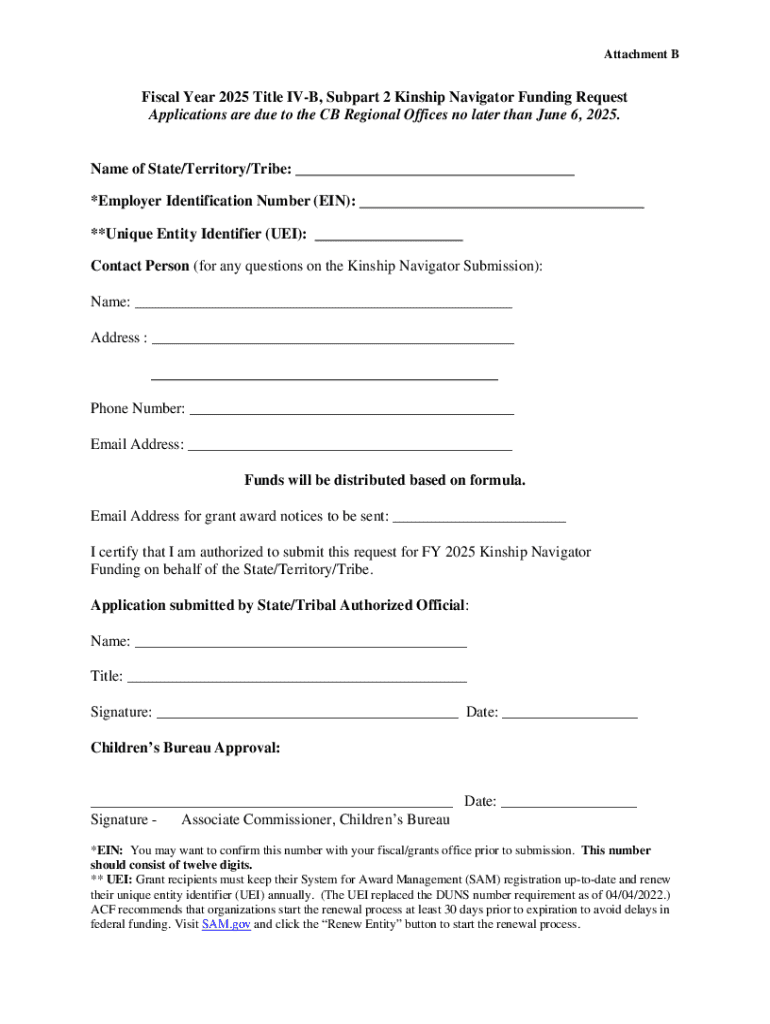
This document is a funding request application for the Kinship Navigator program for Fiscal Year 2025, detailing the required information for submission and certification for funding requests from.
Loading

Open form follow the instructions

Easily sign the form with your finger

Send filled & signed form or save
How to fill out and sign Subpart 2 Kinship Navigator Funding Request online?
Get your online template and fill it in using progressive features. Enjoy smart fillable fields and interactivity.Follow the simple instructions below:
The preparation of legal papers can be high-priced and time-consuming. However, with our pre-built online templates, everything gets simpler. Now, working with a Subpart 2 Kinship Navigator Funding Request takes a maximum of 5 minutes. Our state-specific web-based blanks and crystal-clear instructions eliminate human-prone faults.
Follow our simple actions to have your Subpart 2 Kinship Navigator Funding Request prepared rapidly:
- Select the template in the library.
- Type all necessary information in the necessary fillable fields. The easy-to-use drag&drop user interface makes it simple to include or move areas.
- Check if everything is filled out appropriately, without any typos or missing blocks.
- Use your electronic signature to the page.
- Simply click Done to save the adjustments.
- Save the papers or print your copy.
- Distribute instantly towards the recipient.
Make use of the quick search and innovative cloud editor to produce an accurate Subpart 2 Kinship Navigator Funding Request. Clear away the routine and produce documents on the web!
Tips on how to fill out, edit and sign Subpart 2 Kinship Navigator Funding Request online
How to fill and sign Subpart 2 Kinship Navigator Funding Request
Get your online template and fill it in using progressive features. Enjoy smart fillable fields and interactivity.Follow the simple instructions below:
The preparation of legal papers can be high-priced and time-consuming. However, with our pre-built online templates, everything gets simpler. Now, working with a Subpart 2 Kinship Navigator Funding Request takes a maximum of 5 minutes. Our state-specific web-based blanks and crystal-clear instructions eliminate human-prone faults.
Follow our simple actions to have your Subpart 2 Kinship Navigator Funding Request prepared rapidly:
- Select the template in the library.
- Type all necessary information in the necessary fillable fields. The easy-to-use drag&drop user interface makes it simple to include or move areas.
- Check if everything is filled out appropriately, without any typos or missing blocks.
- Use your electronic signature to the page.
- Simply click Done to save the adjustments.
- Save the papers or print your copy.
- Distribute instantly towards the recipient.
Make use of the quick search and innovative cloud editor to produce an accurate Subpart 2 Kinship Navigator Funding Request. Clear away the routine and produce documents on the web!
How to edit Subpart 2 Kinship Navigator Funding Request
Eliminate the mess from your paperwork routine. Discover the simplest way to find and edit, and file a Subpart 2 Kinship Navigator Funding Request
The process of preparing Subpart 2 Kinship Navigator Funding Request needs precision and focus, especially from those who are not well familiar with this kind of job. It is important to get a suitable template and fill it in with the correct information. With the proper solution for handling paperwork, you can get all the tools at hand. It is simple to simplify your editing process without learning additional skills. Find the right sample of Subpart 2 Kinship Navigator Funding Request and fill it out immediately without switching between your browser tabs. Discover more tools to customize your Subpart 2 Kinship Navigator Funding Request form in the editing mode.
While on the Subpart 2 Kinship Navigator Funding Request page, click on the Get form button to start editing it. Add your data to the form on the spot, as all the necessary tools are at hand right here. The sample is pre-designed, so the work required from the user is minimal. Use the interactive fillable fields in the editor to easily complete your paperwork. Simply click on the form and proceed to the editor mode straight away. Fill out the interactive field, and your document is all set.
Try out more tools to customize your form:
- Place more text around the document if needed. Use the Text and Text Box tools to insert text in a separate box.
- Add pre-designed graphic components like Circle, Cross, and Check with respective tools.
- If needed, capture or upload images to the document with the Image tool.
- If you need to draw something in the document, use Line, Arrow, and Draw tools.
- Try the Highlight, Erase, and Blackout tools to customize the text in the document.
- If you need to add comments to specific document parts, click the Sticky tool and place a note where you want.
Often, a small error can wreck the whole form when someone fills it by hand. Forget about inaccuracies in your paperwork. Find the templates you need in moments and finish them electronically using a smart editing solution.
How to fill and sign Subpart 2 Kinship Navigator Funding Request
Get your online template and fill it in using progressive features. Enjoy smart fillable fields and interactivity.Follow the simple instructions below:
The preparation of legal papers can be high-priced and time-consuming. However, with our pre-built online templates, everything gets simpler. Now, working with a Subpart 2 Kinship Navigator Funding Request takes a maximum of 5 minutes. Our state-specific web-based blanks and crystal-clear instructions eliminate human-prone faults.
Follow our simple actions to have your Subpart 2 Kinship Navigator Funding Request prepared rapidly:
- Select the template in the library.
- Type all necessary information in the necessary fillable fields. The easy-to-use drag&drop user interface makes it simple to include or move areas.
- Check if everything is filled out appropriately, without any typos or missing blocks.
- Use your electronic signature to the page.
- Simply click Done to save the adjustments.
- Save the papers or print your copy.
- Distribute instantly towards the recipient.
Make use of the quick search and innovative cloud editor to produce an accurate Subpart 2 Kinship Navigator Funding Request. Clear away the routine and produce documents on the web!
Experience a faster way to fill out and sign forms on the web. Access the most extensive library of templates available.
Related content
Jun 5, 2024 — Federal Fiscal Year 2024 Title IV-B, Subpart 2 Funding Available to...
The Secretary of Health and Human Services may make matching grants to State, local, or...
Jun 27, 2012 — (2) Have a viable plan for ongoing financial support of the local kinship...
Get answers to your most pressing questions about US Legal Forms API.
What is the Kinship Navigator program in Florida?
The Kinship Navigator program in Florida helps families who care for children that are not their own. This program offers resources, support, and guidance for kinship caregivers, ensuring they have access to necessary services. It also offers assistance with navigating the complexities of the Subpart 2 Kinship Navigator Funding Request, helping caregivers secure critical financial support. Overall, the Kinship Navigator program aims to strengthen family connections and enhance child welfare in the community.
Use professional pre-built templates to fill in and sign documents online faster. Get access to thousands of forms.
If you believe that this page should be taken down, please follow our DMCA take down process here.