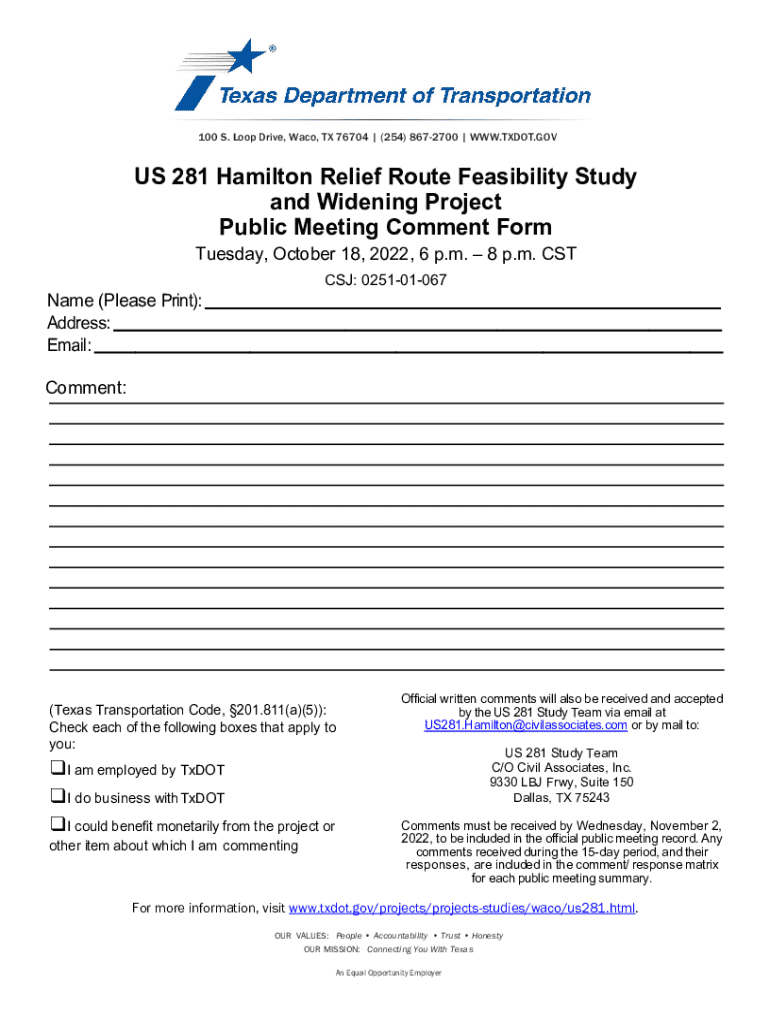
8 p.m. CST CSJ: 0251-01-067 Name (Please Print): Address: Email: Comment: (Texas Transportation Code, 201.811(a)(5)): Check each of the following boxes that apply to you: I am employed by TxDOT I do business with TxDOT I could bene t monetarily from the pr.
Loading

Open form follow the instructions

Easily sign the form with your finger

Send filled & signed form or save
How to fill out and sign TX Public Meeting Comment Form online?
Get your online template and fill it in using progressive features. Enjoy smart fillable fields and interactivity.Follow the simple instructions below:
Feel all the key benefits of completing and submitting forms on the internet. With our solution submitting TX Public Meeting Comment Form requires just a couple of minutes. We make that possible by offering you access to our full-fledged editor effective at changing/fixing a document?s initial text, inserting unique fields, and e-signing.
Complete TX Public Meeting Comment Form within a few moments following the recommendations listed below:
- Pick the document template you want from the library of legal forms.
- Choose the Get form button to open it and begin editing.
- Fill out all of the necessary fields (these are yellow-colored).
- The Signature Wizard will allow you to add your electronic autograph right after you?ve finished imputing info.
- Add the relevant date.
- Double-check the entire form to be certain you have filled out everything and no corrections are required.
- Press Done and download the resulting document to your gadget.
Send your new TX Public Meeting Comment Form in a digital form when you are done with completing it. Your information is securely protected, since we adhere to the newest security standards. Join numerous satisfied users that are already completing legal documents right from their homes.
Tips on how to fill out, edit and sign TX Public Meeting Comment Form online
How to fill and sign TX Public Meeting Comment Form
Get your online template and fill it in using progressive features. Enjoy smart fillable fields and interactivity.Follow the simple instructions below:
Feel all the key benefits of completing and submitting forms on the internet. With our solution submitting TX Public Meeting Comment Form requires just a couple of minutes. We make that possible by offering you access to our full-fledged editor effective at changing/fixing a document?s initial text, inserting unique fields, and e-signing.
Complete TX Public Meeting Comment Form within a few moments following the recommendations listed below:
- Pick the document template you want from the library of legal forms.
- Choose the Get form button to open it and begin editing.
- Fill out all of the necessary fields (these are yellow-colored).
- The Signature Wizard will allow you to add your electronic autograph right after you?ve finished imputing info.
- Add the relevant date.
- Double-check the entire form to be certain you have filled out everything and no corrections are required.
- Press Done and download the resulting document to your gadget.
Send your new TX Public Meeting Comment Form in a digital form when you are done with completing it. Your information is securely protected, since we adhere to the newest security standards. Join numerous satisfied users that are already completing legal documents right from their homes.
How to edit TX Public Meeting Comment Form
Eliminate the mess from your paperwork routine. Discover the most effective way to find and edit, and file a TX Public Meeting Comment Form
The process of preparing TX Public Meeting Comment Form demands precision and attention, especially from those who are not well familiar with such a job. It is essential to get a suitable template and fill it in with the correct information. With the proper solution for processing paperwork, you can get all the instruments at hand. It is easy to streamline your editing process without learning new skills. Identify the right sample of TX Public Meeting Comment Form and fill it out immediately without switching between your browser tabs. Discover more instruments to customize your TX Public Meeting Comment Form form in the editing mode.
While on the TX Public Meeting Comment Form page, simply click the Get form button to start editing it. Add your details to the form on the spot, as all the needed instruments are at hand right here. The sample is pre-designed, so the work required from the user is minimal. Use the interactive fillable fields in the editor to easily complete your paperwork. Simply click on the form and proceed to the editor mode without delay. Fill in the interactive field, and your document is good to go.
Try more instruments to customize your form:
- Place more textual content around the document if needed. Use the Text and Text Box instruments to insert text in a separate box.
- Add pre-designed graphic elements like Circle, Cross, and Check with respective instruments.
- If needed, capture or upload images to the document with the Image tool.
- If you need to draw something in the document, use Line, Arrow, and Draw instruments.
- Try the Highlight, Erase, and Blackout tools to customize the text in the document.
- If you need to add comments to specific document parts, click the Sticky tool and place a note where you want.
Often, a small error can ruin the whole form when someone fills it by hand. Forget about inaccuracies in your paperwork. Find the samples you need in moments and finish them electronically via a smart editing solution.
How to fill and sign TX Public Meeting Comment Form
Get your online template and fill it in using progressive features. Enjoy smart fillable fields and interactivity.Follow the simple instructions below:
Feel all the key benefits of completing and submitting forms on the internet. With our solution submitting TX Public Meeting Comment Form requires just a couple of minutes. We make that possible by offering you access to our full-fledged editor effective at changing/fixing a document?s initial text, inserting unique fields, and e-signing.
Complete TX Public Meeting Comment Form within a few moments following the recommendations listed below:
- Pick the document template you want from the library of legal forms.
- Choose the Get form button to open it and begin editing.
- Fill out all of the necessary fields (these are yellow-colored).
- The Signature Wizard will allow you to add your electronic autograph right after you?ve finished imputing info.
- Add the relevant date.
- Double-check the entire form to be certain you have filled out everything and no corrections are required.
- Press Done and download the resulting document to your gadget.
Send your new TX Public Meeting Comment Form in a digital form when you are done with completing it. Your information is securely protected, since we adhere to the newest security standards. Join numerous satisfied users that are already completing legal documents right from their homes.
Experience a faster way to fill out and sign forms on the web. Access the most extensive library of templates available.
Related content
Mar 19, 2024 — Comments may be sent by: Mail: TxDOT Pharr District Office. Email:...
(1) At each regular board meeting, the board shall allow an open comment period to receive...
Apr 27, 2011 — Public comment period for 60-Day Federal Register Notice. (60 days)...
Get answers to your most pressing questions about US Legal Forms API.
What is the public comment law in Texas?
The public comment law in Texas mandates that government bodies must allow citizens to speak during meetings. This law is designed to promote transparency and ensure that the public's voice is considered in decision-making processes. The TX Public Meeting Comment Form simplifies the process of sharing your thoughts and is essential for active civic participation.
What is public comment in a meeting?
Public comment in a meeting refers to a designated time when attendees can express their opinions, concerns, or support regarding agenda items. This process fosters community engagement and accountability from officials. To effectively communicate your views, the TX Public Meeting Comment Form provides a structured way to submit your comments.
What is the purple law in Texas?
The 'purple law' in Texas refers to a set of regulations that govern the rights of residents in property owner associations. It's essential for protecting homeowners, ensuring their voices are heard in association matters. By using the TX Public Meeting Comment Form, you can actively participate and influence decisions that affect your community.
What is the public comment Texas Open Meetings Act?
The Texas Open Meetings Act allows citizens to attend and participate in public meetings, promoting transparency in government actions. It provides guidelines on how public comments should be collected and addressed. The TX Public Meeting Comment Form is a valuable tool for individuals wishing to submit their comments for consideration during these meetings.
What is the 92.109 law in Texas?
The 92.109 law in Texas deals with the procedures for public meetings regarding property owners' associations. It ensures that members are given the opportunity to voice their concerns and suggestions. Utilizing the TX Public Meeting Comment Form can greatly enhance community engagement on these matters.
What is the 92.056 law in Texas?
The 92.056 law in Texas pertains to the requirements for public meeting notifications. It mandates that local governments provide timely notice of meetings to ensure public participation. This rule connects directly to the TX Public Meeting Comment Form, which allows citizens to express their opinions during these meetings.
How to start a public comment?
Starting your public comment effectively sets the stage for your message. Begin with a brief introduction of who you are and your reason for speaking. You might say, 'My name is Your Name, and I want to discuss the importance of Topic.' Using the TX Public Meeting Comment Form can assist in structuring your thoughts clearly for the audience.
What to say at a city council meeting?
When addressing a city council, it's important to clearly state your position and provide relevant information. Begin by introducing yourself and your topic, then share your thoughts or concerns backed by facts. Using the TX Public Meeting Comment Form can help you organize your comments effectively, making a strong impact on council members.
What restrictions can the government put on speakers during a public comment period in a meeting?
Governments can set certain guidelines for speakers during a public comment period to ensure order and respect. They may limit the time each speaker has to address the group, enforce rules about disruptive behavior, or require speakers to stay on topic. The TX Public Meeting Comment Form often outlines these restrictions, helping you understand what to expect when you speak at a meeting.
How to write a public comment?
Writing a public comment should involve clear and concise statements that address specific agenda items. Start by stating your main point, followed by supporting arguments or examples. Using the TX Public Meeting Comment Form can help organize your thoughts and make it easier to communicate your message effectively.
Use professional pre-built templates to fill in and sign documents online faster. Get access to thousands of forms.
If you believe that this page should be taken down, please follow our DMCA take down process here.