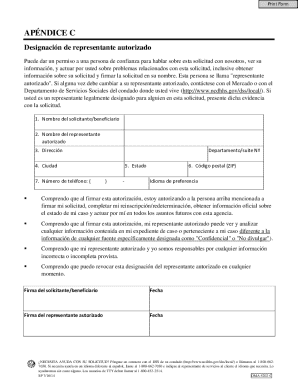
Ed sobre problemas relacionados con esta solicitud, inclusive obtener informaci n sobre su solicitud y firmar la solicitud en su nombre. Esta persona se llama "representante autorizado". Si alguna vez debe cambiar a su representante autorizado, cont ctese con el Mercado o con el Departamento de Servicios Sociales del condado donde usted vive (http://www.ncdhhs.gov/dss/local/). Si usted es un representante legalmente designado para alguien en esta solicitud, presente dicha evidencia con la soli.
Open form follow the instructions
Easily sign the form with your finger
Send filled & signed form or save
How to fill out and sign NC DMA-5202-C SP online?
Get your online template and fill it in using progressive features. Enjoy smart fillable fields and interactivity.Follow the simple instructions below:
Feel all the benefits of completing and submitting legal documents on the internet. Using our platform completing NC DMA-5202-C SP will take a matter of minutes. We make that possible by offering you access to our full-fledged editor capable of changing/correcting a document?s initial textual content, adding unique fields, and putting your signature on.
Complete NC DMA-5202-C SP within a couple of minutes following the recommendations below:
- Find the template you want from our library of legal form samples.
- Click on the Get form button to open the document and begin editing.
- Fill in all of the required boxes (they are yellow-colored).
- The Signature Wizard will help you add your e-autograph after you have finished imputing info.
- Put the relevant date.
- Double-check the entire form to make certain you?ve filled out all the data and no corrections are needed.
- Click Done and save the ecompleted form to the computer.
Send your NC DMA-5202-C SP in a digital form when you are done with completing it. Your information is well-protected, as we adhere to the latest security criteria. Become one of numerous happy clients who are already completing legal forms right from their apartments.
Tips on how to fill out, edit and sign NC DMA-5202-C SP online
How to fill and sign NC DMA-5202-C SP
Get your online template and fill it in using progressive features. Enjoy smart fillable fields and interactivity.Follow the simple instructions below:
Feel all the benefits of completing and submitting legal documents on the internet. Using our platform completing NC DMA-5202-C SP will take a matter of minutes. We make that possible by offering you access to our full-fledged editor capable of changing/correcting a document?s initial textual content, adding unique fields, and putting your signature on.
Complete NC DMA-5202-C SP within a couple of minutes following the recommendations below:
- Find the template you want from our library of legal form samples.
- Click on the Get form button to open the document and begin editing.
- Fill in all of the required boxes (they are yellow-colored).
- The Signature Wizard will help you add your e-autograph after you have finished imputing info.
- Put the relevant date.
- Double-check the entire form to make certain you?ve filled out all the data and no corrections are needed.
- Click Done and save the ecompleted form to the computer.
Send your NC DMA-5202-C SP in a digital form when you are done with completing it. Your information is well-protected, as we adhere to the latest security criteria. Become one of numerous happy clients who are already completing legal forms right from their apartments.
How to edit NC DMA-5202-C SP
Forget an old-fashioned paper-based way of completing NC DMA-5202-C SP. Have the document completed and certified in no time with our professional online editor.
Are you challenged to change and fill out NC DMA-5202-C SP? With a professional editor like ours, you can complete this in only minutes without the need to print and scan papers back and forth. We provide you with fully editable and straightforward document templates that will become a start and help you fill out the necessary document template online.
All forms, by default, contain fillable fields you can complete once you open the form. However, if you need to polish the existing content of the form or insert a new one, you can choose from various editing and annotation options. Highlight, blackout, and comment on the text; add checkmarks, lines, text boxes, graphics and notes, and comments. Moreover, you can quickly certify the form with a legally-binding signature. The completed form can be shared with others, stored, sent to external programs, or converted into any popular format.
You’ll never go wrong by choosing our web-based solution to complete NC DMA-5202-C SP because it's:
- Straightforward to set up and utilize, even for users who haven’t completed the paperwork online in the past.
- Robust enough to accommodate multiple editing needs and document types.
- Safe and secure, making your editing experience safeguarded every time.
- Available for various operating systems, making it effortless to complete the document from just about anywhere.
- Capable of generating forms based on ready-drafted templates.
- Compatible with numerous document formats: PDF, DOC, DOCX, PPT and JPEG etc.
Don't spend time completing your NC DMA-5202-C SP obsolete way - with pen and paper. Use our full-featured tool instead. It provides you with a comprehensive set of editing options, built-in eSignature capabilities, and convenience. What makes it stand out is the team collaboration capabilities - you can collaborate on documents with anyone, build a well-structured document approval flow from the ground up, and a lot more. Try our online tool and get the best bang for your buck!
How to fill and sign NC DMA-5202-C SP
Get your online template and fill it in using progressive features. Enjoy smart fillable fields and interactivity.Follow the simple instructions below:
Feel all the benefits of completing and submitting legal documents on the internet. Using our platform completing NC DMA-5202-C SP will take a matter of minutes. We make that possible by offering you access to our full-fledged editor capable of changing/correcting a document?s initial textual content, adding unique fields, and putting your signature on.
Complete NC DMA-5202-C SP within a couple of minutes following the recommendations below:
- Find the template you want from our library of legal form samples.
- Click on the Get form button to open the document and begin editing.
- Fill in all of the required boxes (they are yellow-colored).
- The Signature Wizard will help you add your e-autograph after you have finished imputing info.
- Put the relevant date.
- Double-check the entire form to make certain you?ve filled out all the data and no corrections are needed.
- Click Done and save the ecompleted form to the computer.
Send your NC DMA-5202-C SP in a digital form when you are done with completing it. Your information is well-protected, as we adhere to the latest security criteria. Become one of numerous happy clients who are already completing legal forms right from their apartments.
Experience a faster way to fill out and sign forms on the web. Access the most extensive library of templates available.
Related content
dma-5202Csp-ia Apéndice C – Designación de representante autorizado. Open ... NC...
Nov 2, 2023 — The Academic Catalog describes the educational programs of Brewton-Parker...
Vector interrupts: 7 (external: 3, internal: 4), • Test inputs: 2 (external: 1...
Get answers to your most pressing questions about US Legal Forms API.
What documents are needed to apply for Medicaid in NC?
When applying for Medicaid in North Carolina, specifically with the NC DMA-5202-C SP, you will need essential documents such as proof of income, identification cards, and proof of residency. Additionally, you may need documents that verify household size or any disability information if applicable. Preparing these documents ahead of time ensures a smoother application experience.
How hard is it to get Medicaid in North Carolina?
Obtaining Medicaid in North Carolina, particularly with the NC DMA-5202-C SP, can range in difficulty depending on individual circumstances. Some applicants find the process straightforward, especially if they have clear documentation and meet eligibility criteria. However, if you encounter challenges, platforms like uslegalforms can provide guidance and resources to assist you in navigating the process effectively.
How long does it take for NC Medicaid to be approved?
The approval process for NC Medicaid can vary, but it generally takes about 45 days once you submit the NC DMA-5202-C SP application. Factors such as the completeness of your documentation and current caseloads can affect the timeline. To avoid delays, ensure all your documents are submitted accurately. This diligence can lead to a smoother approval process.
What is NC Medicaid called now?
Currently, NC Medicaid is often referred to as the NC DMA-5202-C SP. This name reflects the new structure and procedures for administering Medicaid services in North Carolina. Understanding this change can help applicants navigate the system more effectively. Staying informed will enhance your experience while applying.
What documents do I need to apply for NC Medicaid?
To apply for NC Medicaid using the NC DMA-5202-C SP, you need specific documents. Generally, you will require proof of income, identification, and residency. Additionally, providing documentation related to your household size is essential. Having these documents ready will streamline the application process.
How to find NC Medicaid ID number?
To locate your NC Medicaid ID number, check your Medicaid card or any official correspondence regarding your benefits. If you cannot find it, you can call NC Medicaid support for help. Having your ID number handy ensures you can quickly access services and benefits. Using resources from uslegalforms can also guide you through the steps to retrieve this important information.
What is North Carolina's DMA?
The DMA, or Division of Medical Assistance, oversees the Medicaid program in North Carolina. It is responsible for administering Medicaid services and ensuring compliance with federal and state regulations. Understanding the role of the NC DMA-5202-C SP can help you navigate the Medicaid system more effectively. Consider checking out resources on the uslegalforms platform for further clarity.
How do I find my NC Medicaid ID number?
You can find your NC Medicaid ID number on your Medicaid card or in the documentation you received when you were approved for Medicaid. Additionally, you can contact the NC Medicaid customer service for assistance. Always keep this number secure, as it is vital for accessing your benefits. Using uslegalforms, you can find resources to help manage your Medicaid information effectively.
What is the website to apply for NC Medicaid?
The primary website to apply for NC Medicaid is managed by the NC DMA-5202-C SP program. This site offers comprehensive information regarding eligibility, application forms, and answers to common questions. Visit the official site to start your application, where you can also find additional resources to guide you through the Medicaid application process.
How to apply for emergency Medicaid in NC online?
Applying for emergency Medicaid in North Carolina online is straightforward. You can visit the NC DMA-5202-C SP website, where an online application is available for your convenience. Complete the form, providing all necessary details about your situation and any supporting documentation required. This approach will help streamline your application process and enable you to receive assistance faster.
Use professional pre-built templates to fill in and sign documents online faster. Get access to thousands of forms.
If you believe that this page should be taken down, please follow our DMCA take down process here.