Loading
Form preview
  • US Legal Forms
  • Other Templates
  • More Forms
  • More Multi-State Forms
  • Nc Service Provider Roster 2024

Get Nc Service Provider Roster 2024-2026

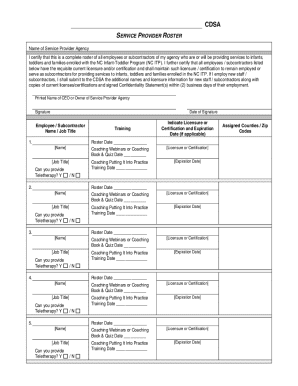
Toddlers and families enrolled with the NC Infant-Toddler Program (NC ITP). I further certify that all employees / subcontractors listed below have the requisite current licensure and/or certification and shall maintain such licensure / certification to remain employed or serve as subcontractors for providing services to infants, toddlers and families enrolled in the NC ITP. If I employ new staff / subcontractors, I shall submit to the CDSA the additional names and licensure information for new.

How it works

  1. Open form

    Open form follow the instructions

  2. Easily sign form

    Easily sign the form with your finger

  3. Share form

    Send filled & signed form or save

How to fill out and sign NC Service Provider Roster online?

Get your online template and fill it in using progressive features. Enjoy smart fillable fields and interactivity.Follow the simple instructions below:

Experience all the key benefits of completing and submitting legal documents on the internet. With our solution submitting NC Service Provider Roster usually takes a couple of minutes. We make that achievable by offering you access to our feature-rich editor capable of changing/fixing a document?s initial textual content, adding special fields, and e-signing.

Complete NC Service Provider Roster within a couple of moments following the instructions below:

  1. Select the document template you need from our collection of legal forms.
  2. Click the Get form key to open it and begin editing.
  3. Fill out all of the required fields (these are yellow-colored).
  4. The Signature Wizard will help you add your e-autograph right after you?ve finished imputing data.
  5. Put the relevant date.
  6. Look through the entire document to make certain you have completed everything and no changes are required.
  7. Click Done and download the resulting template to your computer.

Send the new NC Service Provider Roster in an electronic form when you are done with completing it. Your information is securely protected, since we keep to the most up-to-date security requirements. Become one of numerous satisfied clients who are already filling out legal forms from their homes.

Tips on how to fill out, edit and sign NC Service Provider Roster online

How to fill out and sign NC Service Provider Roster online?

Get your online template and fill it in using progressive features. Enjoy smart fillable fields and interactivity.Follow the simple instructions below:

Experience all the key benefits of completing and submitting legal documents on the internet. With our solution submitting NC Service Provider Roster usually takes a couple of minutes. We make that achievable by offering you access to our feature-rich editor capable of changing/fixing a document?s initial textual content, adding special fields, and e-signing.

Complete NC Service Provider Roster within a couple of moments following the instructions below:

  1. Select the document template you need from our collection of legal forms.
  2. Click the Get form key to open it and begin editing.
  3. Fill out all of the required fields (these are yellow-colored).
  4. The Signature Wizard will help you add your e-autograph right after you?ve finished imputing data.
  5. Put the relevant date.
  6. Look through the entire document to make certain you have completed everything and no changes are required.
  7. Click Done and download the resulting template to your computer.

Send the new NC Service Provider Roster in an electronic form when you are done with completing it. Your information is securely protected, since we keep to the most up-to-date security requirements. Become one of numerous satisfied clients who are already filling out legal forms from their homes.

How to edit NC Service Provider Roster: customize forms online

Approve and share NC Service Provider Roster along with any other business and personal documentation online without wasting time and resources on printing and postal delivery. Take the most out of our online form editor with a built-in compliant eSignature option.

Signing and submitting NC Service Provider Roster documents electronically is faster and more effective than managing them on paper. However, it requires employing online solutions that guarantee a high level of data safety and provide you with a compliant tool for creating eSignatures. Our powerful online editor is just the one you need to prepare your NC Service Provider Roster and other individual and business or tax forms in an accurate and suitable way in line with all the requirements. It features all the necessary tools to quickly and easily fill out, adjust, and sign documentation online and add Signature fields for other people, specifying who and where should sign.

It takes only a few simple steps to complete and sign NC Service Provider Roster online:

  1. Open the selected file for further managing.
  2. Utilize the upper panel to add Text, Initials, Image, Check, and Cross marks to your sample.
  3. Underline the most significant details and blackout or remove the sensitive ones if required.
  4. Click on the Sign option above and choose how you prefer to eSign your form.
  5. Draw your signature, type it, upload its image, or use another option that suits you.
  6. Move to the Edit Fillable Fileds panel and place Signature fields for others.
  7. Click on Add Signer and provide your recipient’s email to assign this field to them.
  8. Check that all information provided is complete and correct before you click Done.
  9. Share your paperwork with others using one of the available options.

When approving NC Service Provider Roster with our extensive online editor, you can always be sure to get it legally binding and court-admissible. Prepare and submit documentation in the most beneficial way possible!

Get form

Experience a faster way to fill out and sign forms on the web. Access the most extensive library of templates available.
Get form

Related content

cdsa service provider roster
SERVICE PROVIDER ROSTER. Name of Service Provider Agency. I certify that this is a...
Learn more
NCSEAA Approved Provider Registrations (as of...
Provider Name. Email Address. Company Name. NC Location. ESA. DGrants. Shufran, Kim...
Learn more
AXIS A9161 Network I/O Relay Module - CSD
To set up an email recipient using one of the listed providers: 1. Go to Events >...
Learn more

Related links form

GA IT-711 2024 CA Application For Business Tax Registration Certificate - City Of Los Angeles 2023 IA 44-095 2023 NY TR-579-PT 2024

Questions & Answers

Get answers to your most pressing questions about US Legal Forms API.

Contact support

A provider roster is a comprehensive list that details all healthcare providers available within a specific network, such as the NC Service Provider Roster. This roster helps you identify which practitioners are part of your insurance plan or healthcare services. By consulting the provider roster, you can easily select qualified professionals for the care you need. It's an essential element in managing your healthcare journey efficiently.

A company roster is a structured list of employees within an organization, outlining their roles and contact information. Similar to the NC Service Provider Roster, it helps in managing interactions and responsibilities efficiently. Understanding how to access this information facilitates better communication within the company. You can be assured of a streamlined process when you seek assistance.

An example of a roster can be seen in a healthcare setting where a list of doctors, nurses, and specialists is compiled for reference. The NC Service Provider Roster serves this exact purpose by detailing available healthcare providers. Having access to such information improves your ability to choose suitable healthcare professionals. It ensures that your needs are met with the right expertise.

A provider is typically defined as an individual or organization that delivers healthcare services to patients. This includes doctors, nurses, clinics, and hospitals. In the context of the NC Service Provider Roster, providers are listed to ensure you have access to quality services. Knowing who qualifies as a provider allows you to effectively navigate your healthcare options.

In medical terms, a roster refers to a list of healthcare providers who are authorized to deliver services within a specific network. The NC Service Provider Roster includes various professionals, such as doctors and therapists, ensuring that patients can access qualified care. This organizational tool improves patient trust and care coordination. Understanding the roster helps you make informed decisions about your healthcare.

To reach NC DHHs customer service, you can visit their official website where you will find a contact form and phone number. This makes it easy for you to ask about the NC Service Provider Roster or other services. Customer service representatives are available during business hours to help you with any inquiries. Don’t hesitate to utilize these resources for prompt assistance.

To become a Medicaid transportation provider in NC, follow the application process outlined by the NC Service Provider Roster. Gather the required documentation, including valid credentials and insurance details. After submitting your application, you will undergo a review by the state to ensure you meet the necessary qualifications. Following approval, you can expand your services to include Medicaid patients, enhancing your business opportunities.

You can contact NCTracks customer service by visiting their website and using the contact form provided. Additionally, you may reach them through their helpline, where representatives are available to assist you with any inquiries related to the NC Service Provider Roster. Consider having your provider number handy for quicker assistance if you need to discuss specific issues.

To become a Medicaid transportation provider in NC, you must apply through the NC Service Provider Roster. First, gather necessary documentation, including proof of insurance and your business credentials. Submit your application and wait for approval, which typically involves a review process to ensure compliance with Medicaid regulations. Once accepted, you can start providing transportation services for Medicaid patients.

To check your eligibility in NC TRACK, visit the official NCTracks website and log in to your account. Once logged in, navigate to the appropriate section to review your eligibility status. This process showcases your alignment with the NC Service Provider Roster requirements. If you encounter issues, consider contacting customer support for assistance with any technical difficulties.

Get This Form Now!

Use professional pre-built templates to fill in and sign documents online faster. Get access to thousands of forms.
Get form
If you believe that this page should be taken down, please follow our DMCA take down processhere.
Get NC Service Provider Roster
Get form
  • Adoption
  • Bankruptcy
  • Contractors
  • Divorce
  • Home Sales
  • Employment
  • Identity Theft
  • Incorporation
  • Landlord Tenant
  • Living Trust
  • Name Change
  • Personal Planning
  • Small Business
  • Wills & Estates
  • Packages A-Z
  • Affidavits
  • Bankruptcy
  • Bill of Sale
  • Corporate - LLC
  • Divorce
  • Employment
  • Identity Theft
  • Internet Technology
  • Landlord Tenant
  • Living Wills
  • Name Change
  • Power of Attorney
  • Real Estate
  • Small Estates
  • Wills
  • All Forms
  • Forms A-Z
  • Other Templates
  • Legal Hub
  • About Us
  • Help Portal
  • Legal Resources
  • Blog
  • Affiliates
  • Contact Us
  • Delete My Account
  • Site Map
  • Industries
  • Forms in Spanish
  • Localized Forms
  • State-specific Forms
  • Forms Kit
  • Real Estate Handbook
  • All Guides
  • Notarize
  • Incorporation services
  • For Consumers
  • For Small Business
  • For Attorneys
  • USLegal
  • FormsPass
  • pdfFiller
  • signNow
  • altaFlow
  • DocHub
  • Instapage
Form Packages
  • Adoption
  • Bankruptcy
  • Contractors
  • Divorce
  • Home Sales
  • Employment
  • Identity Theft
  • Incorporation
  • Landlord Tenant
  • Living Trust
  • Name Change
  • Personal Planning
  • Small Business
  • Wills & Estates
  • Packages A-Z
Form Categories
  • Affidavits
  • Bankruptcy
  • Bill of Sale
  • Corporate - LLC
  • Divorce
  • Employment
  • Identity Theft
  • Internet Technology
  • Landlord Tenant
  • Living Wills
  • Name Change
  • Power of Attorney
  • Real Estate
  • Small Estates
  • Wills
  • All Forms
  • Forms A-Z
  • Other Templates
Customer Service
  • Legal Hub
  • About Us
  • Help Portal
  • Legal Resources
  • Blog
  • Affiliates
  • Contact Us
  • Delete My Account
  • Site Map
  • Industries
  • Forms in Spanish
  • Localized Forms
  • State-specific Forms
  • Forms Kit
Legal Guides
  • Real Estate Handbook
  • All Guides
Prepared for you
  • Notarize
  • Incorporation services
Our Customers
  • For Consumers
  • For Small Business
  • For Attorneys
Our Sites
  • USLegal
  • FormsPass
  • pdfFiller
  • signNow
  • altaFlow
  • DocHub
  • Instapage
Social Media
Call us now toll free:
+1 833 426 79 33
As seen in:
© Copyright 1999-2026 airSlate Legal Forms, Inc. 17 Station Street, Ste. 203, Brookline, MA 02445
  • Your Privacy Choices
  • Terms of Service
  • Privacy Notice
  • Content Takedown Policy
  • Bug Bounty Program