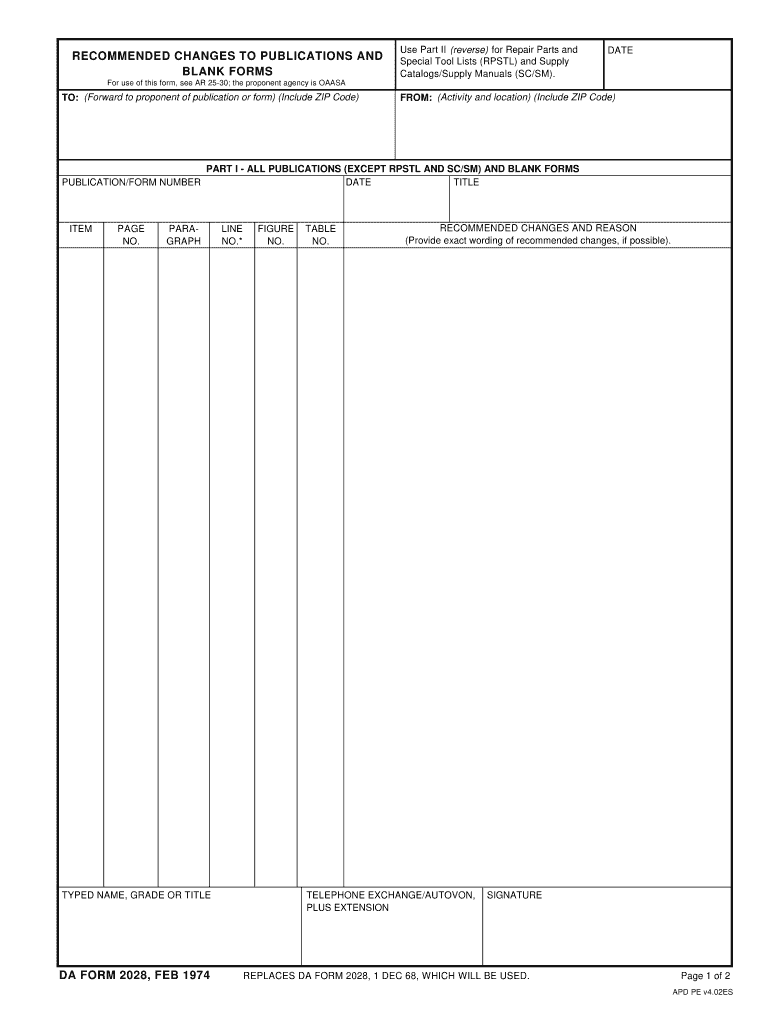
TELEPHONE EXCHANGE/AUTOVON PLUS EXTENSION SIGNATURE REPLACES DA FORM 2028 1 DEC 68 WHICH WILL BE USED. FROM Activity and location Include ZIP Code PART I - ALL PUBLICATIONS EXCEPT RPSTL AND SC/SM AND BLANK FORMS TITLE PARAGRAPH TYPED NAME GRADE OR TITLE DA FORM 2028 FEB 1974 LINE FIGURE TABLE Provide exact wording of recommended changes if possible. RECOMMENDED CHANGES TO PUBLICATIONS AND BLANK FORMS Use Part II reverse for Repair Parts and Special Tool Lists RPSTL and Supply Catalogs/Supply Manuals SC/SM. DATE For use of this form see AR 25-30 the proponent agency is OAASA TO Forward to proponent of publication or form Include ZIP Code PUBLICATION/FORM NUMBER ITEM PAGE NO. Page 1 of 2 APD PE v4. 02ES TO Forward direct to addressee listed in publication PART II - REPAIR PARTS AND SPECIAL TOOL LISTS AND SUPPLY CATALOGS/SUPPLY MANUALS PUBLICATION NUMBER COLM NATIONAL STOCK NUMBER REFERENCE TOTAL NO. OF MAJOR SUPPORTED RECOMMENDED ACTION PART III - REMARKS Any general remarks or recommend....
Loading

Open form follow the instructions

Easily sign the form with your finger

Send filled & signed form or save
How to fill out the DA 2028 online
Filling out the DA 2028 form online can streamline your communication regarding recommended changes to publications and blank forms. This guide provides step-by-step instructions to ensure a smooth process as you complete the required fields.
Follow the steps to successfully complete the DA 2028 online.
- Click ‘Get Form’ button to access the DA 2028 form and open it in your preferred online editor.
- In the 'To' section, provide the name and ZIP code of the individual or agency to whom you are forwarding the form. Be sure to ensure accurate details to facilitate proper processing.
- In the 'Publication/Form Number' field, enter the relevant number that corresponds to the document you are commenting on.
- Fill in the 'Item' and 'Page No.' fields with the specific details to clarify your recommendations.
- In the 'From' section, input your activity name and location, including your ZIP code to help recipients identify the source of the feedback.
- Proceed to Part I, where you will detail the recommended changes. Specify the date, title, paragraph, and line number related to your suggestion.
- Clearly type your 'Recommended Changes and Reason' in the designated area. Provide exact wording where possible for clarity.
- Include your telephone exchange/AUTOVON plus extension and your signature to authenticate your submission.
- If your feedback pertains to repair parts or supply catalogs, proceed to Part II and repeat steps similar to those in Part I, filling in relevant fields as needed.
- In Part III, you may add any additional remarks or general suggestions for the improvement of the publications and blank forms.
- After completing all sections, review your entries for accuracy before saving changes. You can then download, print, or share the formed document as necessary.
Start completing your DA 2028 online today and ensure your suggestions are heard.
Experience a faster way to fill out and sign forms on the web. Access the most extensive library of templates available.
Related content
Sep 4, 2025 — A iniciativa – que promoverá a escala global na produção e...
Calendário. Página inicial; março 2028. Mês. Mês; Dia; Próximos eventos. ←...
Verificação da reserva de energia. 1. Empurre a coroa para a posição 0. 2. Pressione e...
Get answers to your most pressing questions about US Legal Forms API.
What is a DA form 2028 used for?
DA Form 2028 is used to recommend changes to published forms and publications. This form allows users to suggest enhancements and provide feedback so that the Army can improve its resources. Utilizing the DA 2028 helps maintain effective communication about needs and suggestions within the Army. For more insight on this form, uslegalforms has useful tools and templates to assist you.
What is a DA form 4187 used for?
The DA Form 4187 is utilized for various personnel actions, such as requests for personnel changes and adjustments in assignments. This form is crucial in managing human resource activities effectively within the Army. Ensuring it's filled out correctly can help streamline the approval processes. For guidance on completing the DA Form 4187, visit USLegalForms for valuable templates.
What is DA form 2062 used for?
DA Form 2062 is used to record a hand receipt for property accountability. It helps keep track of government property issued to soldiers, ensuring responsible stewardship. By using this form, units can maintain accurate inventory and reduce losses. For templates and support related to DA Form 2062, check USLegalForms, where resources are available.
How to fill out new DA Form 31?
To fill out the new DA Form 31, start by entering your personal data at the top of the form. Next, provide your leave information, including the type of leave and dates, and ensure that your supervisor approves it. This process helps streamline the leave management within your unit. For easy access to this form and related details, visit USLegalForms.
What is DA form 3078 used for?
DA Form 3078, known as the Personal Clothing Summary, helps soldiers keep track of their clothing issue and personal clothing inventory. This form ensures that soldiers maintain proper uniform regulations and manage their clothing supplies effectively. To assist with understanding this form, visit USLegalForms for templates and guidance that can simplify the process.
What is the DA form 7708 used for?
The DA Form 7708, also known as the Brigade Combat Team Reporting Form, serves as a tool for reporting specific combat capabilities and personnel assignments. This form is essential for maintaining accurate records of units during operations. By using the DA Form 7708, commanders can ensure they have the right data for efficient decision-making. For additional resources, check out USLegalForms for more information.
How to fill out a DA Form 200?
Filling out a DA Form 200 requires attention to detail. Start by entering the required information in the appropriate sections of the form. Ensure that you include your unit information, item description, and any related document numbers. For a comprehensive guide on completing this form, consider visiting USLegalForms, where you can find templates and resources to help you.
What is DA Form 2028?
DA Form 2028 is a form used within the Army to submit requests for changes or improvements to existing documents and publications. This form facilitates feedback on Army materials, allowing units to suggest updates based on their operational experiences. Utilizing tools like USLegalForms can streamline the process of completing DA Form 2028, ensuring all feedback is carefully recorded and processed.
What is the Army vision 2028?
The Army vision 2028 articulates a future where the Army is a highly capable, modern force ready to meet national defense needs. It emphasizes leadership, operational effectiveness, and innovative solutions to emerging challenges. By providing clear goals and outcomes, this vision serves as a guiding document emphasizing preparedness for the realities laid out in DA 2028.
What is the National Defense Strategy 2028?
The National Defense Strategy 2028 establishes the blueprint for U.S. military readiness and global engagement for the next decade. It stresses the importance of deterrence and emphasizes preparing for a range of diverse threats. The framework also aligns resources and strategies to ensure that national defense priorities address the challenges outlined in DA 2028.
Use professional pre-built templates to fill in and sign documents online faster. Get access to thousands of forms.
If you believe that this page should be taken down, please follow our DMCA take down process here.