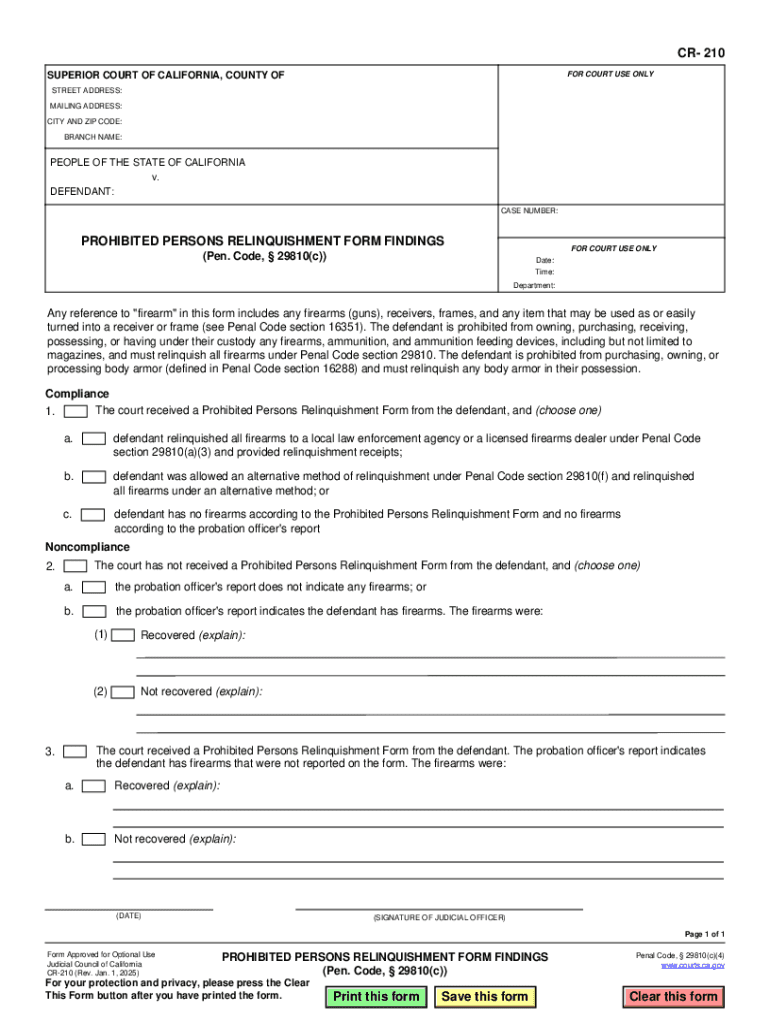
TED PERSONS RELINQUISHMENT FORM FINDINGS FOR COURT USE ONLY (Pen. Code, 29810(c)) Date: Time: Department: Any reference to "firearm" in this form includes any firearms (guns), receivers, frames, and any item that may be used as or easily turned into a receiver or frame (see Penal Code section 16351). The defendant is prohibited from owning, purchasing, receiving, possessing, or having under their custody any firearms, ammunition, and ammunition feeding devices, including but not limited t.

Open form follow the instructions

Easily sign the form with your finger

Send filled & signed form or save
How to fill out and sign CA CR-210 online?
Get your online template and fill it in using progressive features. Enjoy smart fillable fields and interactivity.Follow the simple instructions below:
The preparing of legal documents can be high-priced and time-consuming. However, with our preconfigured online templates, everything gets simpler. Now, creating a CA CR-210 requires at most 5 minutes. Our state-specific browser-based samples and simple recommendations eradicate human-prone mistakes.
Follow our easy steps to have your CA CR-210 well prepared quickly:
- Find the template in the catalogue.
- Enter all required information in the required fillable areas. The intuitive drag&drop user interface allows you to include or relocate areas.
- Check if everything is completed correctly, without typos or missing blocks.
- Place your electronic signature to the PDF page.
- Simply click Done to save the adjustments.
- Download the papers or print out your copy.
- Submit instantly towards the recipient.
Use the quick search and advanced cloud editor to generate a correct CA CR-210. Clear away the routine and make papers on the web!
Tips on how to fill out, edit and sign CA CR-210 online
How to fill and sign CA CR-210
Get your online template and fill it in using progressive features. Enjoy smart fillable fields and interactivity.Follow the simple instructions below:
The preparing of legal documents can be high-priced and time-consuming. However, with our preconfigured online templates, everything gets simpler. Now, creating a CA CR-210 requires at most 5 minutes. Our state-specific browser-based samples and simple recommendations eradicate human-prone mistakes.
Follow our easy steps to have your CA CR-210 well prepared quickly:
- Find the template in the catalogue.
- Enter all required information in the required fillable areas. The intuitive drag&drop user interface allows you to include or relocate areas.
- Check if everything is completed correctly, without typos or missing blocks.
- Place your electronic signature to the PDF page.
- Simply click Done to save the adjustments.
- Download the papers or print out your copy.
- Submit instantly towards the recipient.
Use the quick search and advanced cloud editor to generate a correct CA CR-210. Clear away the routine and make papers on the web!
How to edit CA CR-210
Sign and share CA CR-210 together with any other business and personal paperwork online without wasting time and resources on printing and postal delivery. Take the most out of our online document editor using a built-in compliant eSignature tool.
Approving and submitting CA CR-210 documents electronically is quicker and more productive than managing them on paper. However, it requires employing online solutions that guarantee a high level of data security and provide you with a certified tool for creating eSignatures. Our robust online editor is just the one you need to complete your CA CR-210 and other personal and business or tax templates in a precise and appropriate way in line with all the requirements. It features all the necessary tools to easily and quickly fill out, adjust, and sign documentation online and add Signature fields for other parties, specifying who and where should sign.
It takes only a few simple actions to fill out and sign CA CR-210 online:
- Open the selected file for further processing.
- Make use of the upper toolbar to add Text, Initials, Image, Check, and Cross marks to your template.
- Underline the important details and blackout or erase the sensitive ones if needed.
- Click on the Sign tool above and decide on how you prefer to eSign your document.
- Draw your signature, type it, upload its picture, or use an alternative option that suits you.
- Move to the Edit Fillable Fileds panel and place Signature areas for other people.
- Click on Add Signer and enter your recipient’s email to assign this field to them.
- Check that all data provided is complete and precise before you click Done.
- Share your form with others using one of the available options.
When approving CA CR-210 with our powerful online editor, you can always be certain you get it legally binding and court-admissible. Prepare and submit documents in the most efficient way possible!
How to fill and sign CA CR-210
Get your online template and fill it in using progressive features. Enjoy smart fillable fields and interactivity.Follow the simple instructions below:
The preparing of legal documents can be high-priced and time-consuming. However, with our preconfigured online templates, everything gets simpler. Now, creating a CA CR-210 requires at most 5 minutes. Our state-specific browser-based samples and simple recommendations eradicate human-prone mistakes.
Follow our easy steps to have your CA CR-210 well prepared quickly:
- Find the template in the catalogue.
- Enter all required information in the required fillable areas. The intuitive drag&drop user interface allows you to include or relocate areas.
- Check if everything is completed correctly, without typos or missing blocks.
- Place your electronic signature to the PDF page.
- Simply click Done to save the adjustments.
- Download the papers or print out your copy.
- Submit instantly towards the recipient.
Use the quick search and advanced cloud editor to generate a correct CA CR-210. Clear away the routine and make papers on the web!
Experience a faster way to fill out and sign forms on the web. Access the most extensive library of templates available.
Related content
Jan 1, 2025 — Any reference to "firearm" in this form includes any firearms (guns)...
CA 210 Argumentation 3 cr. Examines the role of argumentation in a democratic society and...
A posição de instalação do pistão. (accurator), a partir da válvula de serviço...
Get answers to your most pressing questions about US Legal Forms API.
How to file for emergency guardianship in California?
Filing for emergency guardianship in California requires immediate action if a child’s safety is at risk. Begin by completing the necessary forms, including the CA CR-210, and providing clear evidence of the emergency. Once completed, file the forms with the court and attend any scheduled hearings. If you need assistance, platforms like USLegalForms offer comprehensive guides and forms to help you navigate this urgent process effectively.
How to fill out GC-210 CA?
The GC-210 CA form is essential for guardianship proceedings in California and must be filled out accurately. Start by providing all required personal information about yourself and the child, and indicate your relationship. Double-check that all fields are filled out completely, as mistakes can lead to delays. Resources from USLegalForms can guide you step-by-step, making this process less daunting.
What forms do I need for guardianship in California?
In California, multiple forms are necessary to establish guardianship, including the CA CR-210 form. You will typically need additional documentation such as a child custody application and notifications for interested parties. It’s crucial to ensure you have all required forms ready to present to the court. USLegalForms can help simplify this process by providing access to easily navigable templates for all needed forms.
How to fill out CA CR-210?
Filling out the CA CR-210 form requires careful attention to detail. Start by providing information about the child and the proposed guardian, including their addresses and relationships. Make sure to answer all questions thoroughly and accurately to avoid delays. For guidance and templates, USLegalForms can offer helpful resources to ensure your form is completed correctly.
How long does the guardianship process take in California?
The guardianship process in California can vary significantly. Typically, it may take several months to finalize, depending on the court’s schedule and the complexity of the case. Gathering all required documentation, completing the necessary forms like the CA CR-210, and adequately representing your situation can influence the timeline. To streamline the process, consider utilizing resources like USLegalForms.
Use professional pre-built templates to fill in and sign documents online faster. Get access to thousands of forms.
If you believe that this page should be taken down, please follow our DMCA take down process here.