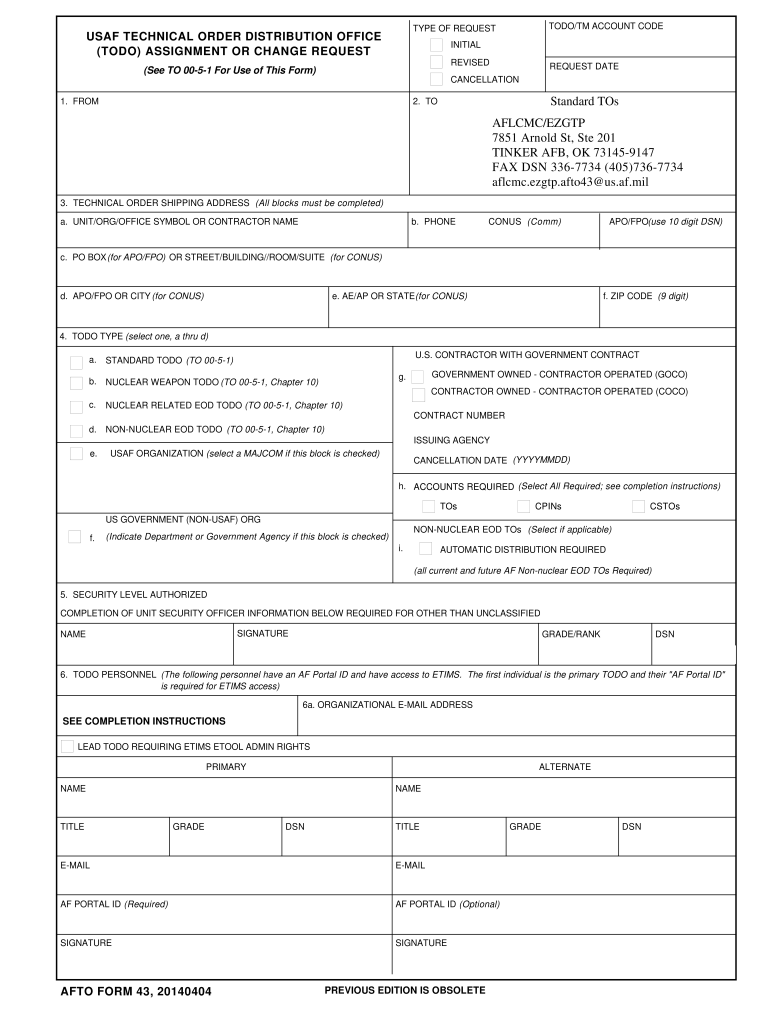
ON 1. FROM Standard TOs 2. TO AFLCMC/EZGTP 7851 Arnold St, Ste 201 TINKER AFB, OK 73145-9147 FAX DSN 336-7734 (405)736-7734 aflcmc.ezgtp.afto43@us.af.mil 3. TECHNICAL ORDER SHIPPING ADDRESS (All blocks must be completed) a. UNIT/ORG/OFFICE SYMBOL OR CONTRACTOR NAME b. PHONE CONUS (Comm) APO/FPO(use 10 digit DSN) c. PO BOX (for APO/FPO) OR STREET/BUILDING//ROOM/SUITE (for CONUS) d. APO/FPO OR CITY (for CONUS) e. AE/AP OR STATE (for CONUS) f. ZIP CODE (9 digit) 4. TODO TYPE (select one,.
Loading

Open form follow the instructions

Easily sign the form with your finger

Send filled & signed form or save
How to fill out the AFTO 43 online
The AFTO 43 form is essential for managing technical order distribution requests within the U.S. Air Force. This guide provides a step-by-step approach to complete the AFTO 43 online, ensuring users can efficiently navigate through its various components.
Follow the steps to fill out the AFTO 43 online effectively.
- Click ‘Get Form’ button to obtain the AFTO 43 form and open it in your editor for online completion.
- Enter the type of request by selecting 'Initial', 'Revised', or 'Cancellation' as appropriate for your submission.
- Fill in the request date to indicate when you are submitting the form.
- In Block 1, provide the information from where the request is being made only if it is different from the shipping address in Block 3.
- In Block 2, select the designated address based on the type of TODO code specified in Block 4.
- Complete Block 3 with the full technical order shipping address, ensuring to include the unit, organization, phone number, and postal details.
- In Block 4, select the appropriate TODO type and provide any corresponding information required based on your case.
- For Block 5, indicate the security level authorized and provide the necessary information of the unit security officer, including their signature.
- In Block 6, enter the required personnel information including organizational email addresses, and ensure both primary and alternate contacts are listed.
- Complete Block 7 with details of the approving agency and ensure the appropriate personnel signs digitally.
- Fill Block 8 only if requesting a contractor or specific TODO types, ensuring to get necessary approvals.
- Leave Block 9 blank, as this is reserved for AFMC TODO code management activity use.
- In Block 10, utilize the continuation section to provide any additional information or additional contracts as necessary.
- Review all entries for accuracy and ensure all required fields are completed before submitting.
- Once completed, save changes, download, print, or share the AFTO 43 form as needed.
Complete your AFTO 43 document online today for efficient processing and management.
Experience a faster way to fill out and sign forms on the web. Access the most extensive library of templates available.
Related content
f. CANCELLATION DATE (Date on which code and all requirements are to be cancelled unless...
Dec 31, 2009 — The approved AFTO Form 43 will also be provided to the Group eTool Admin...
by R PARTS · 1996 — (F) Air Force AFTO Form 22 Directly to: Commander, Sacramento Air...
Get answers to your most pressing questions about US Legal Forms API.
How to fill out a 1 9 form?
Filling out a 1-9 form requires you to provide personal information and verify your employment eligibility in the United States. This form collects documentation that proves your identity and right to work. For a detailed guide on the completion process, consider visiting the US Legal Forms platform, which can provide templates and tips to ensure correct submission.
What is a time compliance technical order?
A time compliance technical order (TCTO) is a directive outlining mandatory procedures to address identified safety issues or equipment deficiencies in the Air Force. These orders require immediate attention to ensure the safety and readiness of operations. Understanding the specifics of TCTOs is vital for compliance and operational efficiency.
How do I request leave in the Air Force?
To request leave in the Air Force, you need to fill out AF Form 988 and submit it to your supervisor. Make sure to provide all necessary details for your absence. Depending on the situation, it might involve discussions with your commanding officer or using the US Legal Forms platform for additional guidance on completing your leave request.
What is the emergency leave form for the Air Force?
The emergency leave form for the Air Force is typically AF Form 988, which allows you to request urgent leave due to family or personal emergencies. It's essential to clearly explain the reason for your request on the form. Using the proper channels for submission ensures that your case receives prompt attention from your chain of command.
How to fill out AF Form 988?
Filling out AF Form 988 involves providing thorough and precise information about your leave request. You need to indicate the type of leave, duration, and supporting details for your absence. To simplify this process, visit the US Legal Forms platform, where you can find guides and templates to ensure accuracy when using AF Form 988.
What is AF Form 1176?
AF Form 1176 serves as a request for a search and seizure warrant. This form specifies the need for law enforcement within the Air Force to obtain necessary items during investigations. Proper completion of this form ensures compliance with Air Force instructions and makes the process smoother for all parties involved.
Where can I find my AF Form 55?
You can find your AF Form 55 online through the official Air Force forms website or your unit's administrative office. This form is critical for documenting your safety training. If you're having trouble locating it, consider visiting the US Legal Forms platform, where you may find additional resources or templates related to Air Force forms, including AF Form 55.
What is AF Form 847 recommendation for change of publication?
AF Form 847 serves as a formal recommendation tool for changes to Air Force publications. It allows personnel to suggest updates or revisions to improve clarity or accuracy. Understanding how to complete AF Form 847 ensures that your input can lead to meaningful changes.
Where can I find AF form 100?
AF form 100 can be found through your unit's administrative offices or by visiting the official Air Force website. It is crucial to use the latest version of the form to avoid issues. For quick access and peace of mind, consider using uslegalforms.
What is AF iMT 100?
AF iMT 100 serves as an interactive management tool designed to streamline operations in the Air Force. It consolidates important information regarding personnel and training, ensuring efficiency in administrative processes. Staying informed about AF iMT 100 can enhance your understanding of Air Force operations.
Use professional pre-built templates to fill in and sign documents online faster. Get access to thousands of forms.
If you believe that this page should be taken down, please follow our DMCA take down process here.