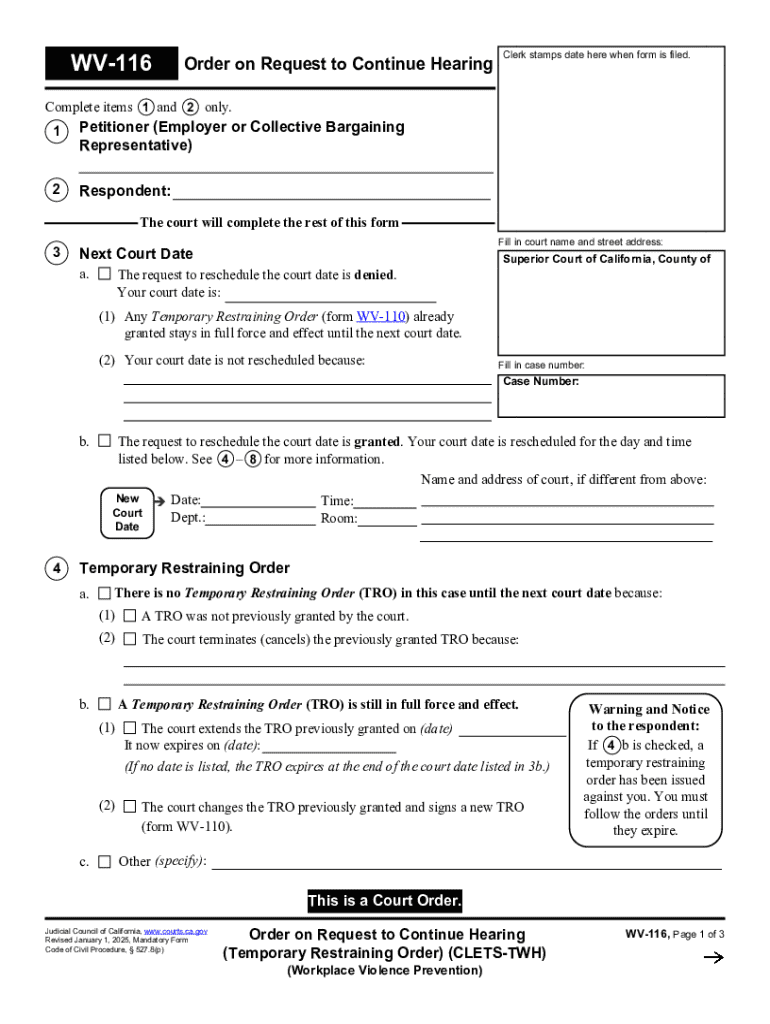
This document is a court order that addresses requests to reschedule hearings related to temporary restraining orders in cases of workplace violence prevention.
Loading

Open form follow the instructions

Easily sign the form with your finger

Send filled & signed form or save
How to fill out and sign Wv-116 online?
Get your online template and fill it in using progressive features. Enjoy smart fillable fields and interactivity.Follow the simple instructions below:
Business, legal, tax along with other documents demand a high level of protection and compliance with the law. Our documents are updated on a regular basis in accordance with the latest legislative changes. In addition, with us, all of the details you provide in the Wv-116 is well-protected from loss or damage via industry-leading file encryption.
The following tips will allow you to fill in Wv-116 quickly and easily:
- Open the document in our full-fledged online editor by clicking on Get form.
- Fill in the requested fields that are colored in yellow.
- Hit the green arrow with the inscription Next to move on from field to field.
- Go to the e-autograph tool to e-sign the form.
- Add the date.
- Double-check the entire document to be sure that you have not skipped anything important.
- Click Done and save the new document.
Our solution allows you to take the entire procedure of executing legal papers online. For that reason, you save hours (if not days or weeks) and eliminate extra expenses. From now on, fill out Wv-116 from the comfort of your home, office, or even while on the go.
Tips on how to fill out, edit and sign Wv-116 online
How to fill and sign Wv-116
Get your online template and fill it in using progressive features. Enjoy smart fillable fields and interactivity.Follow the simple instructions below:
Business, legal, tax along with other documents demand a high level of protection and compliance with the law. Our documents are updated on a regular basis in accordance with the latest legislative changes. In addition, with us, all of the details you provide in the Wv-116 is well-protected from loss or damage via industry-leading file encryption.
The following tips will allow you to fill in Wv-116 quickly and easily:
- Open the document in our full-fledged online editor by clicking on Get form.
- Fill in the requested fields that are colored in yellow.
- Hit the green arrow with the inscription Next to move on from field to field.
- Go to the e-autograph tool to e-sign the form.
- Add the date.
- Double-check the entire document to be sure that you have not skipped anything important.
- Click Done and save the new document.
Our solution allows you to take the entire procedure of executing legal papers online. For that reason, you save hours (if not days or weeks) and eliminate extra expenses. From now on, fill out Wv-116 from the comfort of your home, office, or even while on the go.
How to edit Wv-116
Enjoy the functionality of the multi-featured online editor while filling out your Wv-116. Make use of the diversity of tools to rapidly fill out the blanks and provide the requested information in no time.
Preparing documents is time-consuming and costly unless you have ready-made fillable templates and complete them electronically. The most effective way to cope with the Wv-116 is to use our professional and multi-featured online editing solutions. We provide you with all the essential tools for fast document fill-out and enable you to make any edits to your forms, adapting them to any requirements. Apart from that, you can make comments on the changes and leave notes for other parties involved.
Here’s what you can do with your Wv-116 in our editor:
- Complete the blanks utilizing Text, Cross, Check, Initials, Date, and Sign tools.
- Highlight significant information with a desired color or underline them.
- Hide confidential information using the Blackout option or simply erase them.
- Insert pictures to visualize your Wv-116.
- Substitute the original text using the one corresponding with your requirements.
- Leave comments or sticky notes to communicate with others on the updates.
- Place additional fillable areas and assign them to exact people.
- Protect the sample with watermarks, place dates, and bates numbers.
- Share the document in various ways and save it on your device or the cloud in different formats once you finish editing.
Dealing with Wv-116 in our robust online editor is the quickest and most productive way to manage, submit, and share your paperwork the way you need it from anywhere. The tool operates from the cloud so that you can access it from any location on any internet-connected device. All forms you generate or complete are safely stored in the cloud, so you can always access them whenever needed and be confident of not losing them. Stop wasting time on manual document completion and eliminate papers; make it all online with minimum effort.
How to fill and sign Wv-116
Get your online template and fill it in using progressive features. Enjoy smart fillable fields and interactivity.Follow the simple instructions below:
Business, legal, tax along with other documents demand a high level of protection and compliance with the law. Our documents are updated on a regular basis in accordance with the latest legislative changes. In addition, with us, all of the details you provide in the Wv-116 is well-protected from loss or damage via industry-leading file encryption.
The following tips will allow you to fill in Wv-116 quickly and easily:
- Open the document in our full-fledged online editor by clicking on Get form.
- Fill in the requested fields that are colored in yellow.
- Hit the green arrow with the inscription Next to move on from field to field.
- Go to the e-autograph tool to e-sign the form.
- Add the date.
- Double-check the entire document to be sure that you have not skipped anything important.
- Click Done and save the new document.
Our solution allows you to take the entire procedure of executing legal papers online. For that reason, you save hours (if not days or weeks) and eliminate extra expenses. From now on, fill out Wv-116 from the comfort of your home, office, or even while on the go.
Experience a faster way to fill out and sign forms on the web. Access the most extensive library of templates available.
Related content
Jan 1, 2025 — Your court date is: (1) Any Temporary Restraining Order (form WV-110)...
WV116 ; ACCESSION DATE. 10/03/2003 ; GRANT FY. 2000 ; CONTRIBUTOR. Joseph Morton ;...
Accommodates a standard body fixed camera up to 8" in length . Housing constructed of ABS...
Get answers to your most pressing questions about US Legal Forms API.
What is the penalty for contempt of court in WV?
In West Virginia, the penalties for contempt of court can vary significantly based on the severity of the violation. Generally, the court may impose fines, require compliance with the court order, or, in some cases, impose jail time. The outcome often depends on the circumstances surrounding the contempt. The Wv-116 form can assist you in understanding the implications and taking appropriate steps.
How to file a contempt of court in WV?
To file a contempt of court in West Virginia, you need to submit a motion to the court that issued the original order. This motion should detail how the other party has failed to comply with the court's ruling. Make sure to include any relevant evidence to support your case. Using the Wv-116 form may streamline this process and ensure you meet all legal requirements.
Can a business get a restraining order in California?
Yes, under certain circumstances, a business can obtain a restraining order in California, especially in cases of harassment or threats impacting its operations or employees. Wv-116 provides insight into the process businesses can follow to protect themselves and their staff. It is crucial for organizations to understand that legal protections are available against disruptive or harmful actions.
Who is eligible for a restraining order in California?
Eligibility for a restraining order in California generally includes individuals who have experienced domestic violence, stalking, or harassment. This includes relationships such as spouses, former partners, and specific family relationships. Wv-116 provides clear guidelines on who can seek protection, ensuring that everyone who needs help can access it. Don't hesitate to explore your eligibility if you feel threatened or unsafe.
What is the difference between a no contact order and a restraining order in California?
A no contact order specifically instructs a person to avoid any form of contact with another individual, while a restraining order encompasses broader protections including distance restrictions and additional terms. Wv-116 clarifies these differences and can aid your understanding of each order's implications. It's crucial to choose the order that best addresses your specific situation and safety concerns.
What is the burden of proof for a restraining order in California?
In California, the burden of proof for a restraining order is typically 'preponderance of the evidence.' This means you must present enough evidence to show that it is more likely than not that harassment or abuse occurred. Utilizing resources like Wv-116 can guide you on what evidence to collect and how to enhance your case. A strong presentation of facts can significantly influence the decision of the court.
What is the minimum requirement for a restraining order?
To obtain a restraining order in California, you must provide evidence of a relationship with the person you want to restrain and show that you face harassment, stalking, or abuse. Wv-116 plays a significant role in detailing the necessary steps and documentation needed for this process. It is essential to demonstrate a credible threat to your safety or wellbeing. Gather relevant support documents before applying to strengthen your position.
Use professional pre-built templates to fill in and sign documents online faster. Get access to thousands of forms.
If you believe that this page should be taken down, please follow our DMCA take down process here.