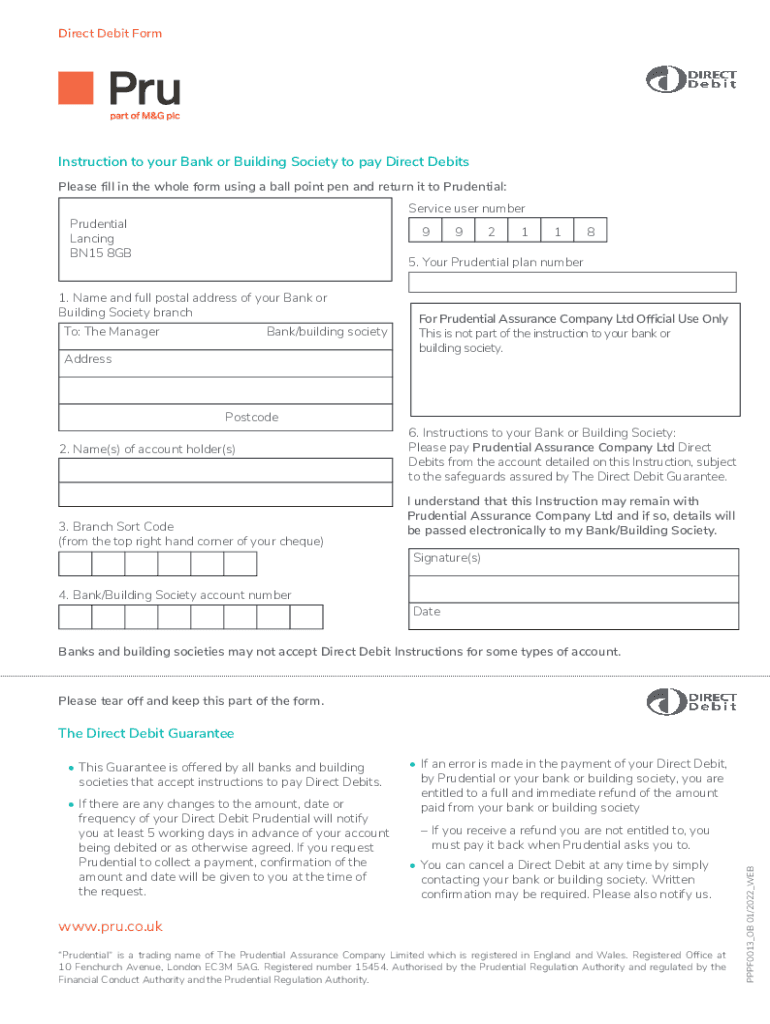
Prudential: Service user number Prudential Lancing BN15 8GB 9 9 2 1 1 8 5. Your Prudential plan number 1. Name and full postal address of your Bank or Building Society branch To: The Manager Bank/building society Address Postcode 2. Name(s) of account holder(s) 3. Branch Sort Code (from the top right hand corner of your cheque) For Prudential Assurance Company Ltd Official Use Only This is not part of the instruction to your bank or building society. 6. Instructions to your Bank.
Loading

Open form follow the instructions

Easily sign the form with your finger

Send filled & signed form or save
How to fill out and sign UK Pru PPPF0013_OB online?
Get your online template and fill it in using progressive features. Enjoy smart fillable fields and interactivity.Follow the simple instructions below:
Are you seeking a fast and convenient solution to fill in UK Pru PPPF0013_OB at a reasonable cost? Our platform provides you with a rich library of templates that are available for submitting online. It only takes a few minutes.
Stick to these simple instructions to get UK Pru PPPF0013_OB ready for sending:
- Select the document you need in the collection of templates.
- Open the template in our online editor.
- Read the recommendations to learn which data you must provide.
- Click on the fillable fields and include the requested details.
- Put the relevant date and insert your e-autograph after you fill in all of the fields.
- Look at the form for misprints along with other errors. If there?s a necessity to change something, the online editing tool as well as its wide variety of instruments are at your disposal.
- Download the completed form to your gadget by clicking Done.
- Send the e-form to the intended recipient.
Submitting UK Pru PPPF0013_OB does not have to be complicated anymore. From now on comfortably cope with it from home or at your workplace straight from your mobile device or desktop computer.
Tips on how to fill out, edit and sign UK Pru PPPF0013_OB online
How to fill and sign UK Pru PPPF0013_OB
Get your online template and fill it in using progressive features. Enjoy smart fillable fields and interactivity.Follow the simple instructions below:
Are you seeking a fast and convenient solution to fill in UK Pru PPPF0013_OB at a reasonable cost? Our platform provides you with a rich library of templates that are available for submitting online. It only takes a few minutes.
Stick to these simple instructions to get UK Pru PPPF0013_OB ready for sending:
- Select the document you need in the collection of templates.
- Open the template in our online editor.
- Read the recommendations to learn which data you must provide.
- Click on the fillable fields and include the requested details.
- Put the relevant date and insert your e-autograph after you fill in all of the fields.
- Look at the form for misprints along with other errors. If there?s a necessity to change something, the online editing tool as well as its wide variety of instruments are at your disposal.
- Download the completed form to your gadget by clicking Done.
- Send the e-form to the intended recipient.
Submitting UK Pru PPPF0013_OB does not have to be complicated anymore. From now on comfortably cope with it from home or at your workplace straight from your mobile device or desktop computer.
How to edit UK Pru PPPF0013_OB
Sign and share UK Pru PPPF0013_OB along with any other business and personal documentation online without wasting time and resources on printing and postal delivery. Get the most out of our online document editor with a built-in compliant electronic signature tool.
Signing and submitting UK Pru PPPF0013_OB templates electronically is quicker and more effective than managing them on paper. However, it requires employing online solutions that guarantee a high level of data protection and provide you with a certified tool for generating electronic signatures. Our robust online editor is just the one you need to complete your UK Pru PPPF0013_OB and other personal and business or tax forms in a precise and appropriate manner in accordance with all the requirements. It features all the essential tools to quickly and easily complete, adjust, and sign documentation online and add Signature fields for other parties, specifying who and where should sign.
It takes only a few simple actions to complete and sign UK Pru PPPF0013_OB online:
- Open the chosen file for further managing.
- Utilize the top toolbar to add Text, Initials, Image, Check, and Cross marks to your template.
- Underline the important details and blackout or remove the sensitive ones if needed.
- Click on the Sign tool above and decide on how you prefer to eSign your document.
- Draw your signature, type it, upload its image, or use another option that suits you.
- Move to the Edit Fillable Fileds panel and place Signature areas for others.
- Click on Add Signer and type in your recipient’s email to assign this field to them.
- Check that all information provided is complete and precise before you click Done.
- Share your paperwork with others using one of the available options.
When signing UK Pru PPPF0013_OB with our robust online solution, you can always be sure to get it legally binding and court-admissible. Prepare and submit documents in the most efficient way possible!
How to fill and sign UK Pru PPPF0013_OB
Get your online template and fill it in using progressive features. Enjoy smart fillable fields and interactivity.Follow the simple instructions below:
Are you seeking a fast and convenient solution to fill in UK Pru PPPF0013_OB at a reasonable cost? Our platform provides you with a rich library of templates that are available for submitting online. It only takes a few minutes.
Stick to these simple instructions to get UK Pru PPPF0013_OB ready for sending:
- Select the document you need in the collection of templates.
- Open the template in our online editor.
- Read the recommendations to learn which data you must provide.
- Click on the fillable fields and include the requested details.
- Put the relevant date and insert your e-autograph after you fill in all of the fields.
- Look at the form for misprints along with other errors. If there?s a necessity to change something, the online editing tool as well as its wide variety of instruments are at your disposal.
- Download the completed form to your gadget by clicking Done.
- Send the e-form to the intended recipient.
Submitting UK Pru PPPF0013_OB does not have to be complicated anymore. From now on comfortably cope with it from home or at your workplace straight from your mobile device or desktop computer.
Experience a faster way to fill out and sign forms on the web. Access the most extensive library of templates available.
Get answers to your most pressing questions about US Legal Forms API.
Did Prudential change their name?
While Prudential has undergone branding updates, the core name remains the same. The company has adjusted its branding strategy to fit modern demands and enhance its services under the UK Pru PPPF0013_OB standards. These changes reflect its ongoing commitment to serving customers effectively and adapting to the evolving market landscape.
Are Pru and Prudential the same?
Although Pru and Prudential are often used interchangeably, there are nuances behind these terms. 'Pru' is a shorthand version that represents Prudential services within specific contexts, particularly in branding and marketing under the UK Pru PPPF0013_OB framework. Both maintain the same commitment to quality financial services and products, tailored for diverse markets.
Is Pru Life UK and Prudential life insurance the same?
Pru Life UK and Prudential life insurance are connected, but they serve slightly different purposes. Pru Life UK focuses primarily on the Philippine market, while Prudential life insurance has a broader scope, including services offered in the UK under the UK Pru PPPF0013_OB guidelines. Understanding these distinctions can help customers choose the best coverage for their needs.
Does Prudential operate in the UK?
Indeed, Prudential actively operates in the UK market. It provides a wide array of financial products and services tailored to meet the needs of British customers. The UK Pru PPPF0013_OB initiatives further empower Prudential to deliver innovative solutions in life insurance and investment opportunities.
Who is the bank partner of Pru Life UK?
Pru Life UK has partnered with a well-established bank to enhance its reach and service offerings. This collaboration strengthens the foundation of the UK Pru PPPF0013_OB initiatives by providing clients with more accessible financial products and services. It aims to create a seamless experience for customers seeking comprehensive financial solutions.
What was the old name for Prudential?
Prudential was previously known as The Prudential Assurance Company. The transition to simply 'Prudential' reflects the company’s evolution and commitment to modern financial services under the UK Pru PPPF0013_OB governance. This name change aligns with its expansion into various market offerings, including insurance and investment solutions.
Does Prudential UK still exist?
Yes, Prudential UK continues to exist and play a vital role in the financial services industry. With a strong focus on life insurance, pensions, and investment solutions, Prudential UK operates under the UK Pru PPPF0013_OB framework. This allows the company to provide customers with a range of financial products that cater to diverse needs.
How do I contact Prudential UK?
You can contact Prudential UK by reaching out through their customer service number available on their website. If your inquiry concerns UK Pru PPPF0013_OB, specify this so the representatives can provide you with accurate information. Additionally, online chat options are often available for immediate assistance. Prioritize your questions to ensure a productive dialogue.
How can I contact Prudential customer service by phone in the USA?
To contact Prudential customer service in the USA, dial the number listed on their official website dedicated to US clients. They provide support for various needs, including inquiries related to UK Pru PPPF0013_OB. The customer service team is prepared to assist you effectively. It’s advisable to have your policy details handy for quicker service.
How to partially withdraw from Pru Life UK?
To partially withdraw from Pru Life UK, log into your account on their website and follow the withdrawal process outlined in the customer portal. Alternatively, you can call customer service for assistance with the UK Pru PPPF0013_OB plan. This ensures you understand any implications of the withdrawal process. Always consider reaching out if you need additional guidance.
Use professional pre-built templates to fill in and sign documents online faster. Get access to thousands of forms.
If you believe that this page should be taken down, please follow our DMCA take down process here.