Loading
Form preview
  • US Legal Forms
  • Form Library
  • More Forms
  • More Multi-State Forms
  • Council Communication

Get Council Communication

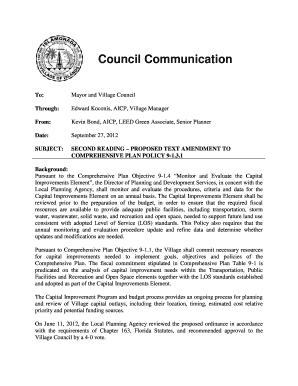
ECT: SECOND READING PROPOSED TEXT AMENDMENT TO COMPREHENSIVE PLAN POLICY 9-1.3.1 Background: Pursuant to the Comprehensive Plan Objective 9-1.4 Monitor and Evaluate the Capital Improvements Element , the Director of Planning and Development Services, in concert with the Local Planning Agency, shall monitor and evaluate the procedures, criteria and data for the Capital Improvements Element on an annual basis. The Capital Improvements Element shall be reviewed prior to the preparation o.

How it works

  1. Open form

    Open form follow the instructions

  2. Easily sign form

    Easily sign the form with your finger

  3. Share form

    Send filled & signed form or save

How to fill out and sign Council Communication online?

Get your online template and fill it in using progressive features. Enjoy smart fillable fields and interactivity.Follow the simple instructions below:

Experience all the benefits of submitting and completing legal documents online. Using our platform filling out Council Communication will take a couple of minutes. We make that possible by giving you access to our feature-rich editor effective at transforming/correcting a document?s initial text, adding special fields, and e-signing.

Execute Council Communication in just a couple of clicks by following the guidelines listed below:

  1. Select the document template you require from the library of legal forms.
  2. Click the Get form button to open it and begin editing.
  3. Fill in all the required boxes (these are yellowish).
  4. The Signature Wizard will enable you to put your e-signature after you have finished imputing details.
  5. Put the relevant date.
  6. Check the entire template to ensure you have filled in all the data and no corrections are needed.
  7. Hit Done and save the filled out template to the gadget.

Send your Council Communication in a digital form when you finish completing it. Your data is securely protected, as we keep to the latest security criteria. Join millions of satisfied customers that are already completing legal documents from their houses.

Tips on how to fill out, edit and sign Council Communication online

How to fill out and sign Council Communication online?

Get your online template and fill it in using progressive features. Enjoy smart fillable fields and interactivity.Follow the simple instructions below:

Experience all the benefits of submitting and completing legal documents online. Using our platform filling out Council Communication will take a couple of minutes. We make that possible by giving you access to our feature-rich editor effective at transforming/correcting a document?s initial text, adding special fields, and e-signing.

Execute Council Communication in just a couple of clicks by following the guidelines listed below:

  1. Select the document template you require from the library of legal forms.
  2. Click the Get form button to open it and begin editing.
  3. Fill in all the required boxes (these are yellowish).
  4. The Signature Wizard will enable you to put your e-signature after you have finished imputing details.
  5. Put the relevant date.
  6. Check the entire template to ensure you have filled in all the data and no corrections are needed.
  7. Hit Done and save the filled out template to the gadget.

Send your Council Communication in a digital form when you finish completing it. Your data is securely protected, as we keep to the latest security criteria. Join millions of satisfied customers that are already completing legal documents from their houses.

How to edit Council Communication: personalize forms online

Finishing papers is more comfortable with smart online tools. Eliminate paperwork with easily downloadable Council Communication templates you can edit online and print.

Preparing papers and forms needs to be more reachable, whether it is a daily part of one’s profession or occasional work. When a person must file a Council Communication, studying regulations and instructions on how to complete a form properly and what it should include may take a lot of time and effort. Nonetheless, if you find the proper Council Communication template, finishing a document will stop being a struggle with a smart editor at hand.

Discover a wider variety of functions you can add to your document flow routine. No need to print, fill in, and annotate forms manually. With a smart modifying platform, all the essential document processing functions will always be at hand. If you want to make your work process with Council Communication forms more efficient, find the template in the catalog, click on it, and see a less complicated way to fill it in.

  • If you want to add text in a random area of the form or insert a text field, use the Text and Text field tools and expand the text in the form as much as you want.
  • Utilize the Highlight instrument to stress the key parts of the form. If you want to conceal or remove some text pieces, use the Blackout or Erase tools.
  • Customize the form by adding default graphic elements to it. Use the Circle, Check, and Cross tools to add these elements to the forms, if possible.
  • If you need additional annotations, utilize the Sticky note resource and place as many notes on the forms page as required.
  • If the form needs your initials or date, the editor has tools for that too. Reduce the chance of errors using the Initials and Date tools.
  • It is also possible to add custom graphic elements to the form. Use the Arrow, Line, and Draw tools to customize the file.

The more tools you are familiar with, the easier it is to work with Council Communication. Try the solution that offers everything necessary to find and edit forms in one tab of your browser and forget about manual paperwork.

Get form

Experience a faster way to fill out and sign forms on the web. Access the most extensive library of templates available.
Get form

Related content

Communication Protocols - NET
Council members are encouraged to communicate on a regular basis with their constituents...
Learn more
Communications Council
The Communications Council is made up of more than 200 people who are involved with...
Learn more
FTTH Council - Definition of Terms
It is common in the industry to refer to systems that bring optical fiber close to the...
Learn more

Related links form

Hope Sports Medicine Brch - Advocate Health Care Notice Of Intention To Amend Article 143 And - NYC . Gov - Nyc FHA CONSTRUCTION NOTICE - Nj MEA 248-02-E Vol. 2 - Nyc

Questions & Answers

Get answers to your most pressing questions about US Legal Forms API.

Contact support

Writing a communication address involves structuring it in a standard format. Begin with the recipient's name, followed by the title if applicable, the council's name, street address, and finally the city, state, and zip code. Utilizing resources like USLegalForms can simplify this process by providing examples and formats, ensuring your Council Communication is professional and effective.

To fill a communication address accurately, start with the recipient's name at the top. Follow this with the council's name on the next line, then provide the complete street address in the subsequent lines. If necessary, include any additional identifying information, as this specificity ensures your Council Communication reaches the intended council members without hesitation.

Address line 1 typically contains the primary components of the address, such as the street number and name. Address line 2 is optional but can include additional details like an apartment or suite number. When preparing your Council Communication, ensure these sections are formatted clearly for swift identification. Consistency in your addresses will enhance your credibility.

Filling in an address correctly is essential to ensure successful delivery of your Council Communication. Start with the recipient's name, followed by their title or role, then the council's name. Next, include the street address with any necessary apartment, suite, or office numbers, and finally the city, state, and zip code. Double-checking each component can prevent delays in communication.

When addressing a council in a speech, it is crucial to show respect and clarity. Begin with a formal greeting such as 'Honorable Members of the Council,' followed by your introduction. Ensure your Council Communication is tailored to the audience's specific interests for greater impact. This personal touch encourages engagement and attentiveness from the council members.

The full communication address refers to the complete mailing address used for sending official correspondence to a council. It typically includes the recipient's name, the council's name, building or office number, street address, city, state, and zip code. This ensures that your Council Communication reaches the right destination promptly. If you're unsure about the correct address format, you can utilize resources like USLegalForms to find the accurate details.

The Forbes Communication Council is an invitation-only organization for senior communication professionals. It provides members with access to resources, networking opportunities, and platforms for sharing insights. This council supports enhancing personal and organizational communication strategies. Joining such a council can be tremendously beneficial for individuals looking to improve their council communication and expand their professional influence.

The Council of Councils is a strategic initiative aimed at fostering collaboration and dialogue among various councils. It functions to address common challenges and share best practices in council communication. By promoting engagement, the Council of Councils enhances the effectiveness of each participating council. This collaborative approach enriches community discussions and decision-making processes.

In mass communication, the 7 Cs focus on Clarity, Conciseness, Concreteness, Correctness, Courtesy, Completeness, and Consideration, tailored to wider audiences. This approach ensures that messages are accessible and relatable to diverse groups. Applying these principles in your council communication can help you reach a broader audience with impactful messages. By adhering to the 7 Cs, you can strengthen community engagement.

The 7 Cs of communication consist of clarity, conciseness, concreteness, correctness, courtesy, completeness, and consideration. Each C represents a key aspect that strengthens council communication and improves interactions among members. By applying these principles, councils can foster a supportive environment where information flows freely and effectively. Implementing these C's enhances both personal and organizational communication.

Get This Form Now!

Use professional pre-built templates to fill in and sign documents online faster. Get access to thousands of forms.
Get form
If you believe that this page should be taken down, please follow our DMCA take down processhere.

Industry-leading security and compliance

US Legal Forms protects your data by complying with industry-specific security standards.
  • In businnes since 1997
    25+ years providing professional legal documents.
  • Accredited business
    Guarantees that a business meets BBB accreditation standards in the US and Canada.
  • Secured by Braintree
    Validated Level 1 PCI DSS compliant payment gateway that accepts most major credit and debit card brands from across the globe.
Get Council Communication
Get form
Form Packages
Adoption
Bankruptcy
Contractors
Divorce
Home Sales
Employment
Identity Theft
Incorporation
Landlord Tenant
Living Trust
Name Change
Personal Planning
Small Business
Wills & Estates
Packages A-Z
Form Categories
Affidavits
Bankruptcy
Bill of Sale
Corporate - LLC
Divorce
Employment
Identity Theft
Internet Technology
Landlord Tenant
Living Wills
Name Change
Power of Attorney
Real Estate
Small Estates
Wills
All Forms
Forms A-Z
Form Library
Customer Service
Your Privacy Choices
Terms of Service
Privacy Notice
Legal Hub
Content Takedown Policy
Bug Bounty Program
About Us
Help Portal
Legal Resources
Blog
Affiliates
Contact Us
Delete My Account
Site Map
Industries
Forms in Spanish
Localized Forms
State-specific Forms
Forms Kit
Legal Guides
Real Estate Handbook
All Guides
Prepared for You
Notarize
Incorporation services
Our Customers
For Consumers
For Small Business
For Attorneys
Our Sites
US Legal Forms
USLegal
FormsPass
pdfFiller
signNow
altaFlow
DocHub
Instapage
Social Media
Call us now toll free:
+1 833 426 79 33
As seen in:
  • USA Today logo picture
  • CBC News logo picture
  • LA Times logo picture
  • The Washington Post logo picture
  • AP logo picture
  • Forbes logo picture
© Copyright 1997-2026
airSlate Legal Forms, Inc.
3720 Flowood Dr, Flowood, Mississippi 39232
Form Packages
Adoption
Bankruptcy
Contractors
Divorce
Home Sales
Employment
Identity Theft
Incorporation
Landlord Tenant
Living Trust
Name Change
Personal Planning
Small Business
Wills & Estates
Packages A-Z
Form Categories
Affidavits
Bankruptcy
Bill of Sale
Corporate - LLC
Divorce
Employment
Identity Theft
Internet Technology
Landlord Tenant
Living Wills
Name Change
Power of Attorney
Real Estate
Small Estates
Wills
All Forms
Forms A-Z
Form Library
Customer Service
Your Privacy Choices
Terms of Service
Privacy Notice
Legal Hub
Content Takedown Policy
Bug Bounty Program
About Us
Help Portal
Legal Resources
Blog
Affiliates
Contact Us
Delete My Account
Site Map
Industries
Forms in Spanish
Localized Forms
State-specific Forms
Forms Kit
Legal Guides
Real Estate Handbook
All Guides
Prepared for You
Notarize
Incorporation services
Our Customers
For Consumers
For Small Business
For Attorneys
Our Sites
US Legal Forms
USLegal
FormsPass
pdfFiller
signNow
altaFlow
DocHub
Instapage
Social Media
Call us now toll free:
+1 833 426 79 33
As seen in:
  • USA Today logo picture
  • CBC News logo picture
  • LA Times logo picture
  • The Washington Post logo picture
  • AP logo picture
  • Forbes logo picture
© Copyright 1997-2026
airSlate Legal Forms, Inc.
3720 Flowood Dr, Flowood, Mississippi 39232