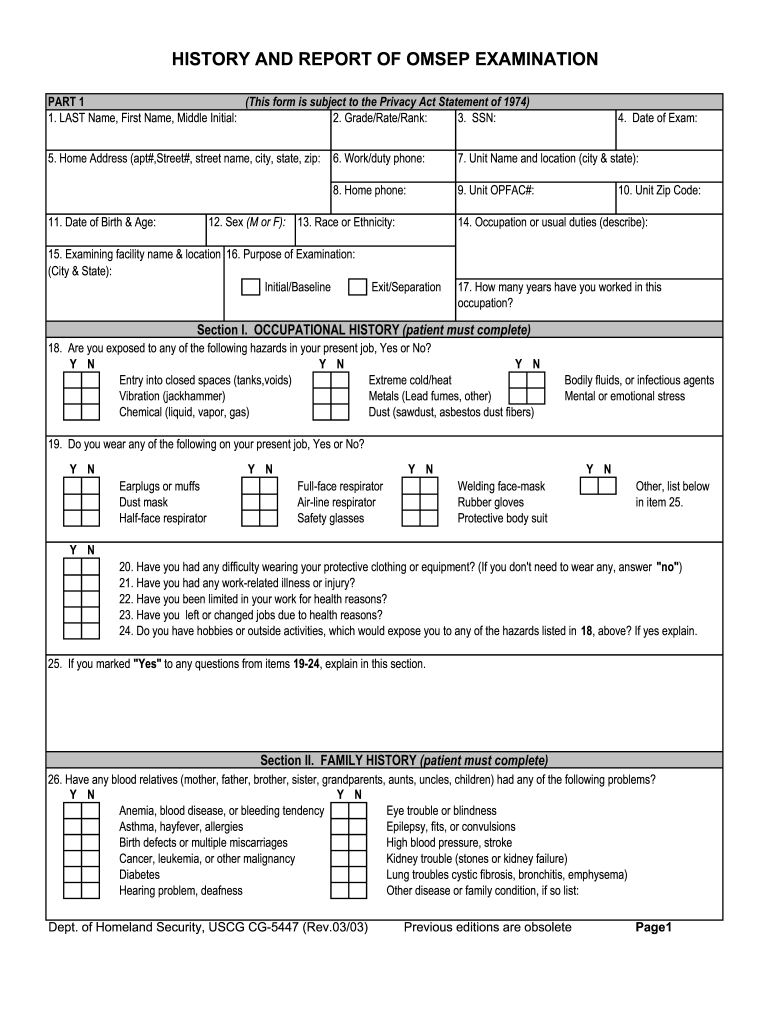
T Name, First Name, Middle Initial: 2. Grade/Rate/Rank: 3. SSN: 5. Home Address (apt#,Street#, street name, city, state, zip: 6. Work/duty phone: 7. Unit Name and location (city & state): 8. Home phone: 9. Unit OPFAC#: 12. Sex (M or F): 13. Race or Ethnicity: 11. Date of Birth & Age: 4. Date of Exam: 15. Examining facility name & location 16. Purpose of Examination: (City & State): Initial/Baseline 10. Unit Zip Code: 14. Occupation or usual duties (describe): Exit/Separation 17. How .
Loading

Open form follow the instructions

Easily sign the form with your finger

Send filled & signed form or save
How to fill out the USCG CG-5447 online
Completing the USCG CG-5447 form online is a straightforward process that ensures you provide essential information regarding your occupational health. This guide will walk you through each section of the form, offering detailed instructions tailored to your needs.
Follow the steps to successfully complete the form online.
- Press the ‘Get Form’ button to obtain the USCG CG-5447 form and open it in your online editor.
- Enter your last name, first name, and middle initial in the designated fields at the top of the form.
- Fill in your grade, rate, or rank, followed by your Social Security Number.
- Provide your home address, including apartment number, street number, street name, city, state, and zip code.
- List your work or duty phone number, unit name, and location (city and state) in the appropriate sections.
- Add details about your date of birth and age, followed by the date of the exam.
- Specify the examining facility's name and location along with the purpose of the examination, marking if it is an initial or exit/separation exam.
- Detail your occupation or usual duties in the space provided.
- Indicate how many years you have worked in your current occupation.
- Complete the occupational history section by answering yes or no to the hazards you may be exposed to in your job.
- Provide your family history by answering if any blood relatives have had certain health issues, using yes or no responses.
- Fill out your social history regarding smoking, alcohol use, and recreational drug history.
- Complete the personal health history, answering questions on any recent symptoms, health status, and noise exposure.
- Use the additional space for comments or explanations of any 'yes' answers where applicable.
- Sign and date the form at the bottom to certify the information is accurate to the best of your knowledge.
- Once completed, save your changes, download a copy, print the form, or share it as needed.
Complete your documents online today for a more efficient filing experience.
Experience a faster way to fill out and sign forms on the web. Access the most extensive library of templates available.
Related content
Jun 28, 2023 — Manning and crewing requirements for certain vessels, vehicles, and...
Mar 5, 2025 — Or 5447 (MS 5447) Oceanography ... achievements of the USCG, while...
Get answers to your most pressing questions about US Legal Forms API.
How to transfer ownership of a USCG documented vessel?
Transferring ownership of a USCG documented vessel involves submitting a bill of sale and a completed application for documentation. You must also notify the Coast Guard of the ownership change to maintain compliance. Using uslegalforms can simplify this process, especially for managing documentation related to your USCG CG-5447.
What are the requirements for USCG Documentation?
The requirements for USCG documentation include proof of ownership, a completed application, and payment of applicable fees. Additional documents may be needed based on the vessel's specifications. Utilizing uslegalforms can help you gather and submit the necessary information for your USCG CG-5447 documentation.
Do I need USCG documentation?
Whether you need USCG documentation depends on various factors, such as the type of vessel you own and its intended use. Generally, if your vessel is over 5 net tons or operates in certain waters, documentation is required. Ensure to check if your vessel falls under the USCG CG-5447 regulations for smoother operations.
How long does it take to get Coast Guard documentation?
The timeline for receiving Coast Guard documentation can vary. Typically, if all documentation is correct, it may take anywhere from a few days to several weeks. For vessels documented under the USCG CG-5447, using an online platform like uslegalforms can streamline your experience.
What is the Coast Guard documentation number requirements?
Coast Guard documentation requires specific identification numbers that ensure your vessel meets legal standards. For the USCG CG-5447, you'll need to include the vessel's official number and any associated documentation. This information is crucial for maintaining your vessel's registration status.
How do I report to the Coast Guard?
Reporting to the Coast Guard is straightforward. You can call the National Response Center or use their online reporting system. Providing clear details about the incident is important, especially if it relates to safety issues regarding vessels documented under the USCG CG-5447.
How to get USCG merchant mariner's credential?
Getting your USCG Merchant Mariner's Credential involves a few critical steps, starting with eligibility assessment and gathering documentation like proof of experience at sea. Utilize the USCG CG-5447 form to help structure your application effectively. After submission, keep track of your application status and be ready for any follow-up requirements from the USCG.
How do I get USCG certification?
To obtain USCG certification, start by determining the specific type of certification you need based on your maritime career goals. Once you’ve identified this, you will need to complete all relevant training and courses. Prepare and submit your application using the USCG CG-5447, ensuring that you have all necessary documentation ready to support your application.
How long does it take to become a USCG rescue swimmer?
Becoming a USCG rescue swimmer typically requires rigorous training and can take several months to complete. After qualifying for the program, candidates undergo intensive physical and technical training, often lasting about eight weeks, followed by additional on-the-job training. While the timeframe may vary, dedication and commitment to the training are essential to succeed.
How do I get my merchant mariner credentials?
To acquire your Merchant Mariner Credential, begin by gathering the necessary documents, including proof of citizenship and sea service. Then, complete the application using the USCG CG-5447 form, which guides you through the process. Don’t forget to pass any required examinations and submit your application to the appropriate Regional Examination Center.
Use professional pre-built templates to fill in and sign documents online faster. Get access to thousands of forms.
If you believe that this page should be taken down, please follow our DMCA take down process here.