Loading

Open form follow the instructions

Easily sign the form with your finger

Send filled & signed form or save
How to fill out the WV PATH & FACTS Direct Deposit Change online
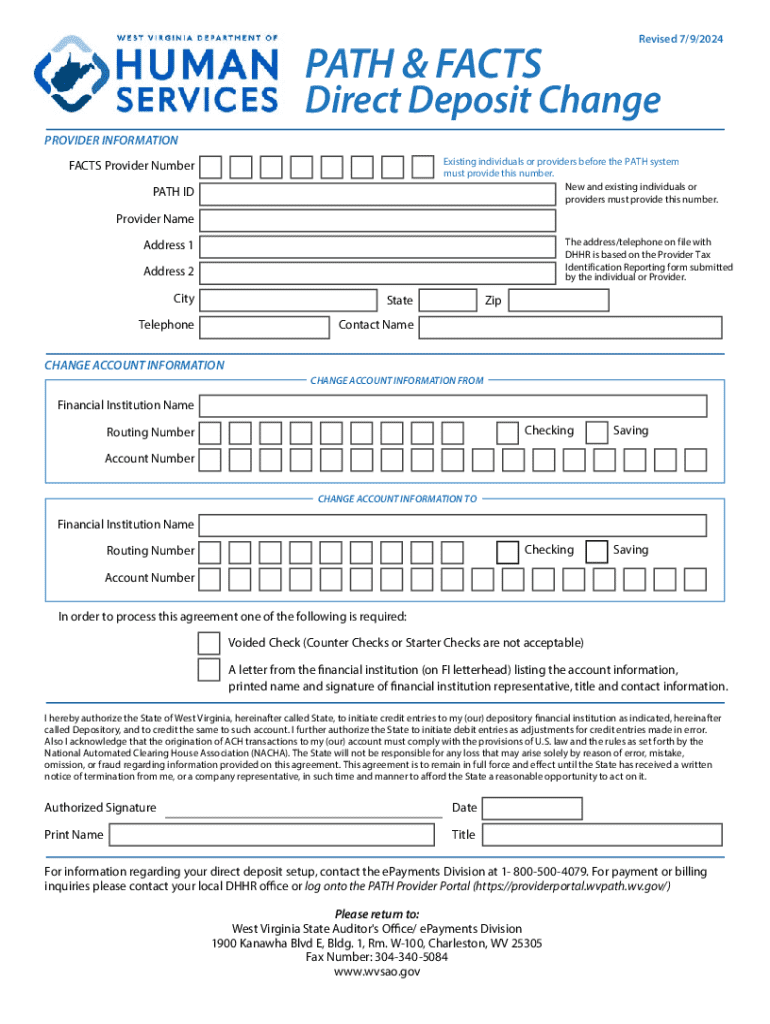
The WV PATH & FACTS Direct Deposit Change form is essential for individuals and providers who need to update their direct deposit information with the West Virginia Department of Health and Human Resources. This guide provides clear, step-by-step instructions to effectively complete the form online.
Follow the steps to complete the direct deposit change form accurately.
- Click ‘Get Form’ button to obtain the form and open it in the editor.
- Verify your personal information. Ensure that the name, address, and phone number on the form match what is currently on file with the Department of Health and Human Resources (DHHR). If there are discrepancies, contact your local DHHR office or caseworker to update your information before proceeding.
- Select the appropriate form. Make sure you are using the PATH & FACTS Direct Deposit Change form if you are changing existing account information.
- Provide your provider information. Complete the section with your FACTS Provider Number, PATH ID Number, Provider Name, Address, Telephone, and Contact Name. These details must match what is recorded with DHHR.
- Fill in the account information. In both the 'From' and 'To' account sections, include the Financial Institution Name, Routing Number, Account Number, and choose either Checking or Savings.
- Attach the required banking documentation. Ensure you include a voided check or a letter from your financial institution on official letterhead, containing the required account information and the representative's contact details.
- Review the form for accuracy. Ensure all sections are filled correctly and that there are no alterations. The form will not be processed if it is altered.
- Sign the form with an ink pen and date it appropriately. Note that electronic signatures are not accepted.
- Once completed, submit the form and documentation via fax or U.S. mail to the addresses provided. Do not send the form via email.
- After submitting, retain a copy for your records to ensure tracking of your request.
Take the necessary steps to update your direct deposit information online using the WV PATH & FACTS Direct Deposit Change form today.
Experience a faster way to fill out and sign forms on the web. Access the most extensive library of templates available.
Related content
PATH & FACTS Providers. PATH & FACTS Direct Deposit ( Change ). PATH & FACTS Direct...
The completed direct deposit form must be printed and physically signed then submitted to...
Jan 31, 2012 — Direct Deposit of Refund . . . . . . . . . .1. The Taxpayer Advocate...
Get answers to your most pressing questions about US Legal Forms API.
How can I create my own direct deposit?
To create your own direct deposit, start by contacting your employer or the financial institution that will be sending the deposits. Provide them with your bank account and routing information for the WV PATH & FACTS Direct Deposit Change. Follow any additional instructions they may have to successfully set it up.
What is an example of direct deposit?
An example of direct deposit includes receiving your paycheck or government benefits directly into your bank account. This method offers convenience and reliability, eliminating the need to visit the bank. Utilizing the WV PATH & FACTS Direct Deposit Change ensures you get your funds swiftly and securely.
How to fill out direct deposit info?
When filling out your direct deposit info, focus on accuracy to ensure the WV PATH & FACTS Direct Deposit Change goes smoothly. Input your bank name, account number, and routing number exactly as they appear on your banking documents. After entering your information, review it one more time to avoid mistakes.
How to get bank info for direct deposit?
To get your bank information for setting up direct deposit, simply log into your online banking portal or check your bank statement. Look for your account number and routing number in your account details. If you need further assistance, consider visiting your bank branch or calling their customer service team.
What should I put for my direct deposit?
For your direct deposit setup, you need to provide your bank name, routing number, and account number. This ensures that your payments are directed to the correct bank account. You can find these details through your bank's website or app, making the WV PATH & FACTS Direct Deposit Change process smoother.
How to fill out direct deposit information?
To fill out your direct deposit information for the WV PATH & FACTS Direct Deposit Change, start by gathering your personal details, including your bank account number and routing number. Ensure that you input these numbers carefully into the designated fields. Double-check your information, as errors can lead to payment delays or issues.
Use professional pre-built templates to fill in and sign documents online faster. Get access to thousands of forms.
If you believe that this page should be taken down, please follow our DMCA take down process here.