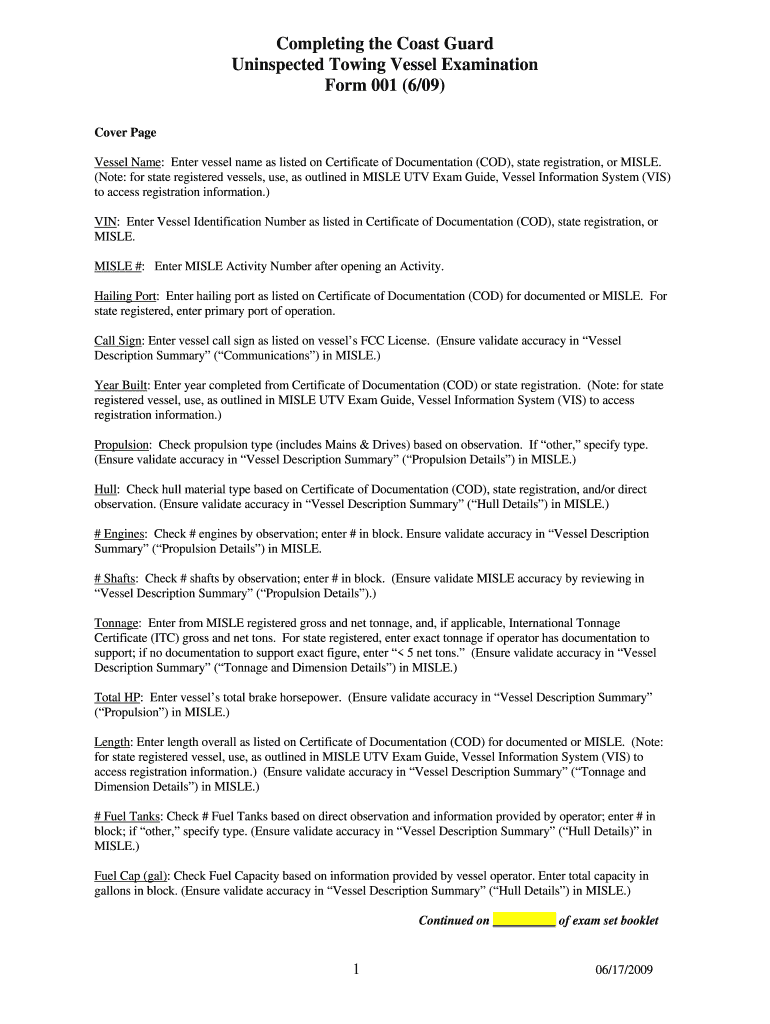
Completing the Coast Guard Uninspected Towing Vessel Examination Form 001 (6/09) Cover Page Vessel Name: Enter vessel name as listed on Certificate of Documentation (COD), state registration, or MISLE.
Loading

Open form follow the instructions

Easily sign the form with your finger

Send filled & signed form or save
How to fill out the DHS USCG Form 001 online
Filling out the DHS USCG Form 001 online can be a straightforward process with the right guidance. This comprehensive guide will walk you through each section and field of the form to ensure your application is completed accurately and efficiently.
Follow the steps to complete the form online.
- Click ‘Get Form’ button to obtain the form and open it in the editor. This will allow you to access the necessary fields to fill out.
- Begin by entering the vessel name as listed on the Certificate of Documentation (COD), state registration, or MISLE. Make sure to refer to the correct source for accuracy.
- Input the Vessel Identification Number (VIN) from the COD, state registration, or MISLE. This number is crucial for identifying your vessel.
- Enter the MISLE Activity Number, which is obtained after opening an activity in the MISLE database.
- Input the hailing port as recorded on the COD for documented vessels, or the primary port of operation for state registered vessels.
- Record the vessel call sign from the vessel’s FCC license, ensuring the information matches the ‘Vessel Description Summary’ in MISLE.
- State the year the vessel was built as listed on the COD or state registration, verifying this data for accuracy.
- Check the propulsion type based on your observation of the vessel and specify if it falls under ‘other’ propulsion types.
- Indicate the hull material type based on the COD, state registration, or direct observation, ensuring it reflects the Vessel Description Summary in MISLE!
- Count the number of engines and shafts, entering the number based on your observation, and validate against the MISLE database.
- Enter the registered gross and net tonnage from the MISLE or enter ‘< 5 net tons’ if documentation is not available to support an exact figure.
- Complete the total horsepower entry, referencing the information contained in the MISLE.
- Input the overall length of the vessel as per the COD or state registration, making sure it is consistent with the summary in MISLE.
- Document the number of fuel tanks observed and enter the fuel capacity in gallons based on the information given by the vessel operator.
- Verify if the operator/vessel possesses all five critical elements of a Crew Endurance Management System (CEMS) and check ‘Yes’ or ‘No’ as appropriate.
- Assess the presence or lack of a Safety Management System and check the appropriate box after reviewing relevant documents.
- Establish the primary route of operation based on information from the COD or inquiry with the operator, ensuring accuracy in reporting.
- Review certificates on board and denote the classification society on the form together with checking if the vessel has a limited license.
- Fill in details of the vessel owner, managing operator details, and the primary representative present during the exam.
- Document examination results, noting any deficiencies and dates of resolution, as well as complete the signature sections to acknowledge receipt.
- Once completed, save the changes made to the form. After confirmation, download or print a copy for your records, and share as necessary.
Start completing your DHS USCG Form 001 online today to ensure your vessel's compliance and safety.
Experience a faster way to fill out and sign forms on the web. Access the most extensive library of templates available.
Related content
Jun 19, 2017 — If an individual decides to complete a paper request, Homeport collects...
Number of tanks on ship: Enter the total number of ballast water tanks, cargo holds, and...
During a radiation emergency, state and local authorities will need to assess the degree...
Get answers to your most pressing questions about US Legal Forms API.
What branch of government is USCG?
The United States Coast Guard (USCG) is a branch of the U.S. military, specifically designated as a maritime service. While it primarily functions as a law enforcement agency and a lifesaving service, it also plays a vital role in national defense. Since its inclusion in the Department of Homeland Security, the Coast Guard collaborates closely with other federal agencies. For those looking to join or understand better, the DHS USCG Form 001 is essential for your navigation through this process.
How to apply to the Coast Guard?
To apply to the Coast Guard, you need to meet certain eligibility criteria, including age, education, and physical fitness standards. The application process can be initiated through the official Coast Guard recruiting website. There, you can also find relevant details about documents required, including the DHS USCG Form 001. Properly filling out this form is crucial for a successful application.
Is USCG under DHS?
Yes, the United States Coast Guard (USCG) operates under the Department of Homeland Security (DHS). This alignment allows the Coast Guard to contribute effectively to national security and disaster response initiatives. As a member of DHS, the USCG focuses on ensuring the safety of our waters and ports. If you need assistance related to the Coast Guard, the DHS USCG Form 001 serves as an important link in your application process.
When did USCG switch to DHS?
The Coast Guard became a part of the Department of Homeland Security during its establishment in March 2003. This move aimed to consolidate various security functions under one umbrella for more effective protection of the nation. Since this shift, the Coast Guard has significantly strengthened its efforts in maritime security and safety. If you are looking to engage with the Coast Guard, knowing about the DHS USCG Form 001 is key.
What organizations fall under DHS?
The Department of Homeland Security (DHS) comprises various organizations, including the Coast Guard, Customs and Border Protection, and the Federal Emergency Management Agency. Each organization has specific roles that ensure the safety and security of the U.S. Understanding these roles can help you navigate processes such as filling out the DHS USCG Form 001, which is often essential for various applications.
Is the Coast Guard DoT or dod?
The Coast Guard is not part of the Department of Transportation (DoT) or the Department of Defense (DoD). Instead, it transitioned to the Department of Homeland Security (DHS) in 2003. This transition allows the Coast Guard to enhance its role in protecting U.S. waters and responding to maritime emergencies. You can learn more about this process and how it relates to the DHS USCG Form 001.
Is the Coast Guard DHS or DoD?
The Coast Guard operates under the Department of Homeland Security (DHS). As a part of DHS, it focuses on maritime safety, security, and environmental protection. This affiliation empowers the Coast Guard to coordinate effectively with various federal, state, and local agencies. By understanding the DHS USCG Form 001, you can find the needed procedures and requirements for many Coast Guard activities.
Can I hand deliver my MMC application?
Yes, you can hand deliver your MMC application to the National Maritime Center, but it's wise to check their policy beforehand. Make sure you have the DHS USCG Form 001 completed when you go. Hand delivery can sometimes expedite the process, so you can be on your way sooner.
How do I submit my MMC application?
Submitting your MMC application involves completing the DHS USCG Form 001 accurately. You can either mail this form to the National Maritime Center or submit it electronically via the official portal. Make sure to double-check all information before submission to avoid any processing delays.
How do I submit my USCG medical certificate?
To submit your USCG medical certificate, complete the DHS USCG Form 001 carefully. After filling it out, you can either mail it to the appropriate address or submit it online if that option is available. Proper submission ensures you remain compliant and can continue your maritime responsibilities.
Use professional pre-built templates to fill in and sign documents online faster. Get access to thousands of forms.
If you believe that this page should be taken down, please follow our DMCA take down process here.