Loading
Get Staff Report
How it works
-

Open form follow the instructions
-

Easily sign the form with your finger
-

Send filled & signed form or save
How to fill out the Staff Report online
Completing the Staff Report online can be a straightforward process if you follow the outlined steps. This guide will provide clear instructions to help you navigate each section of the form effectively.
Follow the steps to successfully complete the Staff Report online.
- Click the ‘Get Form’ button to access the Staff Report and load it for editing.
- Begin by filling out the recipient section. Include the names of the city council and relevant department officials to ensure correct routing of the report.
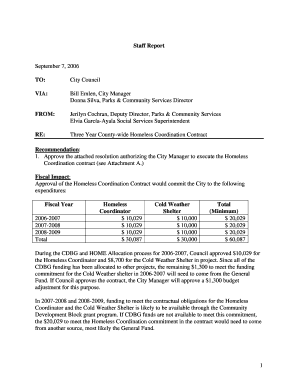
- In the subject line, provide a brief overview of the report’s purpose, such as 'Recommendation for the Three Year County-wide Homeless Coordination Contract'.
- Detail the recommendation section by succinctly outlining the proposed actions, ensuring clarity and precision.
- Next, address the fiscal impact by clearly breaking down the financial commitments involved, specifying amounts for each fiscal year.
- In the background and analysis section, provide context and insights to support the recommendation. Use bullet points for clarity.
- Conclude with a summary that reiterates the request for approval and mentions the benefits of the proposed contract.
- After completing all sections, review the entire document for accuracy and completeness. Make necessary edits before finalizing.
- Once satisfied with the report, save your changes. You may then download, print, or share the completed Staff Report as needed.
Start completing your Staff Report online to ensure timely submission and follow-up.
Related links form
2008 STRIPED BASS RECREATIONAL TROPHY REPORT FORM - Mrc Virginia
2009 Tilefish/Grouper Daily Landing Reporting Form - Mrc Virginia
Application Form For Rental Boat Saltwater Recreational License (Year ) - Mrc Virginia
Renewal Application For Striped Bass Or Hybrid Striped Bass For SaleNov07.doc - Mrc Virginia
To write a good staff report, clarity and organization are crucial. Start by clearly defining the purpose and key points to address. Use straightforward language, incorporate relevant data, and ensure your conclusions are well-supported—a well-structured staff report not only informs but also influences decision-making effectively.
Industry-leading security and compliance
US Legal Forms protects your data by complying with industry-specific security standards.
-
In businnes since 199725+ years providing professional legal documents.
-
Accredited businessGuarantees that a business meets BBB accreditation standards in the US and Canada.
-
Secured by BraintreeValidated Level 1 PCI DSS compliant payment gateway that accepts most major credit and debit card brands from across the globe.