Loading
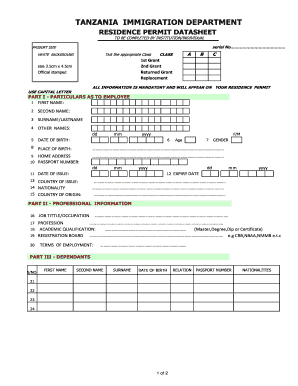
Get Tanzania Residence Permit Datasheet
How it works
-

Open form follow the instructions
-

Easily sign the form with your finger
-

Send filled & signed form or save
How to fill out the Tanzania Residence Permit Datasheet online
Filling out the Tanzania Residence Permit Datasheet online is a straightforward process that requires careful attention to detail. This guide provides step-by-step instructions to ensure that you complete the form accurately and efficiently.
Follow the steps to successfully complete the datasheet online.
- Click the ‘Get Form’ button to access the datasheet and open it in your selected editor.
- Begin by providing your first name in the designated field. Ensure that you use capital letters as required.
- Continue by entering your second name in the next field, also in capital letters.
- Fill in your surname or last name in the respective box, following the same format.
- If applicable, include any other names you go by as mentioned in the prompt.
- Provide your date of birth in the required format of day, month, and year.
- Indicate your place of birth in the space provided.
- Fill in your home address accurately to ensure correct correspondence.
- Enter your passport number in the specified field.
- Document the date your passport was issued as well as the country of issue.
- State your nationality and country of origin as required in the form.
- Select your gender by marking the appropriate option.
- Indicate the expiry date of your passport in the required format.
- In Part II, provide your job title or occupation succinctly.
- Document your profession, ensuring that it is clear and concise.
- List your highest academic qualification, including details such as master’s degree or diploma.
- Enter the name of your registration board relevant to your profession.
- Describe your terms of employment comprehensively.
- In Part III, list any dependents by providing their first and second name, surname, and date of birth.
- Specifically outline the relationship of each dependent and include their passport numbers and nationalities.
- In Part IV, provide information about your institution, including its name and location.
- Document your postal address and place of work within Tanzania.
- State your actual place of residence in Tanzania.
- Indicate the industry or sector in which you participate, such as mining.
- Specify the investment scale, choosing from large, middle, small, or others with details.
- Enter a valid telephone number and mobile phone number.
- Complete your email address as noted on the TF1 form.
- In Part V, declare your understanding and knowledge of the information provided in Parts I, II, III & IV by signing and stamping where required, including the date of declaration.
- Finally, ensure all fields are filled correctly, save your changes, and if needed, download or print the completed datasheet for your records.
Complete your Tanzania Residence Permit Datasheet online today and ensure all your information is accurate.
Related links form
The document number on a residence permit is typically found on the front side of the permit. It is a unique identifier that can help you track your application or verify your residency status. For precise details, referring to the Tanzania Residence Permit Datasheet can be beneficial, as it specifies where important information is located.