Get Request For Solution To Existing Code Discrepancy
How it works
-

Open form follow the instructions
-

Easily sign the form with your finger
-

Send filled & signed form or save
How to fill out the Request For Solution To Existing Code Discrepancy online
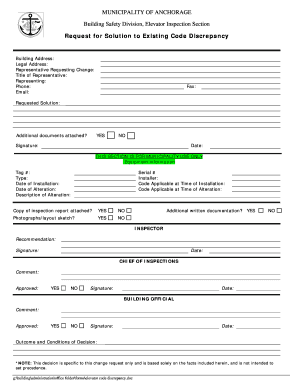
Filling out the Request For Solution To Existing Code Discrepancy form is an essential process for addressing code discrepancies in building safety. This guide will provide you with step-by-step instructions to ensure that your request is completed accurately and efficiently.
Follow the steps to complete your request successfully.
- Click the ‘Get Form’ button to obtain the form and open it in the editor.
- Begin by filling out the 'Building Address' field with the specific location of the building in question. Make sure to input the full address accurately.
- Complete the 'Legal Address' field, which may differ from the building address, particularly for legal documentation purposes.
- Provide the 'Representative Requesting Change' by entering the name of the individual submitting the request. This should be a person directly associated with the discrepancy issue.
- Fill in the 'Title of Representative' to indicate the position or role of the person submitting the request within their organization or group.
- In the 'Representing' field, specify the organization or entity that the representative is acting on behalf of.
- Enter the 'Phone' and 'Email' fields to provide contact information. Ensure these are current to facilitate communication regarding the request.
- Indicate whether you are attaching any additional documents by selecting 'YES' or 'NO' in the provided field. If attaching, ensure all necessary documentation is prepared.
- Detail the 'Requested Solution' section describing the solution you propose for the code discrepancy, ensuring clarity and thoroughness to aid in review.
- Provide your signature and the date at the bottom of the form to validate your submission.
- Complete the sections for municipality use only, if applicable, including equipment information, alteration details, and attach required supporting documentation as needed.
- Upon completing all sections of the form, save your changes. You may download, print, or share the form as necessary for submission.
Submit your documents online to ensure a prompt review of your code discrepancy request.
To resolve data discrepancies, begin with a data audit to identify inconsistencies within the dataset. After identifying the discrepancies, prioritize them based on their impact on your projects. Implement systematic changes to correct these discrepancies while documenting your steps for future reference. Tools that focus on the Request For Solution To Existing Code Discrepancy can enhance your data accuracy and consistency.
Industry-leading security and compliance
-
In businnes since 199725+ years providing professional legal documents.
-
Accredited businessGuarantees that a business meets BBB accreditation standards in the US and Canada.
-
Secured by BraintreeValidated Level 1 PCI DSS compliant payment gateway that accepts most major credit and debit card brands from across the globe.